
Javascript
How Javascript Works? Is Javascript synchronous and asynchronous? Is Javascript single-threaded or multi-threaded?
“Everything in Javascript happens inside an Execution Context.”
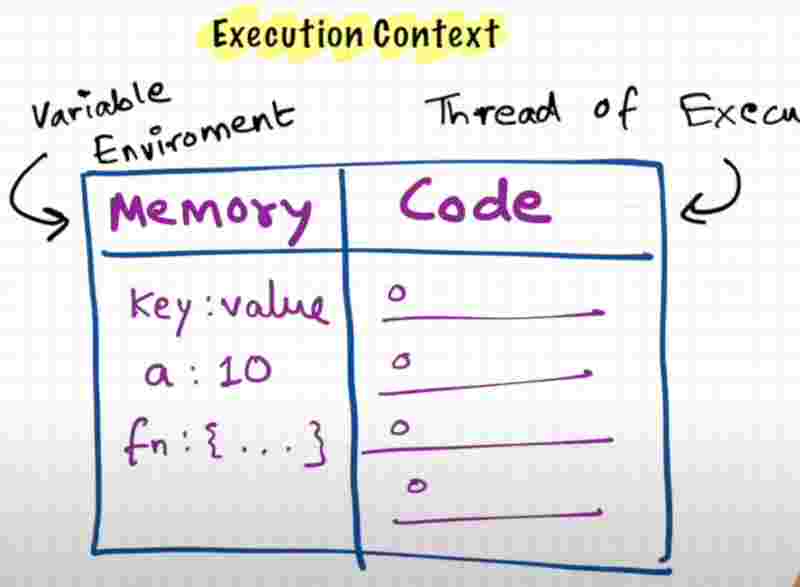
You can assume this execution context to be a big box or a container in which whole js code is executed. So how this execution context looks like?
So execution context is like a big box. And it has two components in it. The first component is also known as the Memory component. So this is the place where all the variables and functions are stored as key-value pairs. So this memory component is also known as variable environment.
The second component of this execution context is the code component. So this is the place where code is executed one line at a time. So this is also known as Thread of execution. So code execution is just like a thread in which the code is executed one line at a time.
“Javascript is a synchronous single-threaded langauge.”
So when I say single-threaded, that means js can only execute one command at a time. And when I say synchronous single-threaded, that means that js can only execute one command at a time and in a specific order only.
So that means it can only go to the next line once the current line has been finished executing. So that maens, synchronous single-threaded language.
But we have heard of something called as AJAX right? Where A stands for Asynchronous. So what does that mean? We’ll understand it soon.
However, understand that js would not be possible without this beautiful execution context.
What happens when you run Javascript code?
What happens when you run a javascript program? An execution context is created.
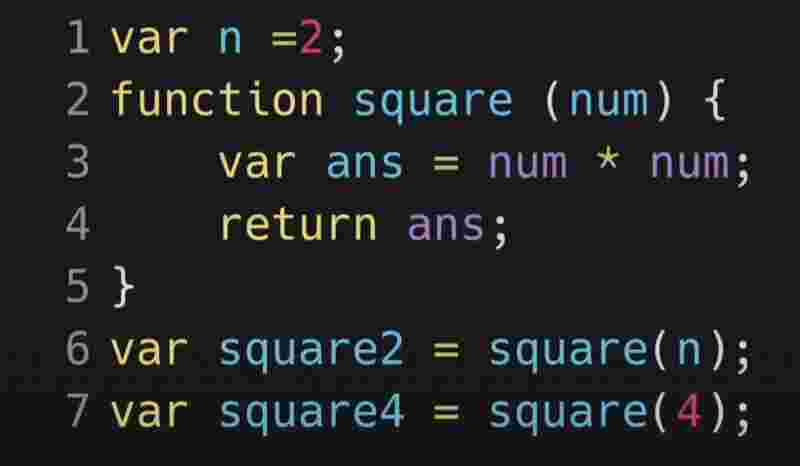
So now let us see how this whole js code runs behind the scene?
A global context is created. It is a big box and it has two components : Memory and Code component.
Execution context is created in two phases. The first phase is known as MEMORY CREATION phase. This is a very critical phase. And afterwards, the second phase, which is the code creation phase.
So in the first phase of memory creation, js will allocate memory to all the functions and variables, reserving the memory space for each and everything.
It starts allocating memory spaces line by line from variables to functions. Now when it allocates memory to variables. It stores a special value known as undefined.
What is undefined? We’ll know soon. It’s a placeholder. It’s a special keyword in js.
And in case of functions, it literally stores the whole code inside the functional memory space, by that we mean that the code is copied into the memory space of the function. Since function name is the key, it’s value will what’s within the function.
Now, the second phase is the code execution phase. So let’s see how this code is executed after the memory allocation.
So js once again, runs through the whole js program line by line and executes the code now. So this is the point where all these functions and calculation in the program runs.
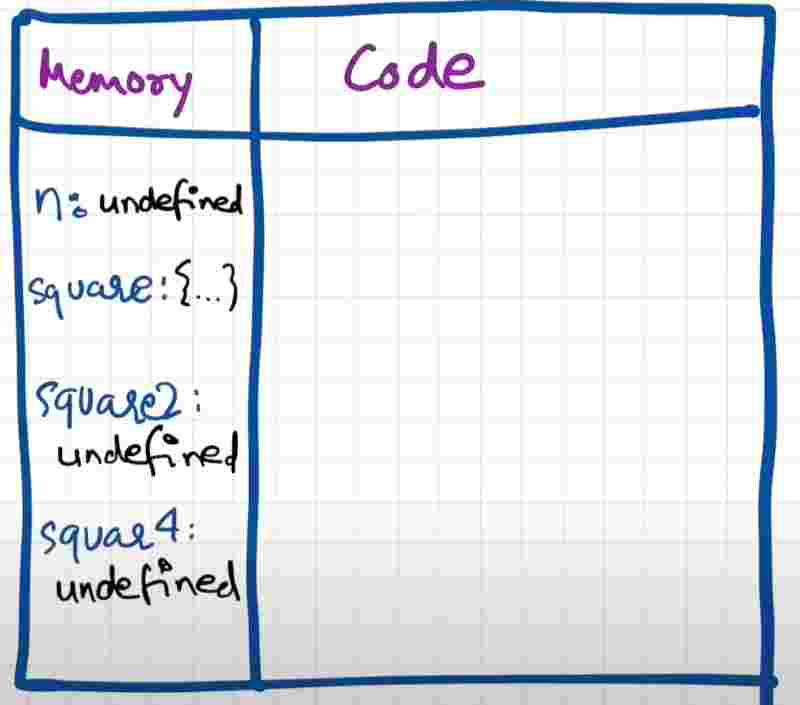
So till now the value of variables were undefined. Now in the second phase of creation of execution context, that is the code execution phase, the value of that varaible is now being placed actually in the placeholder or the variable identifier.
Now when it reads a function again, it’d just pass on, since the function hasn’t been called yet. So it moves next to where the function is being called. Now we see a function invocation.
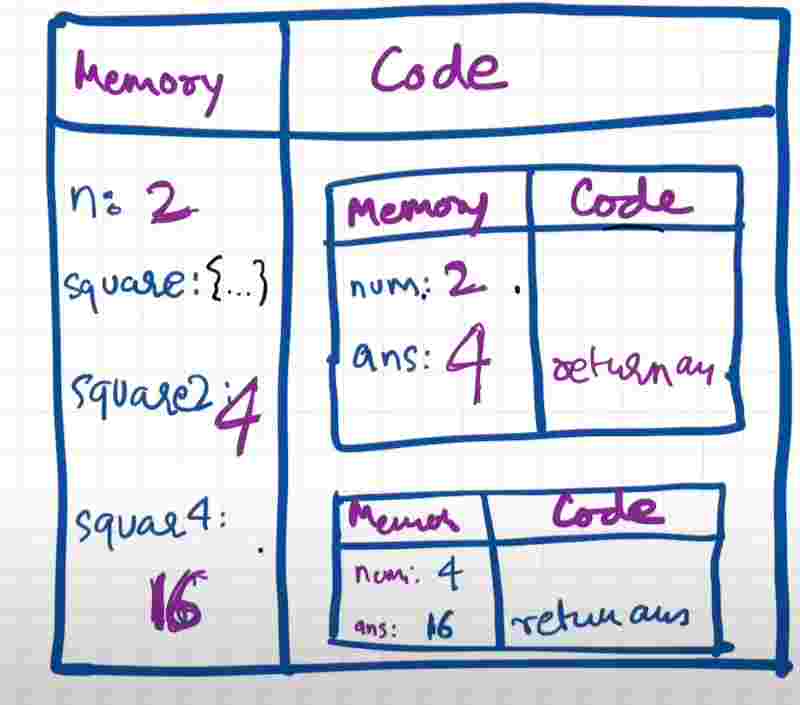
Functions behave very differently than other languages. So functions over here are like a mini program and whenever a new function is invoked, a mini program is invoked, and altogether new execution context is created.
Remember, the whole program was within the global execution context. Now when you invoke a function, a bran new execution context is created. And this execution context again has the two components, which is the memory and code component.And we’d again go with these two phases and again there’d be first memory creation and then code creation.
So within a function, we’ll be allocating memory to parameters and variables. And first, they’ll be undefined. In second phase, we’ll execute each line starting from the line where the function was invoked. The value of argument will be passed to parameter here into function. Then it’ll parse the code execution of the function.
Now we see a special keyword return. So whenever we see a return and a value. So this return keyword tells this function that you are done with your work now so just return the control back to the execution context from where the function was invoked.
Remember. This return keyword startes that return the control of the program to the place where this function was invoked. And now the control goes back to the global execution context.
Now when the execution context of that function has been executed completely after hitting the return keyword, the instance of this function will be deleted. So there won’t be any execution context for the function as soon as we return the value.
So once js is done with all it’s work. Now the program is finished and what happens is, the whole global execution context also deletes and goes off. So that is how the whole code is executed.
But don’t you think that all this is too much to manage for the js engine? Execution context is created one by one, inside one and all these things are very tough to manage, right?
And suppose if there was a function invocation inside the function, so what would have happened is you would have created an exeuction context inside an execution context that may again have another execution context. So it can go to any deep level right? So it is very diffcult for js to manage.
So what js does is it handles it very beautifully. So it handles everything to manage this execution context, deletion, and the control by managing a stack. This is known as the call stack. It has it’s own call stack.
What’s a call stack? It’s a stack and everytime in the bottom of the stack we have our global execution context. That means, whenever any js program is run, this call stack is populated with this global execution context. This whole global execution context is pushed inside this stack.
And whenever a function is invoked, we know that a new execution context is created, this execution context is put inside the stack. When the function hits the return statement, it is poped out of the stack.
“Call stack maintains the order of execution of execution contexts”
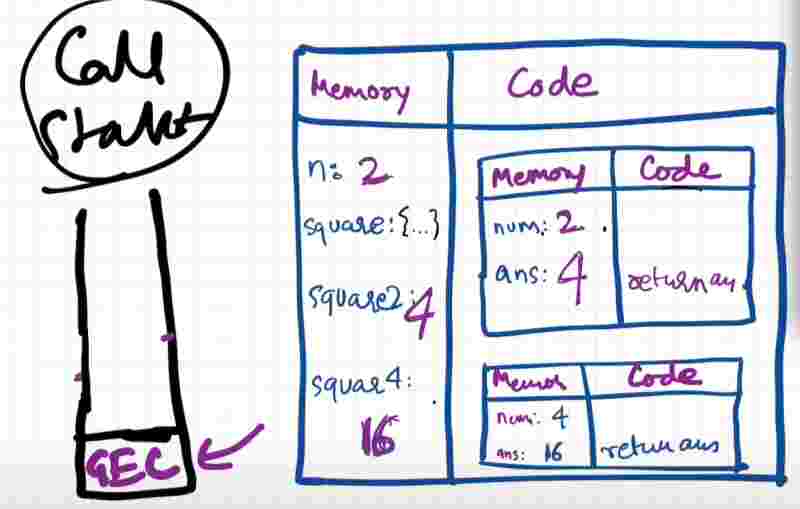
You may see that call stack is also known as the execution context stack, program stack, control stack, runtime stack, machine stack and like that. But it is the same call stack.
Javascript Hoisting
So let’s see some magic here.
var x = 10;
console.log(x);
function fn() {console.log(“log”);}
fn();
The output will be 10log definately.
fn();
console.log(x);
var x = 10;
function fn() {console.log(“e”);}
Now what changed is we are trying to access fn() name even before we have initialized it and we are trying to access x even before we have put some value in it.
So what do we expect to see here? In most of the programming languages, it’d be a complete error and you cannot access variables even before you have initialized it.
The output would be eundefined.
Now you’d be thinking of removing the variable x initialization since it’s showing undefined anyway.
fn();
console.log(x);
function fn() {console.log(“e”);}
It’d be an error saying x is not defined.
So before it was undefined and now it’s not defined.
Isn’t undefined and not defined not the same thing? No, it’s not.
So this whole concept is known as Hoisting.
So hoisting is a phenomena in js by which you can access these variables and functions even before you have initialized it or you have put some value in it. You can access it without any erorr. So wherever this x is in the program, it does not matter and you can just access it anywhere in the program.
Now, suppose we do this.
function fn(){
console.log(“log”)
}
console.log(fn);
Here, what do you expect would happen? It actually prints the function itself, isn’t it?
f fn() {
console.log(“log”);
}
But what if we try to invoke this function even before the function definition itself?
console.log(fn);
function fn(){
console.log(“log”)
}
Suprisingly, it’d give us the same output irrespective of the order.
“ So in case of varaibles we get undefined if we directly access before initializing, whereas in case of functions we get the same output. “
This behaviour may seem wierd in js at first place, let us go deep and see how everything happened and hwy the program is behaving the way it is behaving.
So remember that even before this whole code is js starts executing, the memory is allocated to each and every variable and function.
We can see that here x has already been allocated memory space even before we have started executing. This is phase one. Storing undefined for all variables. Reserves the memory for variables.
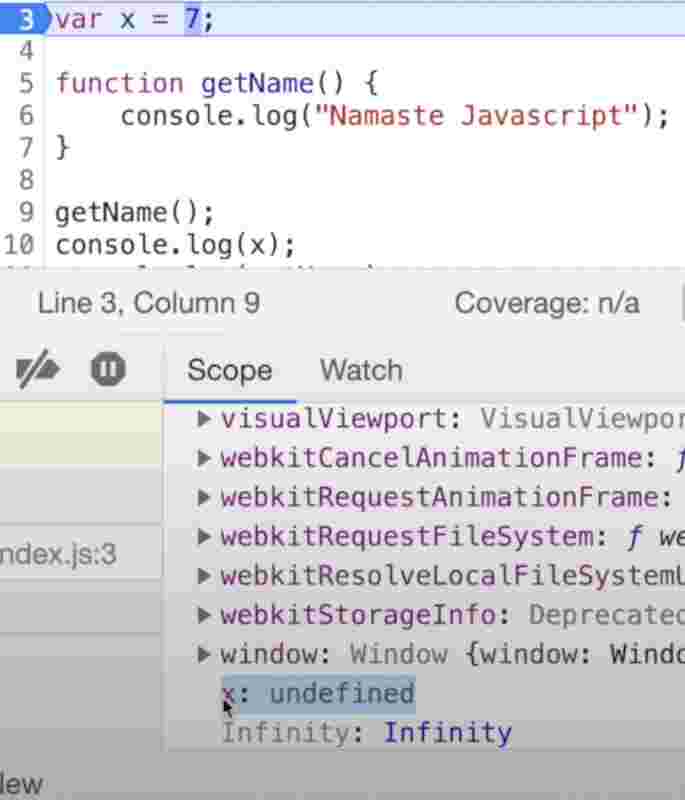
Let’s do something like this.
fn();
console.log(fn);
function fn() {console.log(“e”);}
So before even the function gets it’s declaration we’ll have these functions in memory space from the first phase itself. Now when we do something like this.
console.log(x);
var x = 10;
x will be undefined.
But if we write this only.
console.log(x);
x will be not defined. error. why?
So as soon as it goes to this line in second phase, we have not reserved the memory for x. So in this case when the code goes over here so it tries to access x, then x is not present because we have removed that right, so js will throw an error and it’ll say that reference x is not defined, which means x was not present in the memory.
So if x is nowhere initialized in entire program and you are trying to access the value of x then it’ll throw not defined error. Now let’s see an interesting thing.
fn();
var fn = () => {console.log(“e”)}
It’ll throw an error and say that fn is not a function, right. Why? Because arrow functions behave just like another variable. So this fn does not behave like a funcion but it behaves like a variable.
So what it’ll do is even before we execute this whole code, in the memory execution phase, it’ll allocate undefined to the arrow function fn.
So an arrow functions behaves like a variable in memory creation phase whereas a proper function behaves like a function in memory creation phase.
Let me ask you a question.
var fn = function () {}
How will it behave in memory, like a variable or like a function?
So the keyword function has no significance to how it behaves in memory. Even anonymous functions behave like a variable.
So that’s all about hoisting.
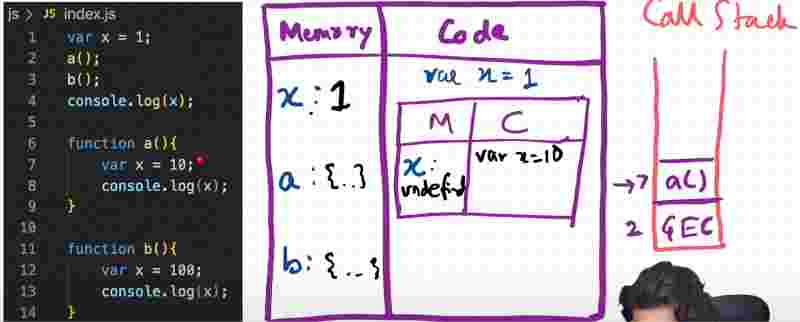
The variable in a function has is within its own execution context.
Shortest Js Program.
The empty file. Yes.
Even if the file is empty, javascript does a lot of things behind the scenes.
It does its job and creates the global execution context even if there is nothing in it.
Window object is created by js engine and into the global space, you can access these functions and variables anywhere in the js program.
Js engine also creates a this keyword. And at the global level, this keyword points to the window object.
Window is actually a global object which is created along with the global execution context.
So this global object in terms of browsers is known as window. And whereever js is running there must be a browser engine running it. For example, chrome has V8 engine.
So it’s the responsibility of V8 engine to create this global object.
Suppose you run js in nodejs, then this global object is different.
At global execution context in browsers, this keyword is equal to window object.
this == window
window is the global space.
var x = 10;
console.log(window.x);
console.log(this.x);
console.log(x);
In all the cases, 10 will be printed.
console.log(a);
var a = 100;
console.log(a);
console.log(x);
undefined
100
not defined
a has been allocated in memory space but since x has not been initialized it is not defined.
undefined != empty
Basically memory has ben allocated but undefined is like a placeholder which is kept for the time being until the vairable is assigned some value.
console.log(a);
var a;
if(a === undefined) console.log(a);
undefined
undefined
Javascript is loosely typed language so I can put anything in it and change the type later on.
However, never do this.
var a;
a = undefined;
console.log(a);
undefined can be assigned but it has a special purpose to it and using it like this may lead to unconsistency.
Scope Chain
Scope is js is directly related to lexical environment.
function a(){
console.log(b);
}
var b = 10;
a();
What will be the output?
This function a will try to find whether the value of b exists in its local memory space or not within its execution context right and it won’t be there. Then what will happen? It will print the value which means this function will somehow be able to access that variable.
function a(){
function b(){
console.log(c);
}
b();
}
var c = 100;
a();
It’ll still print 100. So functions nested within functions can still access the global execution context memory space.
But the vice versa may not be true. The variables defined inside function’s memory space cannot be accessed by global execution memory space.
function a(){
var b = 10;
}
a();
console.log(b); // not defined
So scope means where you can access a specific variable and function in code okay.
- We say for a variable, what is the scope of that variable, that means where can I access that variable?
- We can also say, is this variable inside the function scope of function xyz?
Lexical Environment
Whereever an execution context is created, an lexical environment is also created.
Lexical environment is the local memory along with the lexical environment of its parent.
Lexical as a term means in hierarchy or in sequence.
function a(){
c();
var b = 10;
function c(){}
}
a();
This c function is lexically sitting inside a function and further a is lexically sitting inside the global context.
So lexically means where it is present physically inside the code.
So whenever the execution context is created, we also get reference to the lexical environment of its parent.
At global level, this reference to its outer environment points to null because it has no parent.
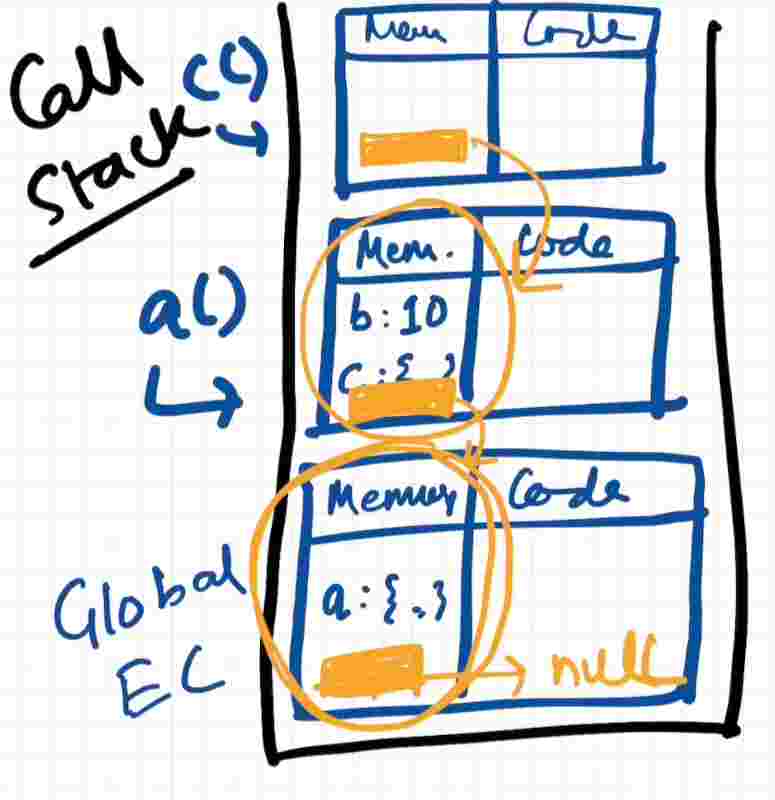
So inside nested function, if we try to console.log something where the value resembles within global context, it’ll first check within its own execution context then it’ll jump to its lexical parent through the pointer reference and try to find it there and it’ll keep doing it until it reaches null of the global execution context and if not found it’ll throw not defined error.
So this way of finding itself is known as scope chain, going level after level lexically untill it reaches null.
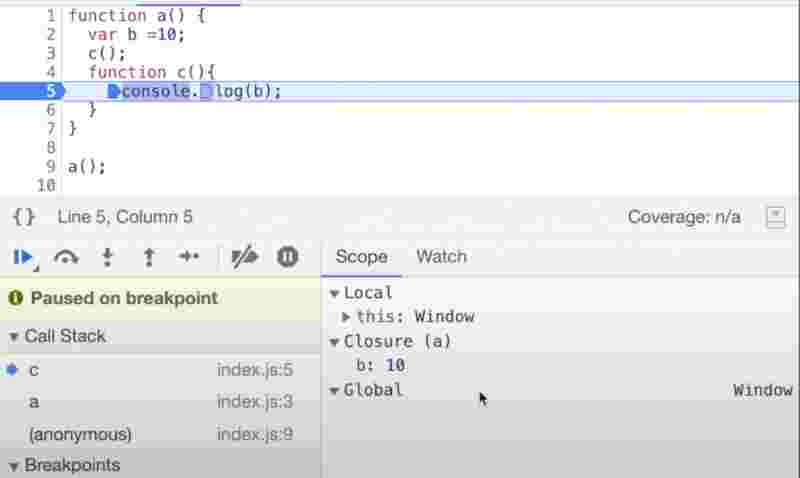
Looking at the call stack of above code, the function c has access to its local memory, the lexical environment of its parent function a, and the lexical evironemtn of the parent’s parent, since they have a chain of references.
Since here we see a closure keyword, which means function c has already enclosed inside function a and this is what closure is.
Temporal Dead Zone
let & const are hoisted but they are in the temporal dead zone.
console.log(c);
let c = 100;
It gives us an error that we cannot ‘c’ before initialization.
So this error tells us that we can only access c after we have assigned or initialized the value to it.
let c = 100;
console.log(c);
Now it works. But how to know whether it was hoisted or not?
So even before executing a single line of code, js will allocate memory to c just like it did with any variable.
However, in-case of let, it’s not in the global space but in the script.
So a typical var variable is assigned memory first as undefined, and is attached to the global object.
But let & const memory spaces are stored in a separate space which is not global and cannot be accessed unless it is initialized.
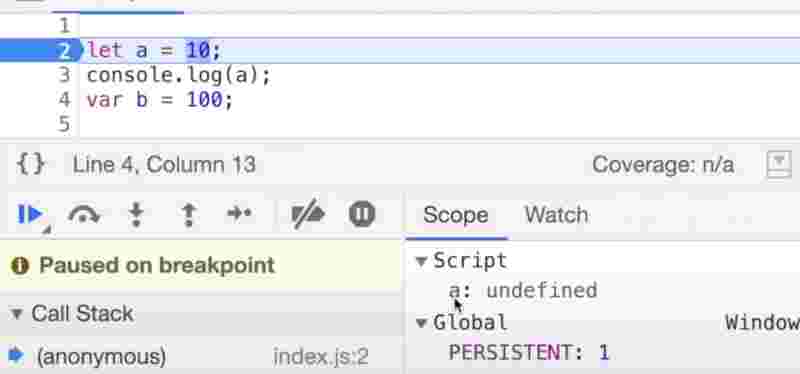
Temporal dead time is the time since the time the let is hoisted and till the time it is initialized.
console.log(a);
let a = 10;
So until variable a has not initialized, it is in the temporal dead zone with undefined value, but since it is declared with let, it’ll throw a reference error that you cannot access it.
So let & const declared variables cannot be accessed in the temporal dead zone.
let a = 10;
console.log(window.a);
We know that window is an global object, and variables in global execution context are stored in the same global object. But let & const are always stored in a separate storage and not present in the global object. So it’ll be undefined.
So let is a little more strict than var. It has constraints in hoisting. As well as in redeclaration.
let a = 10;
let a = “hello”;
Whenever there is a redeclaration error, not even a single line of code executes, it’ll throw syntax error.
It is possible in var however.
var a = 1;
var a = 99;
So you cannot use the same name in the same scope again, but you can redeclare it in another scope.
Now const is even more stricter than let. It is also stored in separate memory space, and it is also in temporal dead zone.
However, we can declare let and we can initialize let later before accessing it. That is completely fine.
let a;
a = 50;
console.log(a);
But you cannot do the same thing in case of const. It’ll directly throw us an syntax error saying missing initializer in const declaration. Syntax error here means code doesn’t even run.
const b; // syntax error
b = 1000;
const b = 1000;
b = 1; // type error
What’s the difference between syntax error, reference error and type error?
const type gets type error since it has to be declared and initialized at the same time, you cannot do it later on, whereas syntax error expects us to write code in a certain manner that it could understand and we get reference error when variables are in the temporal dead zone or they are not declared.
Since we have let const var, which one should be preferred to use?
use const whereever possible when you know that the value will never be changed since it’ll give you least unexpected errors, then prefer let since you’ll get into undefined errors because it’ll never let you access memory before it is initialized, and take var as the last resort to be used.
“ Prefer shrinking the temporal dead zone to zero by moving your initializations and declarations on the top. “
Block Scope { }
We can group multiple statements in a block.
if (true) true;
This is a completely valid if statement but it expects a single line of code. If we want it to provide multiple lines then we have to use the block scope.
{
var a = 10;
let b = 20;
const c = 30;
}
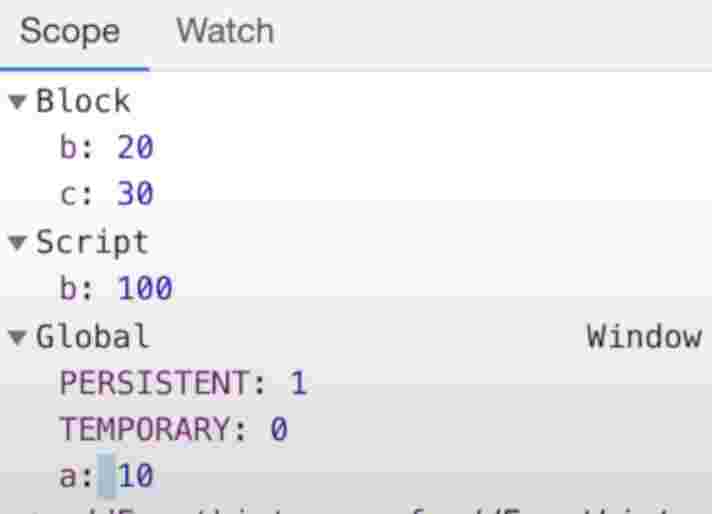
If we debug it, we’d find out b and c are in the block memory scope, a separate memory space, b and c are hoisted and assigned undefined. And variable a is hoisted inside the global scope.
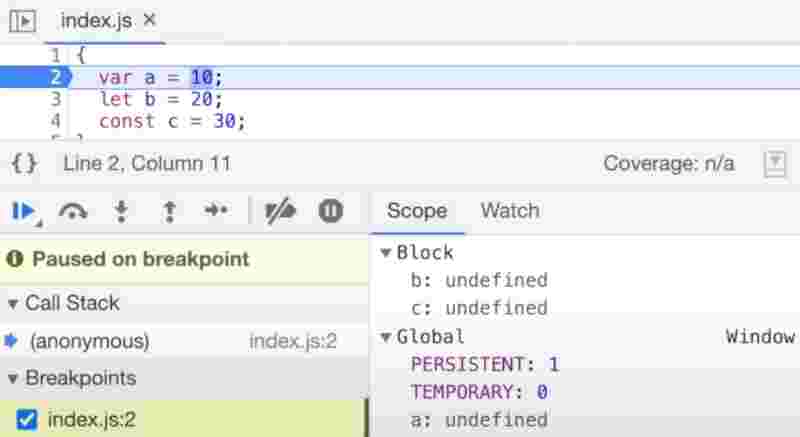
let and const are said to be in block scope so they’ll terminate as soon the control goes outside of block scope, but var is globally scoped so a will presist.
{
var a = 10;
let b = 20;
const c = 30;
}
console.log(a);
console.log(b);
10
not defined
Shadowing in Js
Now if you have the same named variable outside the block, so this variable inside the block shadows that variable.
var a = 100;
{
var a = 10;
}
console.log(a);
Now variable a outside of block scope is shadowed by variable inside the scope, but then even if the scope comes back to global, it still prints 10. Why? Because they both are pointing to the same memory space, that is the global space.
However that is not the case with let & const. Even though shadowing works from outside to inside, its value is not presisted once the control goes outside that the scope where shadowing happened.
let b = 100;
{
let b = 1;
}
console.log(b);
let & const are in a separate memory space within the block scope and also in a separate memory space from the global perspective. When the block scope ends, the let & const memory space terminates with it, and the special global memory space of let & const is used.
let b = 100;
{
var a = 10;
let b = 20;
const c = 30;
}
Illegal Shadowing
let a = 20;
{
var a = 20; // error
let a = 20; // valid
}
You cannot shadow a let using var, but you can shadow a let using a let.
var a = 20;
{
let a = 20;
}
But the vice versa is true here. Js will not throw any error here.
Why does this happen?
If someone is shadowing something it should not go out of the boundary of its scope. So, let cannot be redeclared using var.
What is the boundary of var? var is a function scoped.
let a = 20;
function fn(){
var a = 20; // works
}
Block scope is lexically scoped, which means it’ll access the memory of its nearest scoped variables.
Closures
Closure simply means that a function bind together with its lexical environment.
Function along with its lexical environment becomes bundled and thus forms a closure.
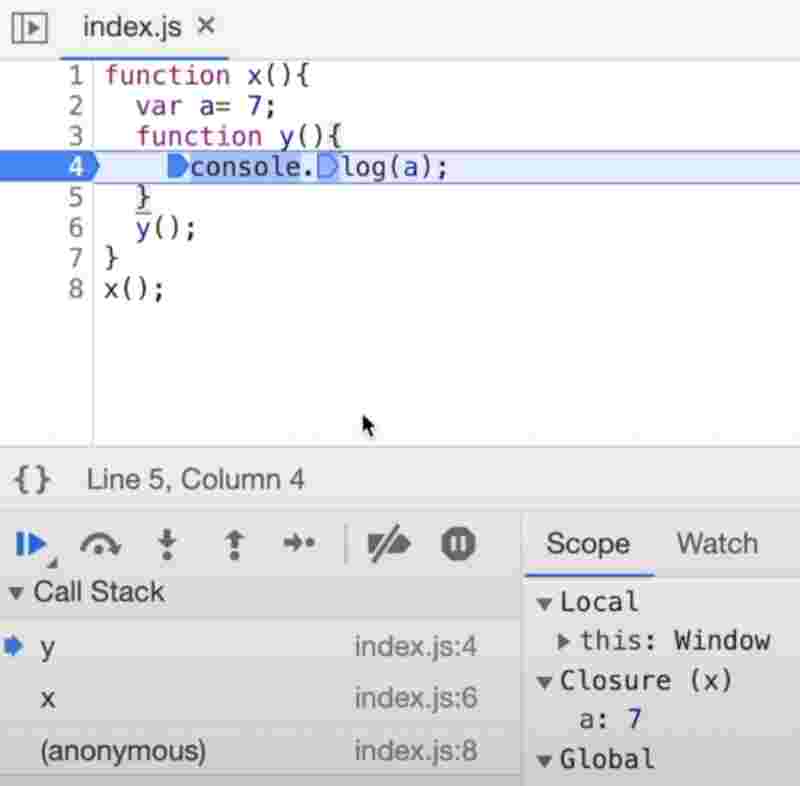
The function y was bind to the variables of x and thus forms a closure with x and has access to its parent lexical scope.
We can do many things with functions in Js.
- We can assign a function to a variable.
- We can pass an entire function as a parameter to function.
- We can return a function form a function.
var a = function f1(){};
function fn(a){
return a;
}
var a = fn(a);
console.log(a);
The above code returns the same function it was passed and prints function on the console.
“ Functions in js are so beautiful that when they are returned from another function, they still maintain their lexical scope, and they remember where they were actually present. “
So when we are returning a function, not only the function was returned but the closure was returned, which means the function along with its lexical scope was returned.
So when you execute function somewhere else in your program after being returned, it still remembers the reference and its lexical environment.
function fn1(){
var whoami = 1;
function fn2(){
console.log(whoami);
}
return fn2;
}
var fn = fn1();
fn();
setTimeout
It takes a function and a timeout duration which will be executed after that timeline.
function fn(){
setTimeout(function (){
console.log(“world”);
}, 3000);
console.log(“hello”);
}
fn();
Here the js engine will not wait for settimeout to execute before printing hello, it’ll print hello first and then world after 3 seconds.
setTimeout takes a callback function, attaches a timer to it, and when the timer expires it calls that function.
While the timer is going, the js engine does not wait for setTimeout okay.
for(var e = 1; e <= 5; e++){
setTimeout(function(){
console.log(i);
}, i * 1000);
}
What do you think would be the output?
6 is printed every second. Why?
Remember when a closure is formed, a closure is a function along with its lexical enviroment. So even when function is taken out from its original scope right and is executed in some other scope. Still it remembers its lexical environemnt right. So what will happen when this settimeout takes a function and stores it somewhere in lexical environment, then the function remembers its reference to i, and not the value of i.
One way to see the expected behaviour is to use let here since let is block scoped and uses a separate memory for each block.
Callback Function
Functions are first class citizens in js. That means that you can take a function and pass it into another function right. And you can even return a function from a function.
We can access a whole asynchronous world in a synchronous single threaded language.
Js is a single threaded langauge, that means it can only do one thing in a specific order but due to callbacks we can do async things in js as well.
function fn(){}
fn(function c(){});
Here function c is known as the callback function. But why?
Because c function is never called over here. So you give the responsibility of this function to another function. It’s like we pass this function c inside fn. Now it is upto fn when it wants to call c.
And because this function c is called sometimes later in your code. So that is why it is known as a callback function.
The function we pass into settimeout is a callback function. That means it is passed onto settimeout and it will be called after the amount of time we pass to it.
Taking a callback function and storing it in a separate space is a part of memory creation phase.
So whatever is executed in js is executed through the call stack only. So even the callback functions will be executed through call stack.
When a callback function is called from setTimeout then it is also known as the blocking thread. Because as soon as a new call is made in the call stack, everything else will be blocked until it executes.
But it should never block the things that take time, that is the timer we set in the setTimeout.
So if js did not had this first class functions and this callback functions then we could never be able to do this async operations.
So even in the event listeners, we only call the callback function. That callback function is temporarily stored. And when the event has occured. That function jumps into the call stack okay.
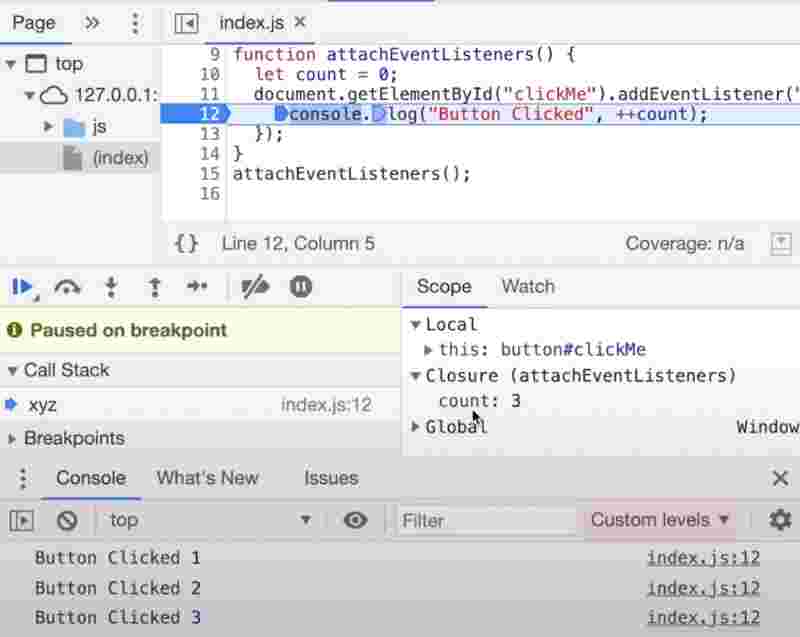
In the above eg, we can see that the event listener forms a closure with the outer function which means it remembers the place where it is as well as the variables.
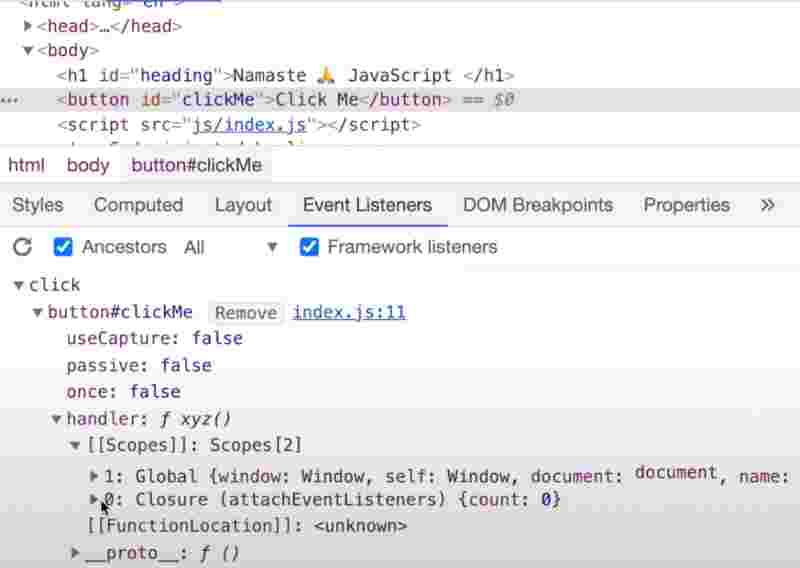
So the handler of the button has a scope attached to it. Inside the scope we have the same closures that we know now.
One thing we must know that event listeners are heavy and are stored in memory. So a good practice is to free up event listeners. And when we remove event listeners, they’ll held by the garbage collection.
Event Loop
So js is a single threaded langauge. It has one call stack. And it can only do one thing at a time. This call stack is present inside the Js engine. And all the code is executed inside the call stack.
function a(){
console.log(“a”);
}
a();
console.log(“end”);
So whenever a piece of code is executed, the global execution context is pushed inside the call stack first. Now in the gec, the whole code will run line by line.
And when a function is invoked, an execution context is created for to execute that code of function. And this execution context is again pushed inside the call stack.
And then that function is executed line by line. And once the control is returned. That execution context is pushed out of the stack.
So call stack works quickly and does not wait. If you give it anything, it executes it right there itself.
“ If anything comes into call stack it quickly executes. “
But what if we have to wait for something? What if we have a script or program which has to be run after 5 seconds? Can we do that. We cannot do that with call stack because whatever comes under call stack is quickly executed.
The call stack does not have a timer.
Suppose we have to track the timer, then we would need some extra super powers. Timers.
Who has those super powers? Browser right.
Browser has local storage, timers, bluetoth, geolocation, connection with external websockets to servers, and it can even display UI dynamically and do concurrent tasks in different tabs.
If browser is so powerful, we need a connection that bridges the gap between the Js engine and the super powers.
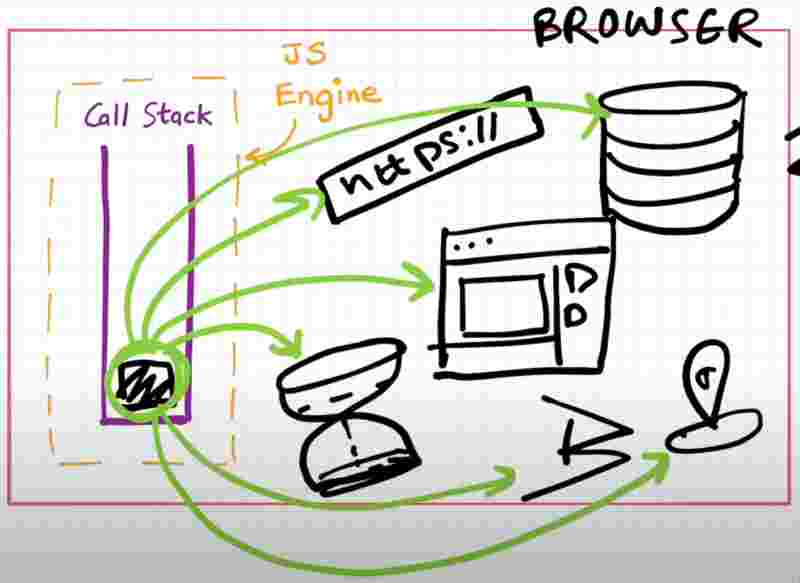
So to access all those superpowers we need Web APIs.
It’d be heart breaking to know that setTimeout is not a part of javascript but of the browser.
Even the DOM APIs is not a part of javascript.
Even the console.log whatever you do and see in the browser is also not a part of javascript.
So these are part of browsers okay. Browsers give us access inside the js engine to use all these super powers.
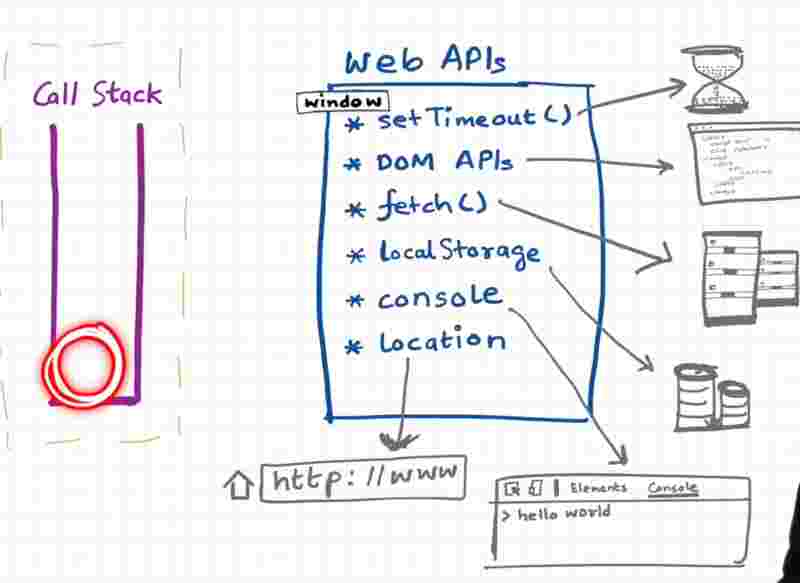
And we get it inside the call stack because of the global object. The global object is the window object.
Browsers give js engine the ability to use these super powers through the keyword window.
Because window is the global scope of the entire js engine so doing something as.
window.setTimeout();
setTimeout();
Are one and the same thing.
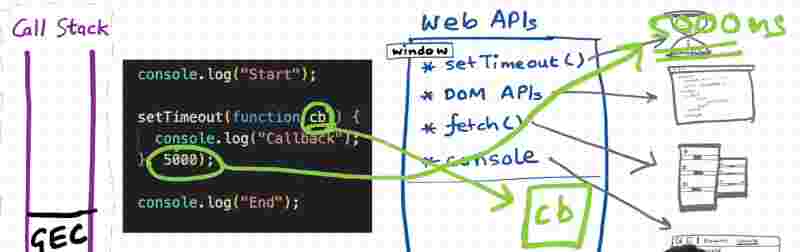
As we know from the above eg, code will be executed in gec, and it’ll call the console web api for console function, and it’ll call the setTimeout web api for the async operation. Now as soon as it hits the setTimeout, it registers the function somewhere and calls the timer. And after quickly executing, the gec pops out from call stack.
Then comes the callback function which was registered in setTimeout. Now it has to be pushed into the call stack to execute it as quickly as possible. How can it be done?
The call back function cannot just directly move unto the call stack right. It will go into the call stack through this call stack queue.
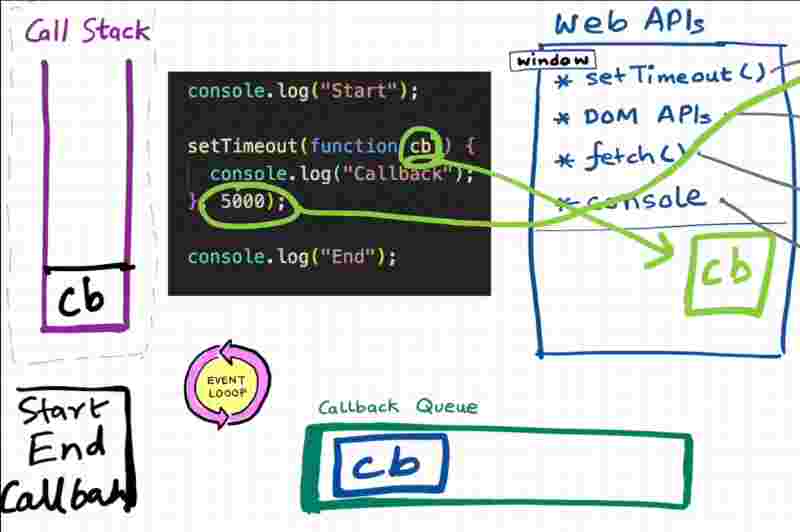
So this callback function after the timer expires moves inside the call back queue. And the job of this event loop is to check the events of this callback queue and to push the call back function into the call stack.
So as soon as the timer expires, this call back funciton is pushed inside the call back queue, and the event loop checks if there is something insie the callback queue, it takes that call back function and pushes it inside the call stack and quickly executes this call back function by creating its execution context.
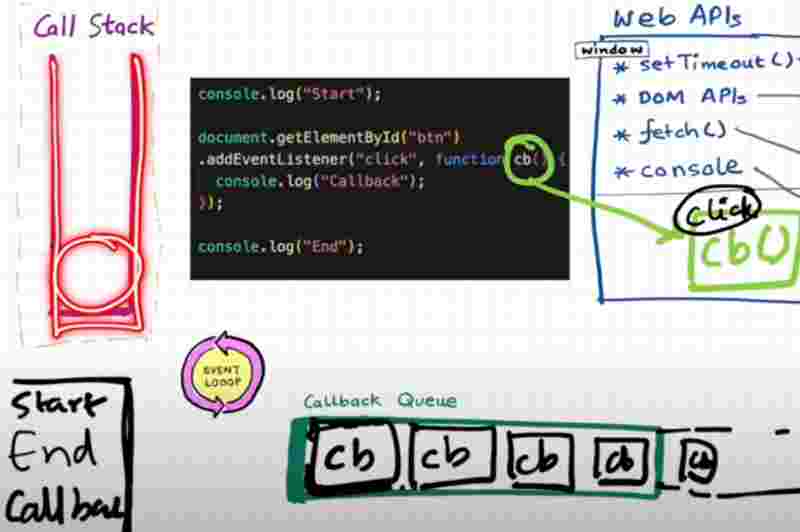
The only job of the event loop is to continously monitor the call stack and the call back queue.
Let us take a deeper example.
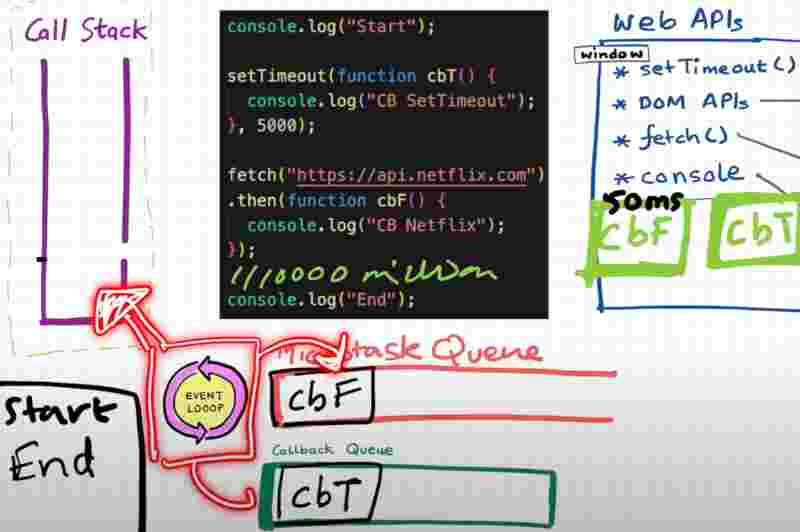
Here, we have setTimeout with 5000 miliseconds and another promise api call to netflix and both returns a call back function.
But here’s the catch, the order is such that setTimeout will be registered first and then fetch() function. But here the fetch returns the response from netflix in under 50ms then why would it wait for setTimeout timer which is 5000ms. That is absurd isn’t it.
That is why fetch() call back functions cannot come under the callback queue. For that purpose we have Microtask queue.
Now what is a microtask queue? All the call back functions that come under promises go only to the microtask queue.
Microtask queue is always given priority over call back queue.
Event loop sits in between the call stack and these two queues.
Once the call stack goes empty and the gec execution is done, it then checks for the microtask queue and quickly pushes it to call stack, and then it checks for call back queue and quickly pushes to call stack. That’s how event loop works.
There is a mutation observer, which continously checks if there is any mutation in the dom tree or not.
So what comes under microtask queue.
- Call back functions that comes through promises.
- Mutation observers in the dom changes.
But all the other call back functions always go inside the call back queue.
Some people call the call back queue as the Task queue, since microtask queue has higher priority than the call back queue.
Starvation of call back queue
Suppose microtask queue when called further calls and adds up another microtask queue. In that case since microtask has higher priority than call back queue, the call back queue will never get a chance to execute.
Javascript Runtime Environment
Js engine is the heart of the js runtime environment which also has web apis, cq and mq and event loop.
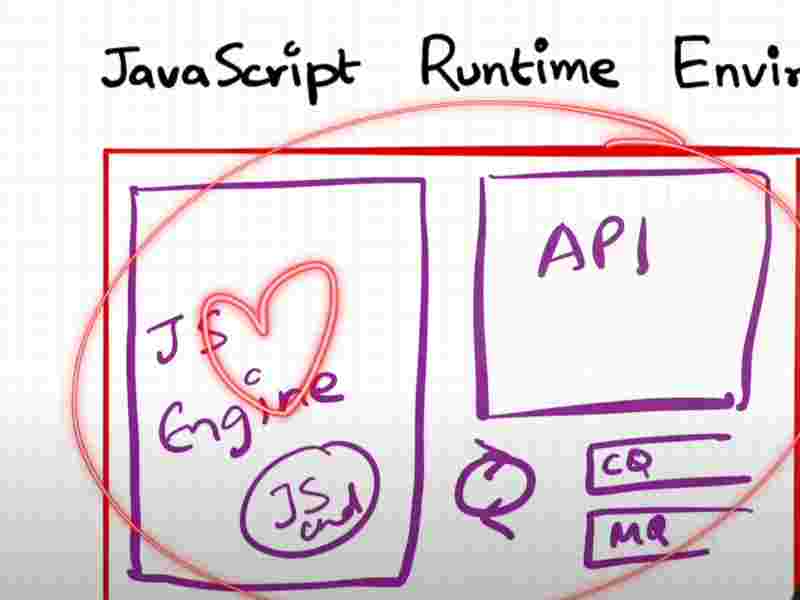
Browser can only execute your code because it has the js runtime environment. Nodejs also has the similar kind of js runtime environment and that is the reason js can run anywhere.
The first Js engine was created by the creator by js himself and now is named spidermonkey and used by firefox. However, the most popular one is V8 Js Engine used in chrome and the other one is chakra js engine used is edge.
Js engine is not a machine but a normal program. For example, google’s V8 engine is written inside C++. So, the V8 engine takes in a code and kind of converts it into machine code.
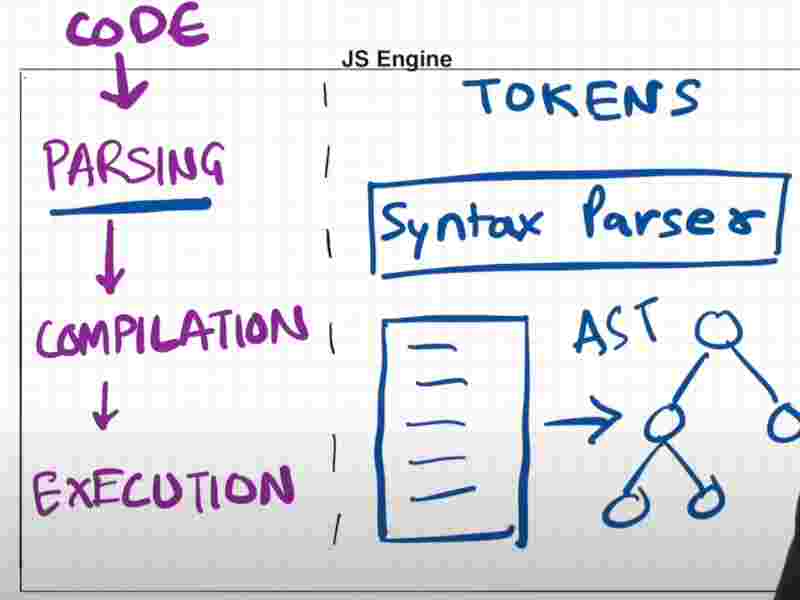
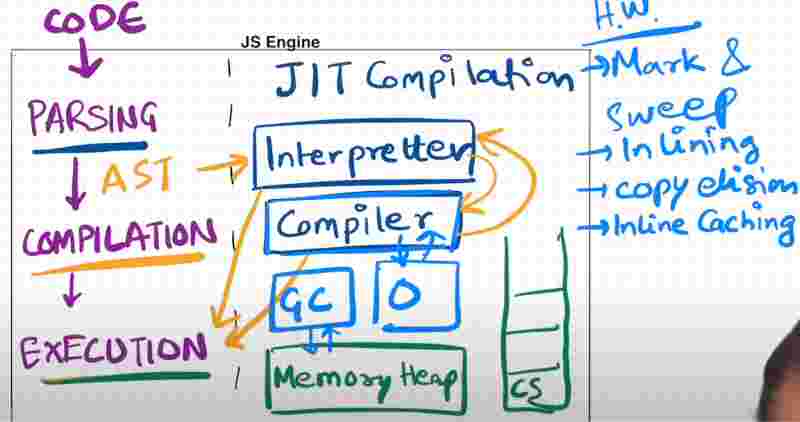
The Js Engine has 3 phases that is
Parsing, Compilation and then Execution.
The parsing stage is done by the syntax parser through the Abstract Syntax Tree which is kind of a JSON object.
The JSON object is passed to the JIT Compilation phase.
The compilation phase has a Interpretter which converts the js code into bytecode line by line and it also has the compiler which optimizies the js code before it is being interpreted. They both go hand in hand which each other to make the js code as fast as possible.
Earlier js engine used to have only interpreter because it executes the code line by line. But then just in time compilation came in modern engines like V8 which is compilation of some code at the time of execution itself for the sake of optimization.
Then we have the execution phase which has the memory heap and the call stack. It also handles the garbage collection internally.
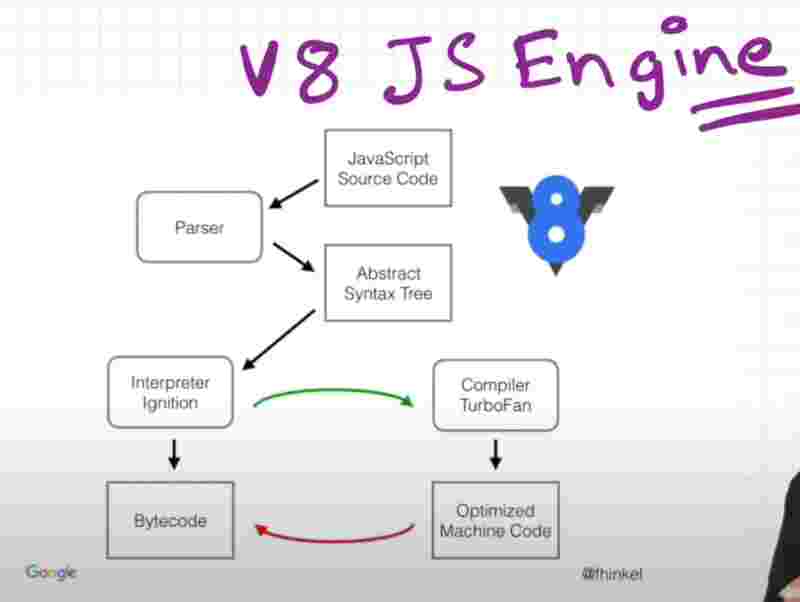
The interpreter of google’s V8 engine is called Ignition and the compiler of google’s V8 engine is called Turbofan.
map() function
map function is used to transform an array like double an array, changing every element to binary format.
map function takes a function which basically tells that what transformation do we need?
What this internally do is call this passed function over each and every value of an array and create a new array out of it.
We simply call it as a transformation logic.
const a = [1,2];
function double(e){ return e * 2; }
const b = a.map(double);
This mapping function is running the passed call back function for each and every value of array and then return s a new array.
We can also write it like this.
const a = [1,2];
const b = a.map(function double(e){ return e * 2; } );
We can also write anonymous function for single line functions.
const a = [1,2];
const b = a.map( (e) => e * 2);
filter() function
filter() function is used to filter.
Suppose we want even numbers from an array, that is an filtered array that we’ll get right.
“ The operations happen such that they do not affect the original data but do mutation on its copy. “
const a = [1,2];
const filterOdd = arr.filter((e) => e % 2);
const filterEven = arr.filter((e) => e % 2 === 0);
reduce() function
They are used to accumulate from each value of array and give either a new value or an object.
const a = [1,2];
const sum = arr.reduce((e, cur){ e += cur; return e; }, 0);
It startes the accumulator with a vlaue of 0 that we passed as second parameter, then it uses this accumulator as storing the sum from each value of array that we’re getting through cur.
Promises
const cart = [a,b,c];
createOrder(cart, function(orderId){
proceedToPayment(orderId);
});
This kind of code using call back functions has issues of inversion of control. So what does that mean is we have given this callback function and passed it to another function, and now we are just sitting back relaxed as a developer that at some point of time, that function will just call my callback function back and everything will be peaceful. But since we are blindly trusting this api, what’s the gurantee that it’d definitely call our callback function or it may call it twice or thrice. Because this api function can be in some other service or some external world, and we can’t just blindly trust these apis, isn’t it? So what we mean to say is that we have given the responsibility fo our code to some other api and it’s not in our control anymore, we have just passed in and we are just expecting it to be like randomly magically being called after the api has been called.
So we can handle such type of situations using promises.
Promise is nothing but an empty object. Since async operation may take time promise object will be undefined till then. As soon as async operation is done. Promise object will automatically be filled with data.
Once we get the promise, how will we continue our program?
Then we’ll attach a callback function to this promise object. We use then() function which is available over promise object.
const cart = [a,b,c];
const promise = createOrder(cart);
promise.then(function (orderId){
proceedToPayment(orderId);
});
You may say, how is it different? Since we are still passing the call back function inside then function.
So earlier we were calling a call back function from a function. But now we are attaching a callback function to a promise object.
In this case, we have the control of our program with us. Promise will automatically call the then() function once it is filled with data. That is why promises give us this trust gurantee that it will call this call back function.
fetch() function is given by browsers to do an api call and it returns us an promise object.
const GITHUB_API = “”;
const user = fetch(GITHUB_API);
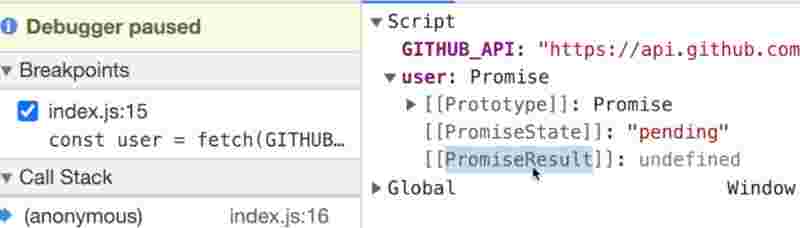
So this is the promise object and the response has not came yet from github.
Promises have two things. One is the PromiseResult that is whatever data fetch() method will return. And other is the PromiseState which tells you in what state that promise is initially.
The promise will be in pending state and once we have got the data back no matter how much time it takes. After that, the promise state is changed to fulfilled state.
Javascript promises us that a promise object will only be resolved once, either a success or a failure. So there is another promise state called as the rejected state.
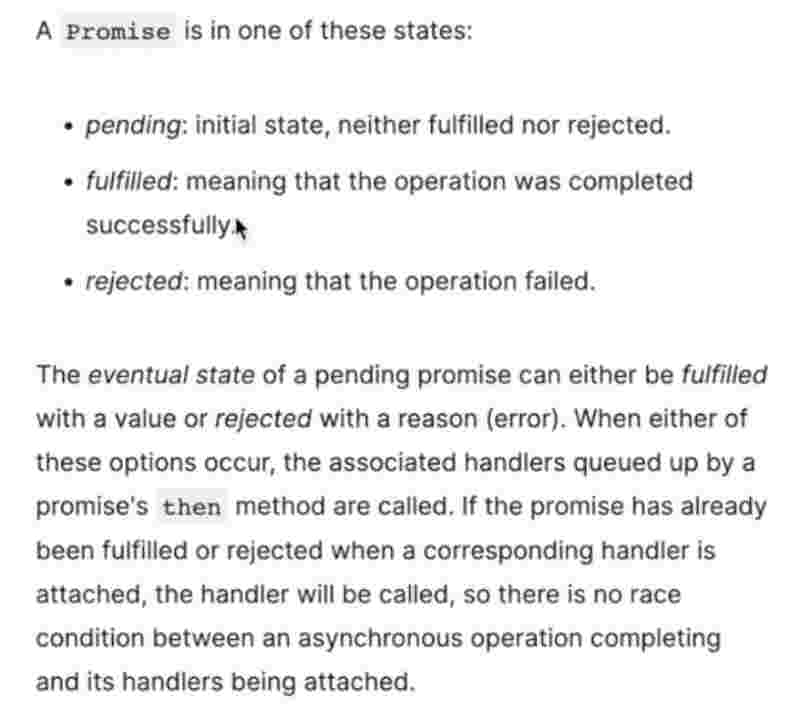
And nobody can mutate the promise object, it’s immutable and resolved just once and you can pass ti whereever you want to.
Promise object is a placeholder for a certain period of time until we receive a value from a asynchronous operation. We can also say, a container for a future value.
Promise is an object that represents an eventual completion or failure of an asynchronous operation.
We can also chain promises easily.
const GITHUB_API = “”;
fetch(GITHUB_API).then(e => console.log(e));
How do we create a promise?
function fn(a){
const p = new Promise(function(resolve, reject){
if(a){ resolve(“Success”); } else {reject(“Failed”); }
});
}
const value = true;
fn(value);
So this is how we write a promise from scratch. We create the Promise object using new keyword which takes a function with two parameters that is resolve and reject which can be used to handle the fulfilled or rejected condition respectively.
But suppose the business logic returned rejected right. Then we have to gracefully handle that error otherwise it’ll pop up in console as red.
const err = new Error(“Failed Promise”);
reject(err);
In promise we created, we create a error object before calling reject so that it can be handled by catch() function if the promise is rejected.
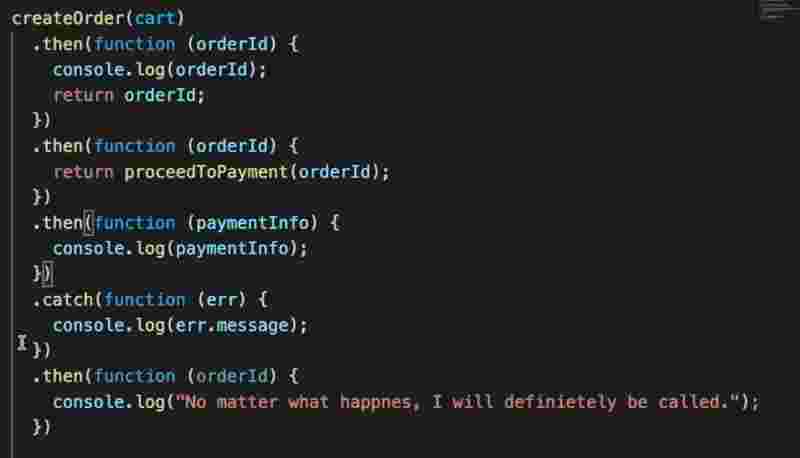
fn(a).then(function (orderId) {
console.log(orderId);
return orderId;
}).then(function(orderId){
return proceedToPayment(orderId);
}).then(function(paymentInfo){
console.log(paymentInfo);
}).catch(function (err) {
console.log(err.message);
});
function proceedToPayment(orderId){
return new Promise( function(resolve, reject){
resolve(“Payment Success”);
})
}
So we can either return a value to be handled by next chain, or we can return promise itself to be handled by next .then() function. So passing it down the chain is a good method of writing code.
If there is a error in this chain, the catch will handle any error inside that chain. So that is why if we are failing at the first chain itself then further chains will not be called and instead catch() method will be called.
And supose we have a long promise chain of 15 to 20. And if we are concerned to handle errors but then continue the chaining as well. So what we can do is put the catch() method in-between the chains so then it’ll only handle the errors of its top promise chains and whatever error message it is we can further return it and pass that message down the chain to next promise.
async
async function fn(){}
How is async function different from a normal function?
“ async function will always return a promise. “
Now either you return a promise from inside the async function. And suppose if you don’t return a promise but a value which is a non-promsie value. Then what this function will do is take this value wrap it inside a promise and then it’ll return it.
async function getData(){
return “Success”;
}
const dataPromise = getData(); // Becomes a promise
dataPromise.then((r) => console.log(r));
However, if this returned value is itself a promise then it will not be wrapped inside a promsie but it will be returned as it is.
async function getData(){
return new Promise((resolve, reject) => {
resolve(“Promise Resolved !!”);
});
}
const dataPromise = getData(); // Already a promise
dataPromise.then((r) => console.log(r));
await
“ async and await are used to handle promises. “
But befoore async await we still could handle promises right. Then why do we really need async await?
We’ll use the keyword await in front of a promise inside the async function that has to be resolved.
async function getData(){
const val = await new Promise((resolve, reject) => {
resolve(“Promise Resolved !!”);
});
console.log(val);
}
“ await can only be used inside the async function ”
Unlike then() function which only executes the code within it and the function where then() function has been written does not wait.
In async function, js engine waits for promise to resolve with the await keyword and only then it executes that async function further.
So await basically waits at that point of time to get the promise and then execute that function further which is only done after the global execution context has been parsed by js engine.
fetch()
What is fetch() basically? So fetch() is a promise which when fulfilled since we’re using it with awit returns a Response obejct which is actually a readable stream to json. And this json() object is again a promise which on using await gives you the fulfilled promise object.
async function handlePromise(){
const data = await fetch(API_URL);
const jsonValue = await data.json();
console.log(jsonValue);
}
handlePromise();
This is how we write it normally !
fetch(e).then(res => res.json()).then(res => console.log(res));
So whenever you have your async await code, wrap it inside your try block and then you can have your catch error.
💬 Comments will load when you scroll here