
MULTITHREADING
TOPICS
Concurrency, Parallelism, Process & Thread, Time Slicing Algorithm, Thread Lifecycle, Ways To Create A Thread, Difference Between Implementaiton Of Runnable And Thread, Sequential Execution Of Main Thread.
Join() Method, Daemon Threads, Thread Priority, Thread Synchronisation, Problems With Synchronisation, Solution to Synchronisation Problems.
Wait() And Notify(), Producer And Consumer Problem, Executor Service Framework, SingleThreadPool(), FixedThreadPool(), CachedThreadPool(), ScheduledThreadPool(), Ideal Thread Pool Size.
Callable And Future, Synchronized Collections, CountDown Latch, Blocking Queue, Concurrent Map, Cyclic Barrier, Exchanger, Copy On Write Array.
Locks, Lock Condition, Reentrant Lock, Lock Fairness, Read Write Lock, Volatile Keyword, Deadlock, Ways to find deadlock, Ways to avoid deadlock.
Semaphore, Mutex, Fork Join Framework.
In a single threaded environment, there may arise a heavy time-consuming task, which might have been blocking the execution of the rest of the code. For that reason, threads are used, to separately execute that time-comsuming task while the rest of the execution runs parallely.
We humans, by our very nature, can do multi-tasking. While we wait for our maggi to be prepared, we can prepare another dish at the same time, or we can talk to someone, or listen to songs. But a program by its very nature, executues in a sequential-manner, to handle a heavy computational task, such as downloading some data, we can perform it parallely using threads.
Concurrency
Concurrency is like having multiple tasks to do, however you can switch between the tasks. It is like having a guitar where you can play one string at a time, but the switching between strings is so fast that it seems like they are playing at the same time.
Concurrency is like doing multiple tasks at the same time by quickly switching between the tasks.
Concurrent systems or tasks may start or end independently of each other, but they are not executing simultaneously at any moment.
Concurrency means a single processor switches between multiple tasks rapidly through the use of multiple threads.
Concurrency is all about breaking down the problem into sub-problems so that the overall program could be executed much faster than what it could without concurrency. Switching between the tasks speeds up the overall program.
Concurrency is like perceived parallelism, or fake parallelism, which is only handled through a single GPU processor.
Concurrency feels like tasks are executed simultaneously, but they are actually executed sequentially, just they are switching their context between independent tasks, the switching is done through a algorithm called time slicing.
Concurrency is interleaving multiple tasks to give an appearance of simultaneous execution.
Parallelism
Suppose you have many friends to the tasks for you, so you are using shared resources between you and your friend, thereby helping you to do multiple tasks at the same time.
Parallelism is like doing multiple tasks at once, by different entities simultaneously at the same time.
In parallelism, the tasks are truly executed simultaneously, to maximize performance, through multiple processors, or through distributed or GPU computing.
Process & Thread
When an application is executed, the OS assigns stack and a heap memory to a single application process.
Thread is a lightweight process within the application, that uses shared memory and resources.
A process can have multiple threads executing within it.
Time Slicing Algorithm
Every thread is given turn one after another, like the time between them is sliced into half. The resources are shared and switching between thread is done, one turn at a time for each thread. This sharing of resources by slicing the time is called time slicing algorithm.

However, if we have multiple CPUs, or different cores of CPUs, the threads can run parallely on a different core rather than running concurrently on the same CPU. And you understand the difference well that time slicing will only occur in the case of concurrency.
Pros of Multithreading
- Better performance
- Better resource utilization
- Responsive Applications
Cons of Multithreading
- Thread context switching is expensive
- Difficult to design and test the threads
- Synchronization is tricky
Thread Lifecycle
- Newborn State
Every thread once created is in this state, before calling the start() method, indicating that the thread has not been executed yet but its object has been created in memory.
- Active State
Once we call the start() method, every thread may be in the runnable state or in running state. Runnable when the thread waits for the CPU to execute it, and running when the CPU has executed it.
- Blocked State
Suppose we have two threads, T1 & T2, and they are executing concurrently turn wise, after one execution of T1, T2 executes, but the rest of the T1 execution of waiting for the turn of T2 to complete, in that scenario, T1 at that instance is in blocked state.
- Terminated State
Once the thread has completed its execution, and the CPU does not have the thread in its memory, then the thread is said to be terminated or ended.
Ways to create a thread
- By extending the Thread Class
class A extends Thread{
public void run(){}
}
psvm{
Thread t = new A();
t.start();
}
It is simple to use. But since the class extends from Thread. It cannot extend from any other class. The run() method is declared in the runnable interface, which the Thread class implements internally.
- By using Runnable Interface
class A implements Runnable{
public void run(){}
}
psvm{
Thread t = new Thread(new A());
t.start();
}
Here, we are passing a class to the thread that implements the runnable interface.
However, the significant difference is.
When you extends Thread class, each of your thread creates a unique object and associate with it. When you implements Runnable, it shares the same object to multiple threads.
Actually, It is not wise to compare Runnable and Thread with each other.
This two have a dependency and relationship in multi-threading just like Wheel and Enginerelationship of motor vehicle.I would say, there is only one way for multi-threading with two steps.
Runnable: When implementing interface Runnable it means you are creating something which is run able in a different thread. Now creating something which can run inside a thread (runnable inside a thread), doesn't mean to creating a Thread. So the class MyRunnable is nothing but a ordinary class with a void run method. And it's objects will be some ordinary objects with only a method run which will execute normally when called. (unless we pass the object in a thread).
Thread: class Thread, I would say a very special class with the capability of starting a new Thread which actually enables multi-threading through its start() method.
Why not wise to compare? Because we need both of them for multi-threading.
For Multi-threading we need two things:
- Something that can run inside a Thread (Runnable).
- Something That can start a new Thread (Thread).
So technically and theoretically both of them is necessary to start a thread, one will run and one will make it run (Like Wheel and Engine of motor vehicle). That's why you can not start a thread with MyRunnable you need to pass it to a instance of Thread. But it is possible to create and run a thread only using class Thread because Class Thread implements Runnable so we all know Thread also is a Runnable inside. Finally Thread and Runnable are complement to each other for multithreading not competitor or replacement.
Implementing Runnable Vs Extending Thread class
Which approach is better?
If we extend Thread then we can't extend any other class, usually a big disadvantage.
However, a class may implement more than one interface, so while using Implements Runnable approach there is no restriction to extension of class now or in the future.
Sequential Execution
Every program is single-threaded if instructed otherwise, and this thread is executed by the JVM to call the main() method, known as the parent thread, or the main thread.
publicclassMain{
publicstaticvoidmain(String[] args){
Thread A = new Thread(() -> {
for(int i = 0; i < 5; i++){
System.out.println("Thread A: " + i);
}
});
Thread B = new Thread(() -> {
for(int i = 0; i < 5; i++){
System.out.println("Thread B: " + i);
}
});
A.start();
B.start();
System.out.println("Done executing the threads!");
}
}
Done executing the threads!
Thread B: 0
Thread B: 1
Thread B: 2
Thread A: 0
Thread B: 3
Thread A: 1
Thread B: 4
Thread A: 2
Thread A: 3
Thread A: 4
In the example above, we have passed an inner class ( passed to the thread as a runnable class overriding the run method ), then we called the start method, but the output is such that “done executing the threads!” always prints first. The reason is that jvm calls the main thread with the highest priority, and though its execution is sequential, threads A and B on calling start() may wait for sometime to complete the execution of main thread as the CPU currently holds the main thread, and once the CPU switches to other thread, they move from runnable state to an running state and their execution begins.
Main thread as the parent thread: When we start a program, usually the execution begins with main() method. This method runs on the main thread. This can be understood as the parent thread since it spawns the other threads.
Independent execution of threads: When you create and start other threads, they run concurrently with the main thread unless instructed otherwise. So under normal circumstances, all threads run independent of each other. More explicitly, no thread waits for other thread.
Join() method
What is .join() operation in Java?
Imagine threads to be lines of execution. So, when we call .join() on a certain thread, it means the parent thread, the main thread in this case (could be any thread which created the thread on which .join() is being called) is saying "Hey thread, once you are done executing your task, join my flow of execution". It's like the parent thread waits for the completion of the child thread and then continues with its execution.
I find that the join keyword is not very intuitive at first for the kind of operation it's doing. Somewhat better terms could have been .waitForCompletion() or .completeThenContinue().
To whichever thread you call the join() method on, it will be prioritized by JVM, as soon as the thread with the join() method completes its execution, then you can start the execution of other threads or the main thread in the queue. Now, the main thread will wait for the thread with the join() method to complete its execution.
publicclassMain{
publicstaticvoidmain(String[] args) throws InterruptedException{
Thread A = new Thread(() -> {
for(int i = 0; i < 5; i++){
System.out.println("Thread A: " + i);
}
});
Thread B = new Thread(() -> {
for(int i = 0; i < 5; i++){
System.out.println("Thread B: " + i);
}
});
A.start();
B.start();
A.join();
B.join();
System.out.println("Done executing the threads!");
}
}
Thread A: 0
Thread A: 1
Thread A: 2
Thread A: 3
Thread A: 4
Thread B: 0
Thread B: 1
Thread B: 2
Thread B: 3
Thread B: 4
Done executing the threads!
In the above program, the main thread will wait for thread A and B to complete its execution and return something before going forward with its execution, internally context switching is still taking place, but the main thread checks that it has not received the return call from the join() method so the flow of execution again switches to thread A or B.
The interesting thing is that, you might think because the main thread executes sequentially, as soon as it checks for the A.join() method, the thread A should be executed entirely before going to the next line and checking for B.join(), but because these threads had been started earlier than checking their return call later on with join() method, their context switching will still be dependent on CPU availability. The main thread only waits for Thread A to complete first, then it reads the next line B.join() and waits for Thread B to complete first. But there might be a case, that they have already been completed earlier, so it checks for it as well.
publicclassMain{
publicstaticvoidmain(String[] args) throws InterruptedException{
Thread A = new Thread(() -> {
for(int i = 0; i < 5; i++){
System.out.println("Thread A: " + i);
}
});
Thread B = new Thread(() -> {
for(int i = 0; i < 5; i++){
System.out.println("Thread B: " + i);
}
});
A.start();
A.join();
B.start();
B.join();
System.out.println("Done executing the threads!");
}
}
Thread A: 0
Thread A: 1
Thread A: 2
Thread A: 3
Thread A: 4
Thread B: 0
Thread B: 1
Thread B: 2
Thread B: 3
Thread B: 4
Done executing the threads!
In this case, Thread A has been started with its separate call stack, and the context may switch between main thread and the thread A based on CPU availability, and when the main thread reads A.join() method, it waits for Thread A() to finish before further sequential execution of main thread.
To understand further, read below explanation,
We are creating three threads and have executed the start() method on them. At later stage, we called the join() method on these 3 threads one after another in sequence in the main thread.
When you start the threads, the JVM schedules them for execution. At that point, they and the thread that created them all vie for runtime on a CPU core. There is no predefined order in which they'll get that runtime, and they may all run in parallel if enough cores are available.
I'm expecting t1->t2->t3 to be the order of terminations
Not necessarily. Your joins will be done sequentially, which means the calling thread will wait until it sees t1 has terminated, then wait until it sees t2 has terminated, and then wait until it sees t3 has terminated; but that's just you checking (and waiting if necessary). They may run and complete in any order.
Picture yourself in a corridor with three doors. Behind each door is a person with a notebook. You walk along the corridor and knock on each door. That tells each person with a notebook to write something in the notebook. Then you open the first door: If the person has finished writing, you move on to the next door; if not, you wait until they're finished and then move on. Then you do that with the second door, then with the third. The people might finish writing in any order, but you checked them in order: First, second, third.
Most of the times, the names are very important and self-explanatory;
What happens is the calling thread waits until:
- The Thread t1 joins it
- The Thread t2 joins it
- The Thread t3 joins it.
And anything comes after won't be executed until these join calls return. There exist additional forms of join() where we specify a maximum amount of time that we want to wait for the given thread to terminate.
Threads (t1, t2, t3) can of course finish in different order, there is no guarantee of the order of termination. and that seems logical, as they may be doing different tasks of different time complexity.
Daemon Threads
On the basis of surface of execution, threads can be of two types.
Either a thread can be a Daemon Thread or it can be a User Thread.
When a Java program starts the main thread (main() method thread) starts running immediately. We can start child threads from the main thread. The main thread is the last thread to finish execution in normal circumstances, because it has to perform various shutdown operations.
Daemon threads are intended to be helper threads which can run in background and are of low priority. ( Eg GC thread )
Daemon threads are terminated by the JVM when all other user threads are terminated. (done with their execution)
So, under normal circumstances, user threads are allowed to terminate once they are done with their execution, however, the daemon threads are shutdown by JVM once all the other threads are done executing.
publicclassMain {
publicstaticvoidmain(String[] args) {
Thread bgThread = new Thread(new DaemonHelper());
Thread usrThread = new Thread(new UserThreadHelper());
bgThread.setDaemon(true);
bgThread.start();
usrThread.start();
}
}
classDaemonHelperimplementsRunnable {
publicvoidrun() {
int count = 0;
while (count < 500) {
try {
Thread.sleep(1000);
} catch (InterruptedException e) {
thrownew RuntimeException(e);
}
count++;
System.out.println("Daemon helper running ...");
}
}
}
classUserThreadHelperimplementsRunnable {
publicvoidrun() {
try {
Thread.sleep(5000);
} catch (InterruptedException e) {
thrownew RuntimeException(e);
}
System.out.println("User Thread Helper done with execution!");
}
}
Daemon helper running ...
Daemon helper running ...
Daemon helper running ...
Daemon helper running ...
User Thread Helper done with execution!
In the above program, Daemon thread is running parallely with an interval of 1 second. However, we have given a count of 500. So, it was intended to run for 500 seconds. But as soon as the user thread completed its execution after 5 seconds. The program was terminated and the daemon thread was shutdown automatically by the JVM.
Thread Priority
Let's say there are 10 threads in runnable state, however, there is only one available CPU, so only one thread can execute at a given time and others will have to wait. So who decides which thread gets to run on the CPU. This component is called as Thread Scheduler.
Each thread has certain priority and under normal circumstance the thread with higher priority gets to run on the CPU.
Priority value from 1 to 10 can be assigned to any thread. 1 priority is represented as MIN_PRIORITY and 10 priority is represented as MAX_PRIORITY. By default, the priority of a thread is 5, it's represented as NORM_PRIORITY.
Threads of the same priority value are executed in FIFO manner.
The thread scheduler stores the threads in a queue.
The main thread is an exception to the normal circumstances of a thread priority. The main thread starts with a thread priority of 5 but it is still privileged to be executed first on the CPU by the thread scheduler irrespective of what priority you give to other threads, so even though main thread has 5 priority, it has to be executed first and gets the first priority to be executed. The thread schedular has already added main thread in the queue.
import java.lang.*;
publicclassMain {
publicstaticvoidmain(String[] args) {
System.out.println(Thread.currentThread().getPriority());
System.out.println(Thread.currentThread().getName());
Thread.currentThread().setPriority(Thread.MAX_PRIORITY);
System.out.println(Thread.currentThread().getPriority());
}
}
5
main
10
Irrespective of what priority you give to other threads, the main thread will execute in the same sequential manner, because priority has its use for the threads that are yet to be executed, so that the context switching through time slicing occurs according to priority.
import java.lang.*;
publicclassMain {
publicstaticvoidmain(String[] args) {
System.out.println(Thread.currentThread().getName());
Thread t = new Thread(new Runnable() {
publicvoidrun(){
System.out.println("hello thread");
}
});
t.setPriority(Thread.MAX_PRIORITY);
System.out.println(t.getPriority());
t.start();
}
}
main
10
hello thread
Thread Synchronisation
publicclassMain {
publicstaticint counter = 0;
publicstaticvoidmain(String[] args) throws InterruptedException {
Thread t = new Thread(() -> {
for (int i = 0; i < 10000; i++){
counter++;
}
});
Thread t2 = new Thread(() -> {
for (int i = 0; i < 10000; i++){
counter++;
}
});
t.start();
t2.start();
t.join();
t2.join();
System.out.println("counter : " + counter);
}
}
counter : 11665
The above program will give inconsistent output for counter, a different value at every execution between 10,000 and 20,000 rather then the expected output being 20,000. The reason this is happening is because the increment operation underhood takes place in 3 steps at minimum.
- Loading the variable in memory
- Reading the Increment value
- Setting back the value
Suppose in thread one, the memory loaded counter = 0, then it read to increment value by 1, but before setting back the value, the thread two interfered inbetween, and interrupted the operation, and because the variable was a shared resources between two rapidly switching threads, many incremented operations got lost while they were switching their context, and we got an inconsistent output. This problem of inconsistent output with a shared resource between two threads is known as Race Condition.
How to get over race condition? We can do something to make sure that the variable is not being accessed by two threads simultaneously at the same time ! We can make sure that once a thread begins its turn, it should do all the 3 steps before jumping and switching the context to another thread. For that, we use the synchronized keyword.
publicclassMain {
publicstaticint counter = 0;
publicstaticvoidmain(String[] args) throws InterruptedException {
Thread t = new Thread(() -> {
for (int i = 0; i < 10000; i++){
increment();
}
});
Thread t2 = new Thread(() -> {
for (int i = 0; i < 10000; i++){
increment();
}
});
t.start();
t2.start();
t.join();
t2.join();
System.out.println("counter : " + counter);
}
publicstaticsynchronizedvoidincrement(){
counter++;
}
}
counter : 20000
Here, when the two threads are trying to acess a synchronized method, only one thread will be given access at a time, leading to a consistent output as 20,000 in this program. We use synchronized to handle critical operations where data is being shared between multiple threads, known as the Critical Section.
Problems with synchronization
Every object in java is associated with a monitor locks which is a mutual exclusion mechanism used for synchronization, and this lock of a particular object is shared among the methods of the object who implements a synchronized method.
This monitor lock of an object is also known as intrinsic lock, which is acquired by the thread that implements the synchronized block. When a thread holds the lock, then other thread goes into the blocked state, and waits for the lock to be released. When a thread completes the execution of the synchronized block, it has to release the monitor lock, and it allows other thread to acquire the lock.
Each object instance acquires and releases the lock implicitly for synchronized method or keyword.
If there are two synchronized methods from a single class instance, and if one synchronized method is being locked while running through a thread to not give access to other thread, meanwhile the other synchronized method which has not even ran will also be locked, and will not be given access to any thread till the lock of the first synchronized method is released.
The reason of the above behaviour is because of multiple synchronized methods that are using a shared locked of a single class instance. And once the lock is released from one synchronized method, then only other synchronized method will execute.
Synchronized blocks are usually better than synchronized methods because we don’t usually want the entire method body to be synchronized but only some specific shared resources within some lines. Because of using synchronized methods, we lose much control that we could had with using synchronized blocks.
Synchronization at inheritance level is such that, if an overridden subclass method uses synchronized keyword then the superclass method also needs to explicitly declare that method as synchronized.
And Synchronization also leads to reduced concurrency and performance bottlenecks in code.
Solution to synchronization problems
synchronized (Object lock1) { }
synchronized (Object lock2) { }
Using the synchronized block is much preferred for a particular critical section that needs to be handled. A synchronized block takes a lock object as a parameter, so we can put a custom lock object as an parameter rather than relying on the class instance shared lock, which was not letting other synchronized methods to work while one is running.
publicclassMain {
publicstaticint counter = 0;
publicstaticfinal Object lock1 = new Object(); // custom lock
publicstaticvoidmain(String[] args) throws InterruptedException {
Thread t = new Thread(() -> {
for (int i = 0; i < 10000; i++){
increment();
}
});
Thread t2 = new Thread(() -> {
for (int i = 0; i < 10000; i++){
increment();
}
});
t.start();
t2.start();
t.join();
t2.join();
System.out.println("counter : " + counter);
}
publicstaticvoidincrement(){
synchronized (lock1){ // custom lock in synchronized
counter++;
}
}
}
counter : 20000
Wait and Notify
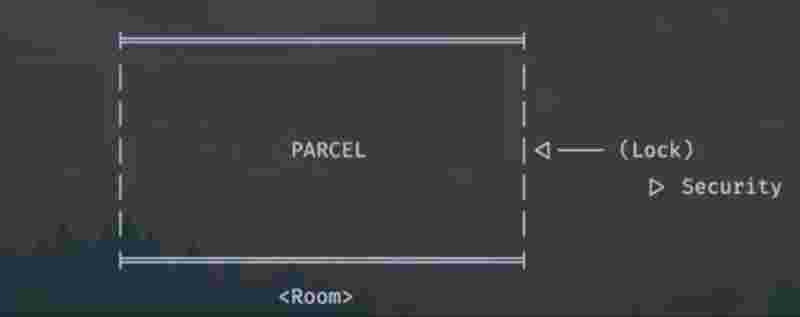
There is a parcel within the room and the room is locked, only the security has the lock, and the only way to get the parcel is to get the lock from the security.But here’s the catch, there is only one key to the lock, so only one person will be given the access, and others will have to wait.
This mechanism is such that only one person is given access to enter the room and get the parcel at a time. So, until the time anyone is inside the room, the room is treated as entirely frozen and locked and nobody else could access it. But as soon as the person comes out, the security notifies the waiting line that anyone can come now and access it until some other person enters the room and locks it.
When a thread completes it execution then it goes to the waiting state, but other threads which were in the waiting state till now, could now have a chance to get hold of the lock and begin their execution. And as soon as they are done with their execution, they could call notify. Notify is a message to all the threads that are at waiting state that now they could get the lock and work on their critical section.
Wait and notify are interruptable, that is why we have to throw an InterruptedException here as well.
Both the wait() and notify() methods are executed to the object that is holding the lock of a synchronized block. Without the synchronized block, there’ll be no lock to either give or take and perform wait and notify on it.
When the wait() method is called on the synchronized lock, what happens is that the thread holding the lock goes to the waiting state, and the block of execution of that thread holds there itself, and passes to the other thread where there may have another synchronized block with common lock object.
In such a case, when the lock object is encountered again in another thread, it executes normally, but as soon as it encounters the notify() method, it will notify the other thread that was in waiting state due to wait() method, that you can get back the access of the same lock as soon as I am done with my method execution.
So even after calling the notify() method, the synchronzied block will be execute entirely for the current thread, and as soon as the lock is released by the current thread, it wil be passed to the other thread at the waiting state, and the rest of the code will execute.
publicclassMain{
publicstaticfinal Object LOCK = new Object();
publicstaticvoidmain(String[] args) {
Thread t = new Thread(new Runnable() {
publicvoidrun() {
try {
one();
} catch (InterruptedException e) {
thrownew RuntimeException(e);
}
}
});
Thread t2 = new Thread(new Runnable() {
publicvoidrun() {
try {
two();
} catch (InterruptedException e) {
thrownew RuntimeException(e);
}
}
});
t.start();
t2.start();
}
publicstaticvoidone() throws InterruptedException {
synchronized (LOCK){
System.out.println("Thread one before wait()");
LOCK.wait();
System.out.println("Thread one after wait()");
}
}
publicstaticvoidtwo() throws InterruptedException {
synchronized (LOCK){
System.out.println("Thread two before notify()");
LOCK.notify();
System.out.println("Thread two after notify()");
}
}
}
Thread one before wait()
Thread two before notify()
Thread two after notify()
Thread one after wait()
There are other variants of wait() and notify() methods, one such is wait(long miliseconds) taking the time to wait as an parameneter, and notifyAll() to notify all the waiting threads, irrespective of whether the lock was same or not.
Producer Consumer Problem
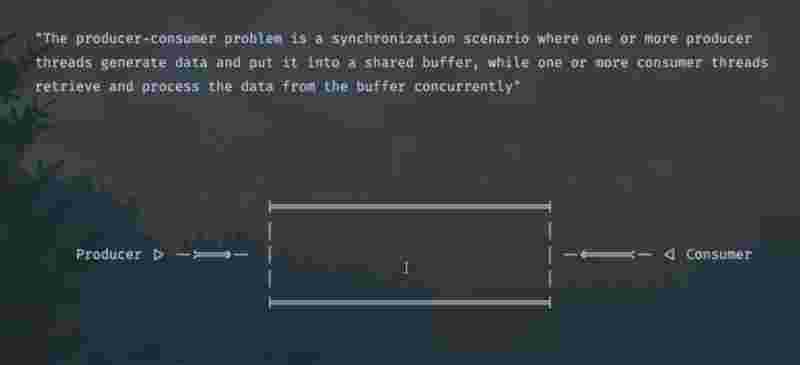
There is a container, where the producer is adding items onto it, and the consumer is removing items from it. Take a scenario, where both producer and consumer are trying to access the container at the same time. Here, we’ll implement the wait() and notify() methods to give access to only one person at a time.
Suppose when the producer was adding items, and the container got full, then it is obvious that the producer should hold on adding more, and pass the access to the consumer for removing the items. In the same way, consumer can only remove item upto the point where there are items in the container. As soon as all the items are removed, it cannot remove any longer, and the consumer should stop removing more, and pass on the access back to the producer. This way, the producer-consumer will pass on the access to each other infinitely.
In its implementation, we’ll see when the container is full at producer side, we’ll call the wait() method, and when the container is empty at the consumer side, we’ll call the wait() method. Otherwise, we’ll call the notify() method, because we know that the notify() method will only notify the other thread, when the current thread completes its execution and releases its lock, which will only happen once the wait() method has been called after notify() because the thread will go to the waiting state.
import java.util.ArrayList;
import java.util.List;
publicclassMain{
publicstaticvoidmain(String[] args) {
Worker work = new Worker(5, 0); // one shared container
Thread producer = new Thread(new Runnable() {
publicvoidrun() {
try {
work.producer();
} catch (InterruptedException e) {
thrownew RuntimeException(e);
}
}
});
Thread consumer = new Thread(new Runnable() {
publicvoidrun() {
try {
work.consumer();
} catch (InterruptedException e) {
thrownew RuntimeException(e);
}
}
});
producer.start();
consumer.start();
}
}
classWorker{
staticint s = 0;
publicstaticint top;
publicstaticint bottom;
publicstatic List<Integer> list;
publicstaticfinal Object LOCK = new Object();
Worker(int top, int bottom){
Worker.top = top;
Worker.bottom = bottom;
Worker.list = new ArrayList<Integer>();
}
publicvoidproducer() throws InterruptedException {
synchronized (LOCK){
while(true) {
if (list.size() == top) {
System.out.println("Container full... Passing from Producer to Consumer");
LOCK.wait();
} else {
System.out.println(s + " is added to container");
list.add(s++);
LOCK.notify();
}
Thread.sleep(1000);
}
}
}
publicvoidconsumer() throws InterruptedException {
synchronized (LOCK){
while(true) {
if (list.size() == bottom) {
System.out.println("Container empty... Passing from Consumer to Producer");
LOCK.wait();
} else {
System.out.println(--s + " is removed from container");
list.removeLast();
LOCK.notify();
}
Thread.sleep(1000);
}
}
}
}
0 is added to container
1 is added to container
2 is added to container
3 is added to container
4 is added to container
Container full... Passing from Producer to Consumer
4 is removed from container
3 is removed from container
2 is removed from container
1 is removed from container
0 is removed from container
Container empty... Passing from Consumer to Producer
0 is added to container
1 is added to container
2 is added to container
3 is added to container
4 is added to container
Container full... Passing from Producer to Consumer
Process finished with exit code 130 (interrupted by signal 2:SIGINT)
Executor Service
Suppose we want to create 1000 threads to handle 1000 different tasks simultaneously. In such a case, creating 1000 threads using for loops isn’t feasible enough, as the process of creating and destroying the threads again and again is a very expensive process and will put a lot of load on the cpu.
To handle such a case, we define a set of threads that are created by the exector service at the beginning of the program, so as typically what happens is instead of destroying these threads once we are done with them, what happens now is that, we reuse the same set of threads again and again.
This thread management by executor service effectively handles how thousands of multiple threads can be scaled up in any application without any issues or load on the cpu.
By making use of the executor service, we save time of the thread creation, and making thing smore efficient and manageable.
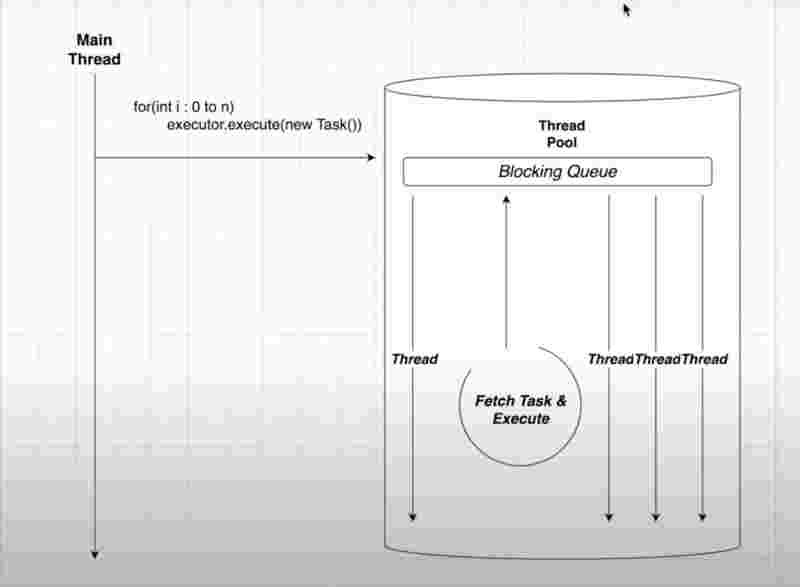
Internal Structure of Executor Service
When the executor service executes a task, it goes straight into the queue that implements the FIFO principle, one threads picks up the task from a bunch of threads that were already created in advance to execute that task in the queue, once the task is completed, the threads that are internally implemented in the executor service is reused again for some another task given to queue by calling the execute() method.
Single Thread Executor()
import java.util.concurrent.ExecutorService;
import java.util.concurrent.Executors;
publicclassMain{
publicstaticvoidmain(String[] args) {
try (ExecutorService service = Executors.newSingleThreadExecutor()) {
for (int i = 0; i < 5; i++){
service.execute(new A(i));
}
}
}
}
classAimplementsRunnable {
publicint s;
A(int s){
this.s = s;
}
publicvoidrun() {
System.out.println("Task " + s + " executed by " + Thread.currentThread().getName());
try{
Thread.sleep(500);
} catch (InterruptedException e){
thrownew RuntimeException();
}
}
}
Task 0 executed by pool-1-thread-1
Task 1 executed by pool-1-thread-1
Task 2 executed by pool-1-thread-1
Task 3 executed by pool-1-thread-1
Task 4 executed by pool-1-thread-1
Here in the above program, we used a single thread executor service, where the executor has a single thread, which it reuses again and again for executing multiple tasks one after another. As we can see in the above program, we have created the object of executors service, and initialized it with the constructor of a single thread executor, and then used the execute method to pass a class that implements the runnable interface. So what happens in the above program, is that only one thread among the pool is being used again and again as shown in the output as well.
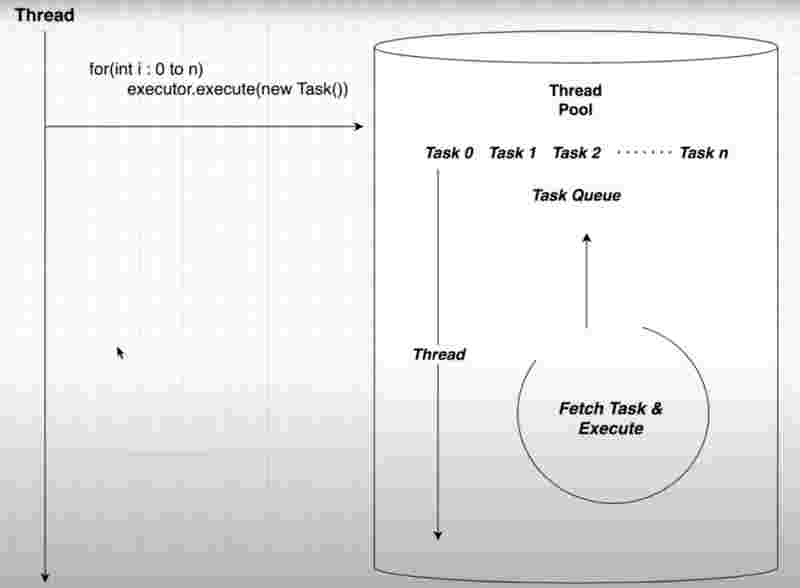
Internal Structure of Single Thread Pool
Since, there is one thread here, it is guaranteed that tasks will be executed sequentially. And only one thread will be reused again and again for multiple tasks added in the task queue.
Fixed Thread Pool()
import java.util.concurrent.ExecutorService;
import java.util.concurrent.Executors;
publicclassMain{
publicstaticvoidmain(String[] args) {
try (ExecutorService service = Executors.newFixedThreadPool(2) ){
for (int i = 0; i < 10; i++){
service.execute(new A(i));
}
}
}
}
classAimplementsRunnable {
publicint s;
A(int s){
this.s = s;
}
publicvoidrun() {
System.out.println("Task " + s + " executed by " + Thread.currentThread().getName());
try{
Thread.sleep(500);
} catch (InterruptedException e){
thrownew RuntimeException();
}
}
}
Task 0 executed by pool-1-thread-1
Task 1 executed by pool-1-thread-2
Task 2 executed by pool-1-thread-1
Task 3 executed by pool-1-thread-2
Task 5 executed by pool-1-thread-1
Task 4 executed by pool-1-thread-2
Task 6 executed by pool-1-thread-1
Task 7 executed by pool-1-thread-2
Task 8 executed by pool-1-thread-2
Task 9 executed by pool-1-thread-1
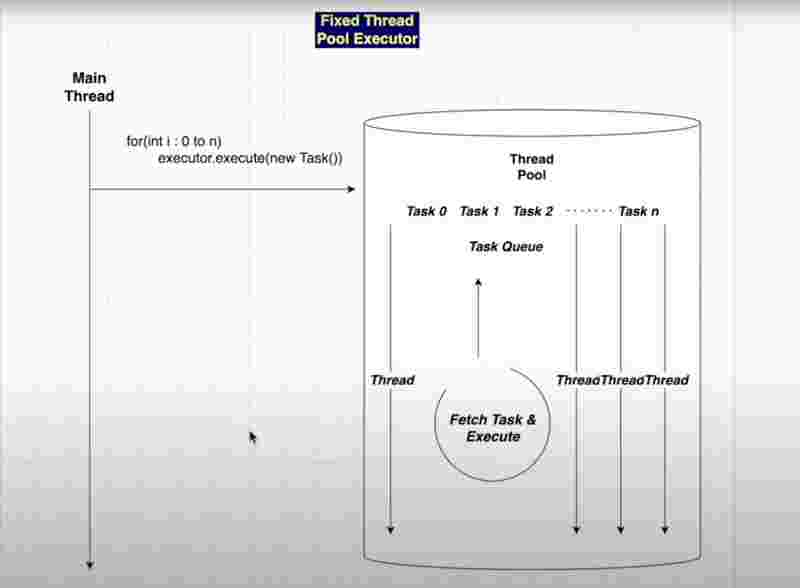
Internal Structure of Fixed Thread Pool
New Cached Thread Pool()
Unlike a fixed thread pool, we don’t give a value as the number of threads required, it itself internally manages how many threads it needs to manage the tasks on hand.
import java.util.concurrent.ExecutorService;
import java.util.concurrent.Executors;
publicclassMain{
publicstaticvoidmain(String[] args) {
try (ExecutorService service = Executors.newCachedThreadPool() ){
for (int i = 0; i < 10; i++){
service.execute(new A(i));
}
}
}
}
classAimplementsRunnable {
publicint s;
A(int s){
this.s = s;
}
publicvoidrun() {
System.out.println("Task " + s + " executed by " + Thread.currentThread().getName());
try{
Thread.sleep(500);
} catch (InterruptedException e){
thrownew RuntimeException();
}
}
}
Task 2 executed by pool-1-thread-3
Task 4 executed by pool-1-thread-5
Task 0 executed by pool-1-thread-1
Task 6 executed by pool-1-thread-7
Task 8 executed by pool-1-thread-9
Task 1 executed by pool-1-thread-2
Task 7 executed by pool-1-thread-8
Task 5 executed by pool-1-thread-6
Task 9 executed by pool-1-thread-10
Task 3 executed by pool-1-thread-4
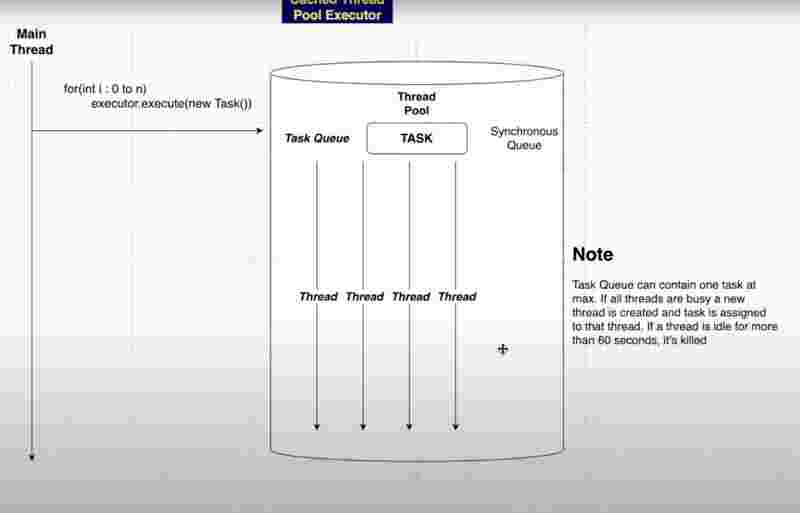
Internal Structrure of Cached Thread Pool
Cached Pool Executor has the potential to create thousands of threads as per requirement. But it not always creates a new thread for tasks, what it does is reuses the threads that are idle and are in resting state.
However, there may arise a situation when some n threads have been idle for more than 60 seconds and not reused at all, in such a case, they are automatically destroyed in the cached pool. That’s why the cached pool is like a cache memory.
Synchronous queue holds a single task at a time to assign it to a thread in the resting state. If there are no resting threads currently, it creates a new thread, else it reuses the exciting threads again and again.
Cached Thread pool is limited to the cpu and memory for the number of threads it can create, if the threshold limit is created, then the program will crash and the following such error will occur,
.
.
.
Task 2075 executed by pool-1-thread-2014
Task 2076 executed by pool-1-thread-2015
Task 2077 executed by pool-1-thread-2016
Task 2078 executed by pool-1-thread-2017
Task 2079 executed by pool-1-thread-2018
Task 2080 executed by pool-1-thread-2019
[0.172s][warning][os,thread] Failed to start thread "Unknown thread" - pthread_create failed (EAGAIN) for attributes: stacksize: 2048k, guardsize: 16k, detached.
[0.172s][warning][os,thread] Failed to start the native thread for java.lang.Thread "pool-1-thread-2020"
Exception in thread "main" java.lang.OutOfMemoryError: unable to create native thread: possibly out of memory or process/resource limits reached
at java.base/java.lang.Thread.start0(Native Method)
at java.base/java.lang.Thread.start(Thread.java:1545)
at java.base/java.lang.System$2.start(System.java:2669)
at java.base/jdk.internal.vm.SharedThreadContainer.start(SharedThreadContainer.java:152)
at java.base/java.util.concurrent.ThreadPoolExecutor.addWorker(ThreadPoolExecutor.java:953)
at java.base/java.util.concurrent.ThreadPoolExecutor.execute(ThreadPoolExecutor.java:1376)
at Main.main(Main.java:8)
Process finished with exit code 1
Scheduled Thread Pool Executor()
If we want a particular class to run again and again as a completely new thread instance, at same intervals of time, until a specific condition is met, that means we require something called as a schedule thread pool.
Here, the threads will be created and assigned the task based on the schedule you provide it.
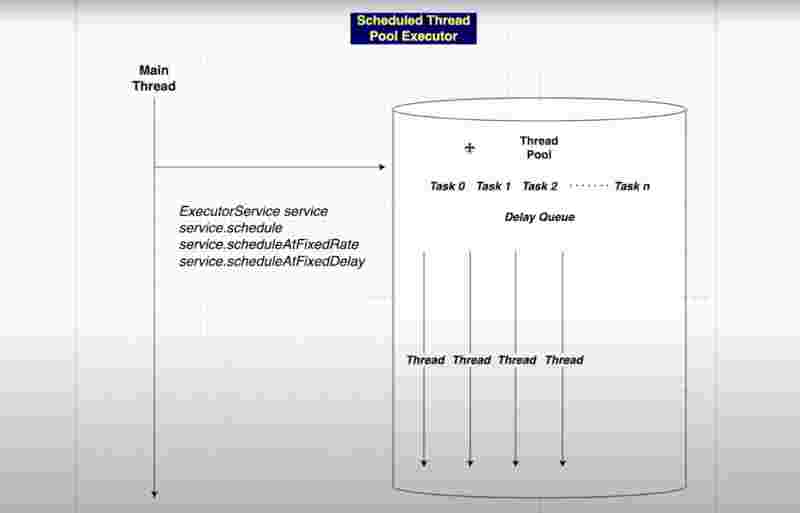
Internal Structure of Scheduled Thread Pool
In the program above, we take the object of the scheduledExecutorsService class, from where we call the newScheduleThreadPool() and give the number of threads as the parameter to its constructor. From its object, we call the scheduleAtFixedRate() method, which takes the runnable class, the first delay, and the interval delay, and the timeunit as parameters to understand the needs of the schedule.
This kind of schedule occurs infinitely, unless a base condition is met and we enforce it to shutdown.
import java.util.concurrent.Executors;
import java.util.concurrent.ScheduledExecutorService;
import java.util.concurrent.TimeUnit;
publicclassMain{
publicstaticvoidmain(String[] args) {
ScheduledExecutorService service = Executors.newScheduledThreadPool(1);
service.scheduleAtFixedRate(new A(), 1000, 1000, TimeUnit.MILLISECONDS);
}
}
classAimplementsRunnable{
publicstaticint t = 0;
publicvoidrun() {
System.out.println("Running schedule... " + t + "ms");
t += 1000;
}
}
Running schedule... 0ms
Running schedule... 1000ms
Running schedule... 2000ms
Running schedule... 3000ms
Running schedule... 4000ms
Running schedule... 5000ms
Running schedule... 6000ms
Process finished with exit code 130 (interrupted by signal 2:SIGINT)
Note: The above program runs infinitely unless it is stopped and interrupted manually.
import java.util.concurrent.Executors;
import java.util.concurrent.ScheduledExecutorService;
import java.util.concurrent.TimeUnit;
publicclassMain{
publicstaticvoidmain(String[] args) throws InterruptedException {
ScheduledExecutorService service = Executors.newScheduledThreadPool(1);
service.scheduleAtFixedRate(new A(), 0, 2000, TimeUnit.MILLISECONDS);
if(!service.awaitTermination(10000, TimeUnit.MILLISECONDS)){
service.shutdown();
}
}
}
classAimplementsRunnable{
publicstaticint t = 0;
publicvoidrun() {
System.out.println("Running schedule... " + t + "ms");
t += 2000;
}
}
Running schedule... 0ms
Running schedule... 2000ms
Running schedule... 4000ms
Running schedule... 6000ms
Running schedule... 8000ms
Running schedule... 10000ms
Process finished with exit code 0
Here, we have used the awaitTermination() method, which returns a boolean value after the specific time given in its parameters, that if the service is not terminated till now, it returns a false value, because the method says that it awaits for termination and checks whether the schedule is terminated or not.
When we check that the boolean value returned by the awaitTermination() is false after given milliseconds, then we called the shutdown() method, to completely shutdown the scheduled executor service.
Ideal Thread Pool Size?
If your task is CPU Intensive, it is good to assume that the ideal number of threads can be equal to the number of cpu cores in your machine, since each core handles one thread at a time. However, not all cores can be utilized for multi-threading purposes since some of them would be busy with internal os processes. However, this can be an assumed to be an ideal thread pool size.
However, creating large of threads, which are often much greater than the number of cores in a cpu degrades the performance, since those large number of threads will try to get their share of time in cpu through time slicing algorithm, but beyond a certain threshold, the expense of context switching overpowers the benefits that we were getting form it.
If your task is some IO operation, such as reading a file or some network operation, then such IO intensive tasks are generally fire and forget in nature. And waiting to get the resource in a background thread is much needed in such scenarios. However, even here, only a limited number of threads must be used as per requirement, otherwise the program will break.
Callable And Future
What if we want to return something from the thread execution. We don’t know how to do that. Runnable interfaces don’t allow us to have a run() method other than of void type, because that is how it is defined. However, in order to be able to return something from a thread. We have to implement callable interface.
Callable is another interface to implement threads, which however, also asks for defining a generic type <?> of the interface while defining the class which implements it, so that the default call() method is also able to return the same generic type value. Here, in the case of callable, the the call() method acts the same as the run() method from the runnable interface.
Now, the execute() method of the executor service does not take callable interface as its parameter. However, the submit() method of the executor service takes both runnable and callable interfaces as its parameters for executing the threads.
To fetch the value from the submit() method of the executor service, we need a future class, that also requires us to give generic type before using it, so that it gets to knwo what type of value it is going to store.
Future class is a placeholder for asynchronous execution, where the value being returned will be stored later, and can be get using the get() method on the future class instance. However, if the get() method is called before some thread returning any value, then this will cause issues.
Future is a placeholder and it’s empty till the process of the thread is completed. And that time taken to process your thread could be anything based on the implementation. Future is a blocking mechanism. It means that if you called the future.get() method and at this point of time, the thread process did not returned a value because it was not completed, then the main thread will be blocked from further execution till the thread returns the value.
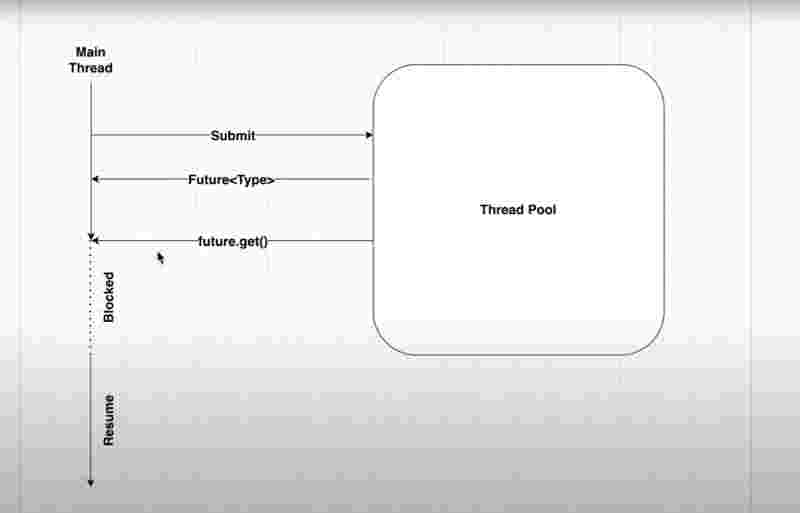
Internal Working of Callable and Future
Future has other methods such as cancel(boolean) where on giving true value will cancel the return value. And methods such as isCancelled() to check whether the future task is cancelled or not. Also isDone() method to check whether the thread has successfully executed or returned anything.
Future’s .get() method is also overridden that we can give it parameters such as get(time, time_unit) so that it throws some exception at the time given in the parameter if the value is not returned from the thread before that time. The reason for this is that, the get() method blocks the further execution of the code before receiving the returned value from the thread.
import java.util.concurrent.*;
publicclassMain {
publicstaticvoidmain(String[] args) throws ExecutionException, InterruptedException, TimeoutException {
try(ExecutorService executorService = Executors.newFixedThreadPool(2)) {
Future<Integer> result = executorService.submit(new ReturnValueTask());
System.out.println(result.get(6, TimeUnit.SECONDS));
System.out.println("Main thread execution completed!");
}
}
}
classReturnValueTaskimplementsCallable<Integer> {
public Integer call() throws Exception {
Thread.sleep(5000);
return12;
}
}
12
Main thread execution completed!
Process finished with exit code 0
Synchronized Collections In Java
Most of the collections in Java are not synchronized, leading to unexpected behaviour while using them concurrently. Java came up with 2 methods to overcome this, using Collections.synchronize() method or provided in-built concurrent collections.
Without using the Collections.synchronize() method, a collection will behave unexpectedly when it is being shared among multiple threads, but with the Collections.synchronize() method, a common lock will be acquired and used across all threads that are using it, which will give a consistent output always.
import java.util.ArrayList;
import java.util.List;
publicclassMain{
publicstaticvoidmain(String[] args) throws InterruptedException {
List<Integer> l = new ArrayList<Integer>();
Thread t = new Thread(() -> {
for (int i = 0; i < 10000; i++){
l.add(i);
}
});
Thread t2 = new Thread(() -> {
for (int i = 0; i < 10000; i++){
l.add(i);
}
});
t.start();
t2.start();
t.join();
t2.join();
System.out.println("List size: " + l.size());
}
}
List size: 15716
Process finished with exit code 0
The expected output was that list size should have been 20,000 before we implemented two threads each adding 10,000 items onto the list, but because the list was not synchronized, some steps of the thread one have been interrupted by the quick context switching of the thread two, and it lost some 5000 items.
To fix this issue, we’ll now use the Collections.synchronize() method for a consistent output.
import java.util.ArrayList;
import java.util.Collections;
import java.util.List;
publicclassMain{
publicstaticvoidmain(String[] args) throws InterruptedException {
List<Integer> l = Collections.synchronizedList(new ArrayList<Integer>());
Thread t = new Thread(() -> {
for (int i = 0; i < 10000; i++){
l.add(i);
}
});
Thread t2 = new Thread(() -> {
for (int i = 0; i < 10000; i++){
l.add(i);
}
});
t.start();
t2.start();
t.join();
t2.join();
System.out.println("List size: " + l.size());
}
}
List size: 20000
Process finished with exit code 0
However, there are some disadvantages of Collections.synchronized() method, one that it has a single lock mechanism, means multiple users cannot access a list at the same time, one thread will have the lock, and others will be waiting for it to release, this can cause reduced concurrency and performance overhead.
Also, it has limited functionally that we cannot add custom synchronization mechanisms to it.
CountDown Latch In Java
Suppose you are the teamlead of a project and you have delegated the tasks among 5 peers, now before moving ahead with the project, you’d want all the delegated tasks to be completed. You maintain a checklist, and once the checklist is empty, you move ahead.
Similarly, countdown latch helps ot coordinate multiple threads to meet at a certain point in order for the program to proceed further. It happens such that, once a thread completes it execution it decrements the countdown, and turn by turn the countdown decreases by other threads, and once the countdown reaches zero, that is a hit point, where the program proceeds further.
We’ll create a CountDown Latch Object and pass on its initial value as a parameter, then we’ll pass the same object as a parameter onto the constructor of new threads, which we’ll obviously call the countDown() method once they are done with their execution. The process where these countDwon latch object was actually created and these threads were started will be blacked from further execution on reading the await() method on the countDown latch object, and once the countDown reaches to zero, the block from the await() method will be released and further execution will occur normally.
However, countdown latch is also waiting from further execution using await() till all the threads call the countDown() method, and the waiting for other threads is kind of similar to the functionality of join() method. The difference between countdown latch and join() is that countdown latch is used to get coordination among multiple threads, whereas join() method is used to wait only for a single thread at a time. The join() method on the other hand is specifically used for thread syncrhonization is a single threaded context.
However, countdown latch is useful to coordinate multiple threads performing independent tasks before moving forward in your main thread execution. And in dynamic situations where the number of threads is not known at compile time, then we do not know how many join() methods to call, and thats where countdown latch shines.
However, countdown latch is a sureshot way to manage thread coordination so you cannot reset the countdown in-between the execution of the program.
import java.util.concurrent.CountDownLatch;
publicclassMain{
publicstaticvoidmain(String[] args) throws InterruptedException {
CountDownLatch c = new CountDownLatch(10);
Thread t = new Thread(new Runnable() {
publicvoidrun(){
for (int i = 0; i < 5; i++){
c.countDown();
System.out.println("Thread A c: " + c);
}
}
});
Thread t2 = new Thread(new Runnable() {
publicvoidrun(){
for(int i = 0; i < 5; i++) {
c.countDown();
System.out.println("Thread B c: " + c);
}
}
});
t.start();
t2.start();
c.await();
System.out.println("Countdown: " + c);
}
}
Thread B c: java.util.concurrent.CountDownLatch@56ffd813[Count = 8]
Thread B c: java.util.concurrent.CountDownLatch@56ffd813[Count = 7]
Thread B c: java.util.concurrent.CountDownLatch@56ffd813[Count = 6]
Thread B c: java.util.concurrent.CountDownLatch@56ffd813[Count = 5]
Thread A c: java.util.concurrent.CountDownLatch@56ffd813[Count = 8]
Thread A c: java.util.concurrent.CountDownLatch@56ffd813[Count = 3]
Thread A c: java.util.concurrent.CountDownLatch@56ffd813[Count = 2]
Thread A c: java.util.concurrent.CountDownLatch@56ffd813[Count = 1]
Thread A c: java.util.concurrent.CountDownLatch@56ffd813[Count = 0]
Thread B c: java.util.concurrent.CountDownLatch@56ffd813[Count = 4]
Countdown: java.util.concurrent.CountDownLatch@56ffd813[Count = 0]
Process finished with exit code 0
Blocking Queue In Java
If an thread tries to get an item from the queue which is currently empty,, that thread will be blocked and on hold until the queue receives an element from somewhere else. Similarly, if a thread tries to add item to a full queue, it will be blocked, untilspace is released from the queue from some other thread.
Blocking queue is a common parent interface in java which follows the FIFO principal for items. The 2 class that implements the blocking queue interface are, Blocking dequeue and TransferQueue.
Blocking dequeue blocks when reaching overflow or underflow, thereby addressing facilities for producers and consumers among a common container as we’d seen before in synchronization. A deqeue allows enqueue() and dequeue() from both ends, and it is fully thread-safe for concurrent operations.
TransferQueue is a special kind of queue in concurrent collections, which allows one thread to transfer an item directly to another waiting thread potentially avoiding the need for blocking. If there are no waiting threads, Transfer() method behaves like enqueue() operation and blocks until there is a space available for the item. TransferQueue ensures a strong hold coordination.
Suppose you are the producer pushing the items to the packaging manager. While the packaging manager is busy, the producer waits or blocks itself until the packaging manager is available to receive the items, then once it has received the items, the producer continues with its flow.
The major implementations of a BlockingQueue interface is, ArrayBlockingQueue, LinkedBlockingQueue, PriorityBlockingQueue, DelayQueue, SyncrhronousQueue, with operations such as offer() for enqueue, poll() for dequeue, also put() and take() as alias names, and peek() to see who’s at front.
import java.util.concurrent.ArrayBlockingQueue;
import java.util.concurrent.BlockingQueue;
publicclassMain{
publicstatic BlockingQueue<Integer> q = new ArrayBlockingQueue<Integer>(10);
publicstaticvoidmain(String[] args) {
Thread producer = new Thread(() -> {
for(int i = 0; i < 10; i++) {
try {
q.put(i);
System.out.println("Task produced: " + i);
} catch (InterruptedException e) {
thrownew RuntimeException(e);
}
}
});
Thread consumerOne = new Thread(() -> {
while(true){
try {
System.out.println("Task Consumed By ConsumerOne: " + q.take());
} catch (InterruptedException e) {
thrownew RuntimeException(e);
}
}
});
Thread consumerTwo = new Thread(() -> {
while(true){
try {
System.out.println("Task Consumed By ConsumerTwo: " + q.take());
} catch (InterruptedException e) {
thrownew RuntimeException(e);
}
}
});
producer.start();
consumerOne.start();
consumerTwo.start();
System.out.println("Main Thread ended");
}
}
Main Thread ended
Task Consumed By ConsumerOne: 0
Task produced: 0
Task produced: 1
Task produced: 2
Task produced: 3
Task produced: 4
Task produced: 5
Task produced: 6
Task produced: 7
Task produced: 8
Task produced: 9
Task Consumed By ConsumerOne: 2
Task Consumed By ConsumerTwo: 1
Task Consumed By ConsumerOne: 3
Task Consumed By ConsumerTwo: 4
Task Consumed By ConsumerOne: 5
Task Consumed By ConsumerOne: 7
Task Consumed By ConsumerTwo: 6
Task Consumed By ConsumerOne: 8
Task Consumed By ConsumerTwo: 9
Process finished with exit code 130 (interrupted by signal 2:SIGINT)
Concurrent Map
Concurrent Map is an common interface to implement hashing in a concurrent manner. Hashing is a way to store key-value pairs in memory. Here, the key-value pairs can be stored and accessed in a thread-safe environment. There are several implementations of Concurrent Map provided by Java, such as ConcurrentHashMap, ConcurrentSkipListMap, ConcurrenyLinkedHashMap, ConcurrentNavigableMap.
However, for most of the use cases, ConcurrentHashMap is preferred.
Internal working of the Concurrent Map
Inserting an element to Concurrent Map
- Hashing and Determining Segment: The Concurrent Map’s key is hashed to determine which segment it belongs to. And each segment acts like a hashmap within the larger concurrent hashmap.
- Acquiring Lock: Now, the lock by a thread is acquired on that segment, which ensures that only one thread at a time can modify that particular segment.
- Inserting in Segment: With the acquired lock, the new key-value pair is added by the thread to that segment’s internal array.
- Releasing Lock: After the Insertion, the lock is released and that segment is available for other threads to modify it.
Fetching an element from Concurrent Map
- Hashing and determining the segment: When trying to fetch the value of a key, it first hashes the key to determine which segment that key belongs to.
- Acquiring Lock: It then acquires the lock for that particular segment, so it does not interfere with any other thread at the same time.
- Searching in Segment: The thread then searches for value in that particular segment in a thread-safe environment.
- Releasing Lock: Once the value for that particular key is found, it releases the lock for other threads to get hold of that segment.
import java.util.Map;
import java.util.concurrent.ConcurrentHashMap;
publicclassMain {
privatestaticfinal Map<String, String> cache = new ConcurrentHashMap<>();
privatestatic String compute(String key) {
System.out.println(key + " not present in the cache, so going to compute!");
try {
Thread.sleep(500); // Simulating computation time
} catch (InterruptedException e) {
thrownew RuntimeException(e);
}
return"Value for " + key;
}
publicstatic String getCachedValue(String key) {
String value = cache.get(key);
// If not in the cache, compute and put it in the cache
if (value == null) {
value = compute(key);
cache.put(key, value);
}
return value;
}
publicstaticvoidmain(String[] args) {
for (int i = 0; i < 5; i++) {
finalint threadNum = i;
new Thread(() -> {
String key = "Key @ " + threadNum;
for (int j = 0; j < 2; j++) { // Fetch the same key 2 times
String value = getCachedValue(key);
System.out.println("Thread " + Thread.currentThread().getName() + ": Key=" + key + ", Value=" + value);
}
}).start();
}
}
}
Key @ 0 not present in the cache, so going to compute!
Key @ 4 not present in the cache, so going to compute!
Key @ 2 not present in the cache, so going to compute!
Key @ 1 not present in the cache, so going to compute!
Key @ 3 not present in the cache, so going to compute!
Thread Thread-4: Key=Key @ 4, Value=Value for Key @ 4
Thread Thread-2: Key=Key @ 2, Value=Value for Key @ 2
Thread Thread-2: Key=Key @ 2, Value=Value for Key @ 2
Thread Thread-3: Key=Key @ 3, Value=Value for Key @ 3
Thread Thread-3: Key=Key @ 3, Value=Value for Key @ 3
Thread Thread-0: Key=Key @ 0, Value=Value for Key @ 0
Thread Thread-1: Key=Key @ 1, Value=Value for Key @ 1
Thread Thread-4: Key=Key @ 4, Value=Value for Key @ 4
Thread Thread-0: Key=Key @ 0, Value=Value for Key @ 0
Thread Thread-1: Key=Key @ 1, Value=Value for Key @ 1
Process finished with exit code 0
Cyclic Barrier In Java
Suppose you called your friends to meet at a certain point. Now, you’d wait for all your friends to reach where you told them to reach before moving further in your journey. This is a situation demonstrating the cyclic barrier where you’d move forward only once all the threads meet at a certain point.
Under the hood, the cyclic barrier uses a counter and a condition to manage the waiting threads, where you create the cyclic barrier object and you specify the number of threads that must call the await() method before the barrier is broken, Each thread that calls the await() method decrements the internal counter of the cyclic barrier. If the cyclic barrier has not reached zero yet, the calling thread enters a waiting state.
When a specific number of threads have called the await() method, the same number we passed to the constructor of the cyclic barrier, then the barrier is stripped. When the internal counter of the cyclic barrier reaches zero, then the barrier is broken, and all the waiitng threads are released and they can proceed with their execution.
import java.util.concurrent.BrokenBarrierException;
import java.util.concurrent.CyclicBarrier;
publicclassMain{
publicstaticint abc = 0;
publicstatic CyclicBarrier c = new CyclicBarrier(3, () -> {
System.out.println("Barrier for thread " + ( abc - 2 ) + " " + ( abc - 1 ) + " " + abc + " is broken...");
});
publicstaticvoidmain(String[] args) throws InterruptedException {
for(int i = 0; i < 3; i++){
new Thread(() -> {
System.out.println("Thread " + ++abc + " Began...");
try {
c.await();
} catch (InterruptedException | BrokenBarrierException e) {
thrownew RuntimeException(e);
}
System.out.println("After breaking Barrier");
}).start();
}
}
}
Thread 2 Began...
Thread 3 Began...
Thread 1 Began...
Barrier for thread 123 is broken...
After breaking Barrier
After breaking Barrier
After breaking Barrier
Process finished with exit code 0
Exchanger In Java
Two threads can call exchange method on the exchanger object passing the object they want to exchange.
Exchanger are useful in scenarios where two threads need to synchronize and exchange data before proceeding with their respective tasks.
Exchanger is a standalone class of the concurrent package, and it does not implement any interface, nor dodes it extend any class. Also exchanger is not implemented by any other class in Java.
The exchange method called through the exchanger object performs a blocking exhcange operationl, and it waits until another thread arrives at the same exchange point, then it exchanges the current object in the current thread, with the other object in the other thread. It returns the new exchanged object.
The other exchange method overloads the base exchange method, and expects us to pass a timeout. If the other thread has not arrived at the exchange point within the specified timeout duration, a timeout exception is thrown.
import java.util.concurrent.Exchanger;
publicclassMain{
publicstaticvoidmain(String[] args) {
Exchanger<Integer> e = new Exchanger<>();
Thread t = new Thread(new A(10, e));
Thread t2 = new Thread(new B(20, e));
t.start();
t2.start();
}
}
classAimplementsRunnable{
Integer i;
Exchanger<Integer> e;
A(Integer i, Exchanger<Integer> e){
this.e = e;
this.i = i;
}
publicvoidrun(){
System.out.println("Thread A, before exchange: " + i);
try {
Integer x = e.exchange(i);
System.out.println("Thread A, after exchange: " + x);
} catch (InterruptedException ex) {
thrownew RuntimeException(ex);
}
}
}
classBimplementsRunnable{
Integer i;
Exchanger<Integer> e;
B(Integer i, Exchanger<Integer> e){
this.e = e;
this.i = i;
}
publicvoidrun(){
System.out.println("Thread B, before exchange: " + i);
try {
Thread.sleep(5000);
Integer x = e.exchange(i);
System.out.println("Thread B, after exchange: " + x);
} catch (InterruptedException ex) {
thrownew RuntimeException(ex);
}
}
}
Thread B, before exchange: 20
Thread A, before exchange: 10
Thread B, after exchange: 10
Thread A, after exchange: 20
Process finished with exit code 0
However, you can achieve similar implementation using a concurrent queue. But there are slight differences,
Exchanger performs a point to point communication between two threads, and it waits for each other to reach at the exchange point. The exchanger provides a simple and efficient mechanism to exchange data between two threads. It is completely synchronous and waits for each other at the exchange point. Both threads exchange data of the same data type, thus a symmetrical exchange.
The queue on the other hand is different form the exchanger in these parameters. Queues are useful for one to many communication. Queue can perform asynchronously. Producers can enqueue data without waiting for consumer and consumers can dequeue data without waiting for producers. Queues can act as Buffers, allowing producers to continue producing data even if consumers not immediately available to process it. In some cases, the exchange of data using queues may not be symmetric.
The exchanger class is very similar to a type of concurrent queue, called Synchronous Queue. Both can be used for exchanging the data synchronizally. However, while queue is unidirectional, the exchanger happens ot be bidirectional. On one hand, you’re sending some data, but you’re also receiving data from other thread at the sam etime, hence bidirectional.
Copy On Write Array
Suppose you want to write on a book, but you don’t want to disturb the readers. In such a scenario, we can use copy on write array, which will create the copy of the array before making any write operations on it, such that it does not cause any interruptions to the readers.
When you’ve multiple threads accessing and modifying data at the same time, it ensures that readers don’t get disturbed by writers and writers don’t interfere with each other making your program safer and more efficient.
How copyOnWriteArray Internally works?
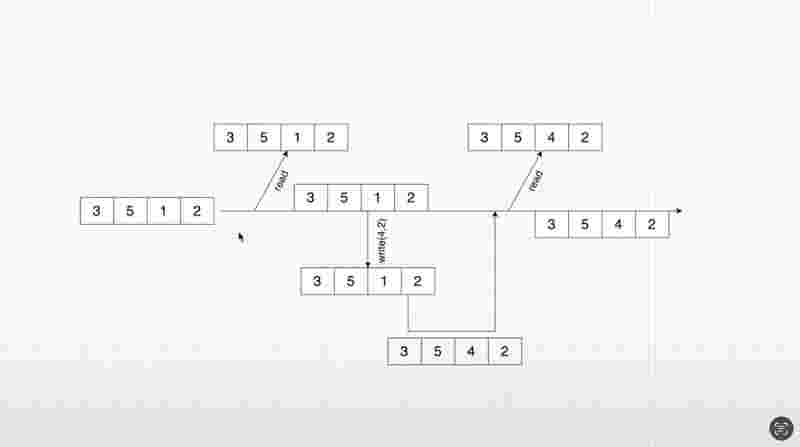
When a thread wants to read from the array, it creates a snapshot of the array and uses the same to read. If a thread wantrs to write, it also creates a snapshot fo the array and performs the write operation. Once the write operation is completed, the changed array is considered as the latest version of the array form which snapshots could be created for the read and write operations again.
This way, readers don’t see the changes until they get a new snapshot, it ensures that they always have a consistent view of the data. So we could loosely draw a balance between the approach and the way in which icopy on write array works.
It is just the same as git would allow parallel development by creating a new branch without any conflict, and it does so without interfering with each other’s branches. Just as git consolidated the changes on merging, similarly copy on write array eventually consolidates the modifications into a single reference version, and this verison ensures data consistency.
Internal Working of copyOnWriteArray
Whenever we’re reading from the array, we’re creating a snapshot. Whenever we’re writing to the array, we’re creating a snapshot, and after that write operation is complete, the same is merged back to the main line. And you could consider the main line as the master branch storing the reference to the array.
We want to avoid any change to the master branch whilw the read operation is being performed. That is that reason, we’re taking a snapshot to create a thread-safe environment.
import java.util.List;
import java.util.concurrent.CopyOnWriteArrayList;
publicclassMain{
publicstaticint adder = 0;
publicstaticvoidmain(String[] args) {
List<Integer> l = new CopyOnWriteArrayList<Integer>();
for (int i = 0; i < 5; i++) {
l.add(adder++);
} // l is [0,1,2,3,4]
Thread read = new Thread(() -> {
while(true){
try {
Thread.sleep(1000);
System.out.println("Read " + l);
} catch (InterruptedException e) {
thrownew RuntimeException(e);
}
}
});
Thread write = new Thread(() -> {
while (true) {
try {
Thread.sleep(1200);
l.add(adder++);
System.out.println("Write " + l);
} catch (InterruptedException e) {
thrownew RuntimeException(e);
}
}
});
read.start();
write.start();
}
}
Read [0, 1, 2, 3, 4]
Write [0, 1, 2, 3, 4, 5]
Read [0, 1, 2, 3, 4, 5]
Write [0, 1, 2, 3, 4, 5, 6]
Read [0, 1, 2, 3, 4, 5, 6]
Write [0, 1, 2, 3, 4, 5, 6, 7]
Read [0, 1, 2, 3, 4, 5, 6, 7]
Write [0, 1, 2, 3, 4, 5, 6, 7, 8]
Read [0, 1, 2, 3, 4, 5, 6, 7, 8]
Write [0, 1, 2, 3, 4, 5, 6, 7, 8, 9]
Read [0, 1, 2, 3, 4, 5, 6, 7, 8, 9]
Read [0, 1, 2, 3, 4, 5, 6, 7, 8, 9]
Write [0, 1, 2, 3, 4, 5, 6, 7, 8, 9, 10]
Read [0, 1, 2, 3, 4, 5, 6, 7, 8, 9, 10]
Write [0, 1, 2, 3, 4, 5, 6, 7, 8, 9, 10, 11]
Read [0, 1, 2, 3, 4, 5, 6, 7, 8, 9, 10, 11]
Process finished with exit code 130 (interrupted by signal 2:SIGINT)
Locks In Java
Imagine you have multiple threads running simultaneously in your program and all are trying to access the same resource. Without proper synchronization, it could laed to inconsistency in data and other chaotic situations,. That’s where locks come in handy, they provide a way to control access to shared resources ensuring that only one thread can access the rsource at a given point of time. Thus, it helps preventing data corruption and other concurrency issues.
Are they not very similar to synchronized blocks? Right. But there are differences.
When it comes to managing concurrent access to shared resources, two commonly used mechanisms are available. These are, synchronized blocks, and locks.
Synchronized blocks use the synchronized keyword to ensure that only thread execurtes a particular section of code at a given point of time. They provide intrinsic locking which means that the lock associated with the object is acquired and released automatically by the JVM.
Synchronized blocks are easy to use and require less boiler plate code compared to the locks. However, they have limitations, such as lack of flexibility and lock acquisition and inability to handle the interrupts. Locks provide more flexibility and control over synchronization.
Java lock interface and its implementations allow to manually acquire and release locks. Moreover, you could acquire and release the locks in any sequence and in any scope, which is not possible if you use a simple synchronized approach.
So, use synchronized blocks for simple syncrhonzation needs where flexibility and performance are not that critical. Use locks in much complex and customized scenarios where fine grained locking mechanisms are needed.
Lock Condition In Java
There is a need of interaction between threads and locks. A lock in Java can have its own set of rules. And these rules are called as conditions. A lock could have more than one condition associated with it . Conditions help us in controlling how threads interact with the lock.
Think of a situation where people are trying ot access some protected resource. The condition here is a waiting room attached to the lock. One person has acquired the lock. And the other person cannot enter the room unless it also acquires the lock. In the waiting room, people wait and someone sends the signal that it’s their turn to use the lock. This signal could come from the person that is currently holding the lock.
Once a signal is given, any person is allowed to acquire the lock next. These conditions helps in interaction between threads and locks.
Assume here in this case, a lock is itself a key. As soon as you have access to the lock, the door which is guarding the protected resource is also unlocked. As soon as you acquire the lock, you also get access to the resource. Note that only one person is allowed to access the resource.
Internal working of signal() method
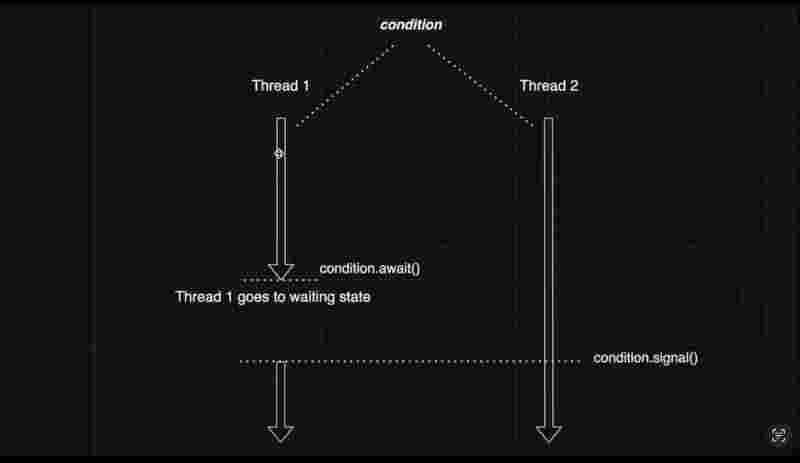
Thread one here is effectively waiting for a given condition to be fulfilled. Hence, thread one goes to a waiting state. When the thread two begins its operations, and the condition for the thread one is fulfilled. Thread two sends the signal to thread one that your condition is fulfilled, and you can proceed with your execution,
As soon as the signaling happens, JVM finds all the threads which are in the waiting sate and anticipating for this condition to be fulfilled and fulfills their condition so that those threads could proceed with their execution.
Internal working of signalAll() method
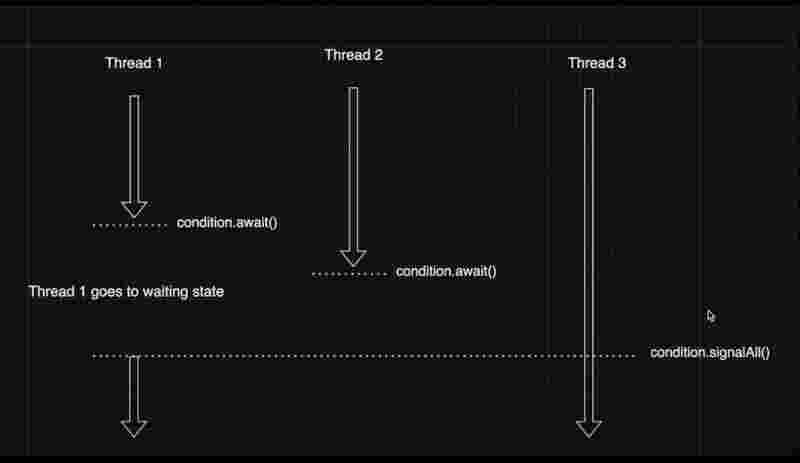
There is another method called signalAll(). As soonas the signalAll() method is invoked by a thread. All the other threads who were in the waiting state due to await() method are waked up by the JVM. JVM moves from the blocked state into the runnable state.
However, in this case, if signal() method is invoked instead of signalAll() method, only thread one would have been woken up from the sleep, since it has been waiting for the longest, so it is considered.
To implement lock conditions, we’d have a lock() method and a unlock() method on a common lock. However, a lock once locked must be unlocked in the end. Otherwise, all other threads will be infinitely be in rhe waiting state for this lock to be unlocked which never happened.
There can be some exception occurring in the code, during the execution after acquiring a lock, in either of the cases, whether exception occurs or not, put the unlock() method in the finally block, so that it always executes and releases its lock after execution.
Reentrant Lock
It allows a thread to acquire the same lock multiple times without causing any blocking. A thread which holds a lock can acquire it again without blocking itself, if the lock is reentrant.
In contrast, an attempt to acquire the lock again within the same thread without reducing it first typically results in blocking state, and could also potentially cause a dead lock situation if it’s not handled properly.
However, the given thread helds a count for how many times the lock has been acquired/. Since it indicates that the thread has released the lock the same number of times it has acquired it.
The reason we need such a implementation is that in complex scenarios, there may arise a need to invoke another method in the same thread which also needs to acquire a lock.
import java.util.concurrent.locks.ReentrantLock;
publicclassMain{
publicstaticvoidmain(String[] args) {
Thread one = new Thread(new Runnable() {
public ReentrantLock LOCK = new ReentrantLock();
publicstaticint e = 0;
publicvoidrun(){
A();
}
voidA(){
LOCK.lock();
System.out.println("Doing Task From A: " + ++e);
B();
LOCK.unlock();
System.out.println("A() Unlocked");
}
voidB(){
LOCK.lock();
System.out.println("Doing Task From B: " + --e);
LOCK.unlock();
System.out.println("B() Unlocked");
}
});
one.start();
}
}
Doing Task From A: 1
Doing Task From B: 0
B() Unlocked
A() Unlocked
Process finished with exit code 0
Lock Fairness
Reentrant Lock provides a constructor in which we can pass a boolean value for the fairness of the lock. When this value is true, its called a fiar lock. When its false, it’s called an unfair lock. By default, the reentrant locks are unfair due to better performance.
Imagine there are couple of threads which are trying to acquire a lock. Among all the threads which are competing for the lock, let’s say, thread one gets hold of the lock, and all the remaining threads go to waiting queue. After a certain time, thread one releases the lock by calling the unlock method. At that time, one of the locks in the waiting queue will get a chance to acquire the lock. Imagine that out of all the threads in the waiting queue, thread two has been waiting the longest for acquiring the lock. Then, if the reentrant lock is fair, thread two will get a chance to acquire the lock and do its processing. In the case of unfair reentrant locks, there is no deterministic guarantee as to which thread gets to acquire the lock. As a sweet side effect, the unfair locks could potentially provide a better performance as compared to the fair locks, because they avoid the overehad associated with maintaining the waiting queue and enforcing some sort of deterministic ordering.
Methods of Reentrant Lock
getHoldCount(): It returns an integer which is the number of times the current thread has successfully acquired the lock without releasing it.
tryLock(): It is an approach where we request a thread to try acquiring a lock. Result is a boolean which teels if a thread was successfully acquired or not. If the outcome is true, we can proceed with the processing, and if the outcome is false, we can do something else. We can know that if we have not acquired a lock, then we are not blocked, and we can do other processing as well.
There is also a overloaded tryLock() method with timeout, to request a thread for acquiring the lock as well as being blocked for the given time duration. If the lock is held by some other threasd, we hope that the lock becomes available during the waiting time period. If not, then the output of tryLock() is false, and we can do something else.
The disadvantage with tryLock() is that it does not give priority to the waiting threads, and itself tries to acquire the lock on priority even if its newly created, after the lock has been released.
isHeldByCurrentThread(): Returns a boolean whether the current thread holds the lock or not.
getQueueLength(): It tells the number of waitiing threrds.
newCondition(): It returns a condition on the given lock.
Read Write Lock
This type of lock is useful when the resource is predominantly read heavy rather than write heavy. It enforces that only write operation at a time in a multi-threaded environment, but allows multiple read operations anyway.
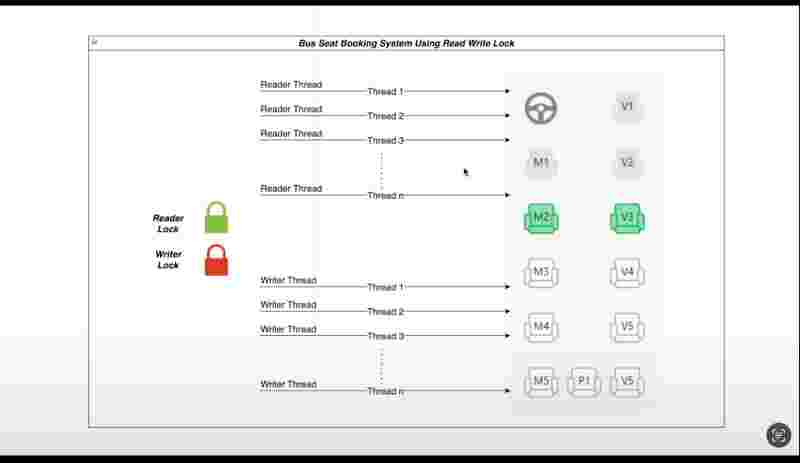
Imagine a scenario, where you enter a booking system , where you an either view the seats or book a particular seat. We have threads 1 to n for viewing, and similarly, thread 1 to n for booking as well.
All the threads that are reading the seats acquire a common shared lock, and when all reading threads are done reading, the lock is released. The reason is that reading does not create any concurrency problems, so we can club the threads together that wants to read only as one common lock.
When the read block is released, one of the write block could start do their processing.
In the read write lock, either one write block could get hold of a single lock, or multiple read blocks could together get hold a single lock at any given particular time.
Even though we have two different locks, reader lock and writer lock, only one lock can be acquired by a thread or multiple threads at a given point of time.
However, it could never happen that both the locks could be used at the same time ever.
Since reader threads are not mutating anything in the threads, they are safe to run together.
import java.util.concurrent.locks.ReadWriteLock;
import java.util.concurrent.locks.ReentrantReadWriteLock;
classSharedResource {
privateint counter = 0;
privatefinal ReadWriteLock lock = new ReentrantReadWriteLock();
publicvoidincrement() {
lock.writeLock().lock();
try {
counter++;
System.out.println(Thread.currentThread().getName() + " writes: " + counter);
} finally {
lock.writeLock().unlock();
}
}
publicvoidgetValue() {
lock.readLock().lock();
try {
System.out.println(Thread.currentThread().getName() + " reads: " + counter);
} finally {
lock.readLock().unlock();
}
}
}
publicclassMain {
publicstaticvoidmain(String[] args) {
SharedResource sharedResource = new SharedResource();
// Create multiple reader threads
for (int i = 0; i < 2; i++) {
Thread readerThread = new Thread(() -> {
for (int j = 0; j < 3; j++) {
sharedResource.getValue();
}
});
readerThread.setName("Reader Thread " + (i + 1));
readerThread.start();
}
// Create a writer thread
Thread writerThread = new Thread(() -> {
for (int i = 0; i < 5; i++) {
sharedResource.increment();
}
});
writerThread.setName("Writer Thread");
writerThread.start();
}
}
Reader Thread 2 reads: 0
Reader Thread 1 reads: 0
Writer Thread writes: 1
Writer Thread writes: 2
Writer Thread writes: 3
Writer Thread writes: 4
Writer Thread writes: 5
Reader Thread 2 reads: 5
Reader Thread 2 reads: 5
Reader Thread 1 reads: 5
Reader Thread 1 reads: 5
Process finished with exit code 0
Volatile Keyword
Assume you have a cpu with 8 cores in it, the cores itself has no memory and they receive the address of memory blocks from the registers, which are the fastest yet has the least size, then there are certain level of cache with intcreased size as the level increases. However, with that in note, the latency of cache ( the ability to the cache to respond quickly to the thread ) also decreases. Due to the difference in the latency, the shared cached at the later levels can cause some memory retrieval issues and would lead to a problem known as the visibility problem.
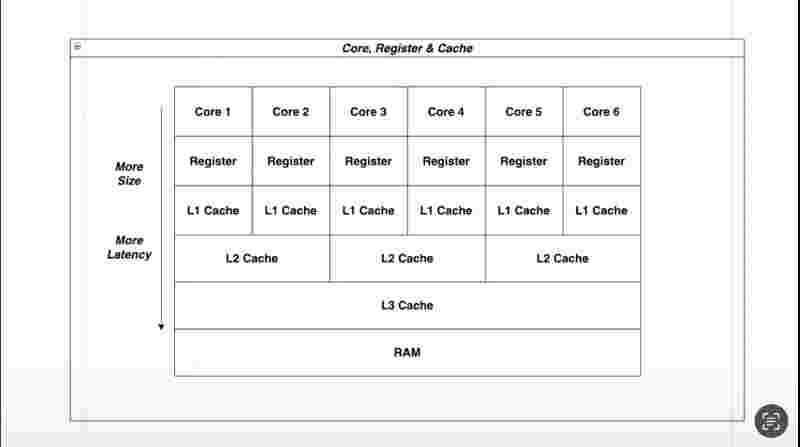
In the example below, assume that we have two threads, namely write and read thread performing their respective tasks. In such a scenario, both the threads are executing concurrently across different cores, and because every core has its own register, one register writes and the other does register does not updates its value, because the context switching is sometimes so fast, that it delays the time to update the values among the shared cache.
To solve such a major concurrency problem, we can use the volatile keyword with the variable count. What it does is that, it directly stores the value among the shared cache, and skips whatever is there in the register, and similarly, for the retrieval part, it directly fetches the value from the shared cache and skips the register.
However, this could only be useful at some places, but it also leads to slow down of the program, and its overuse would potentially lead to heavy slow down of the program and latency problems.
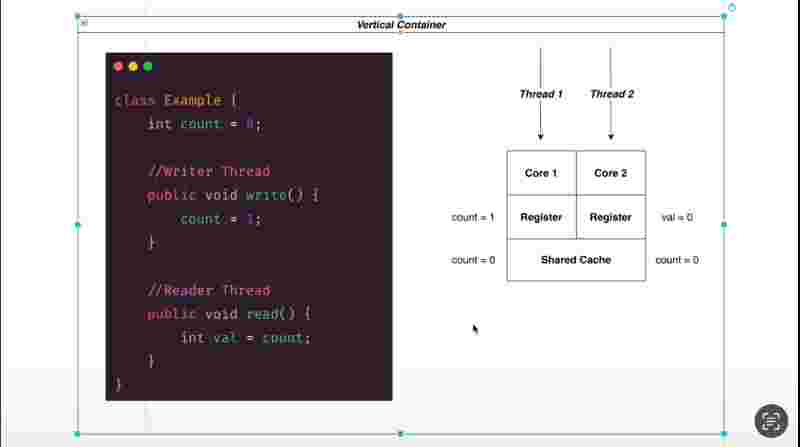
Deadlock
Here, both the threads require both the locks to be acquired in order for processing will be completed. Only after the processing has been completed, both the locks A and B will be released.
Imagine the scenario where thread one needs Lock B while it has already acquired Lock A. Likewise, thread two needs Lock A while it has already acquired Lock B. Since both the threads won’t be able to acquire the needed lock, because their need is being held by the other thread, and neither of the threads are in a situation to let go of their acquired lock, in such a situation, none of the threads could proceed with their execution, and this situation is called as a deadlock.
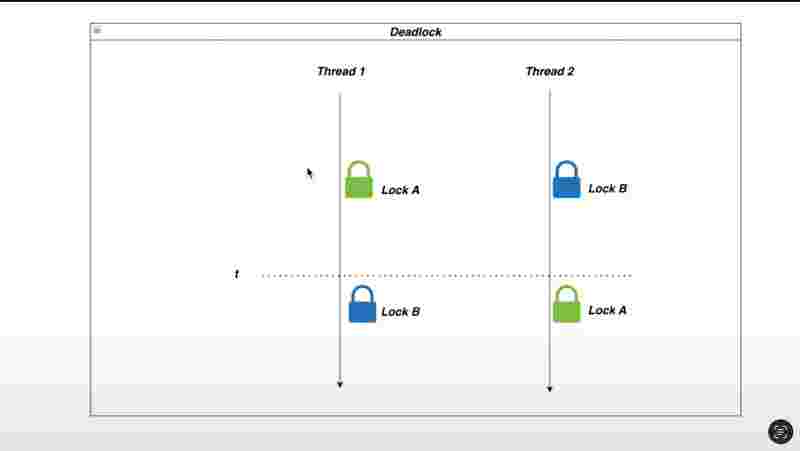
Formal definition of deadlock: In a multi-threaded context, a deadlock occurs when two or more threads are blocked forever each waiting for the other thread to release a resource they need to proceed. This situation creates a cycle of dependencies with no thread able to continue with its execution.
At compile time, it is nearly impossible to figure out a deadlock, this so due to multiple reasons, Java comes with different types of explicit and implicit locks, and also there could be multiple sources of threads in the code, due to these two factors combines with the fact that the thread execution and CPU location is not deterministic, it’s nearly impossible to figure out a deadlock at compile time.
import java.util.concurrent.locks.Lock;
import java.util.concurrent.locks.ReentrantLock;
publicclassMain {
privatefinal Lock lockA = new ReentrantLock(true);
privatefinal Lock lockB = new ReentrantLock(true);
publicvoidworkerOne() {
lockA.lock();
System.out.println("Worker One acquired lockA");
try {
Thread.sleep(200);
} catch (InterruptedException e) {
thrownew RuntimeException(e);
}
lockB.lock();
System.out.println("Worker One acquired LockB");
lockA.unlock();
lockB.unlock();
}
publicvoidworkerTwo() {
lockB.lock();
System.out.println("Worker Two acquired lockB");
try {
Thread.sleep(200);
} catch (InterruptedException e) {
thrownew RuntimeException(e);
}
lockA.lock();
System.out.println("Worker Two acquired LockA");
lockB.unlock();
lockA.unlock();
}
publicstaticvoidmain(String[] args) {
Main deadlock = new Main();
new Thread(deadlock::workerOne, "Worker One").start();
new Thread(deadlock::workerTwo, "Worker Two").start();
}
}
Worker One acquired lockA
Worker Two acquired lockB
Process finished with exit code 130 (interrupted by signal 2:SIGINT)
Ways to find deadlock
Full Thread Dump
Manually, it’s very hard to figure out a deadlock in a complex program. Through the programming approach, one way to find a deadlock is by using Full Thread Dump. What we do is while the progarm is running, we find the process ID, and we kill it with hyphen 3, then it will give you a full thread dump with the output whether a deadlock is found or not.
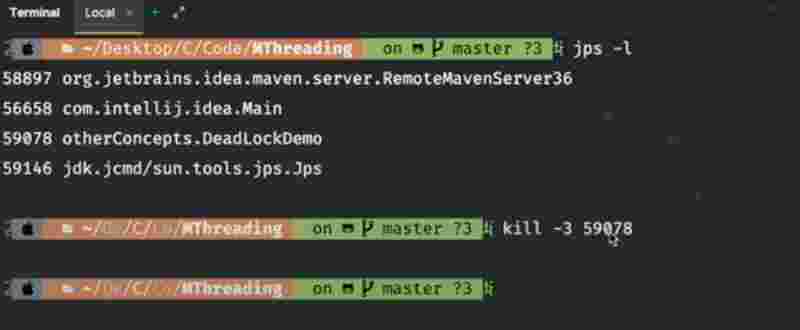
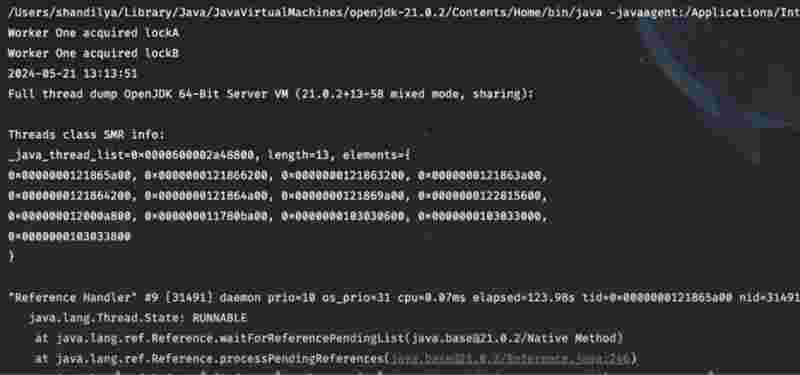
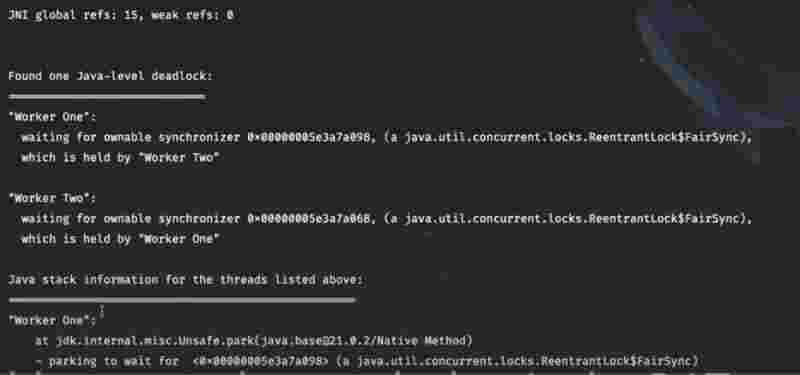
ThreadMXBean Class
This is another method to detech a deadlock from the program itself.
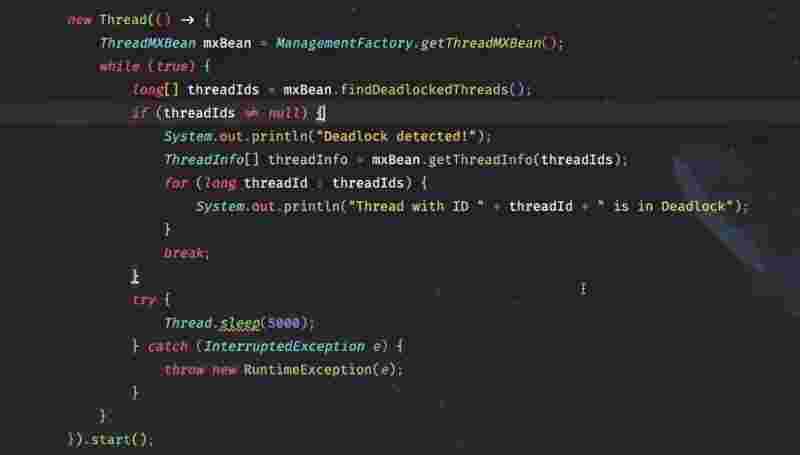
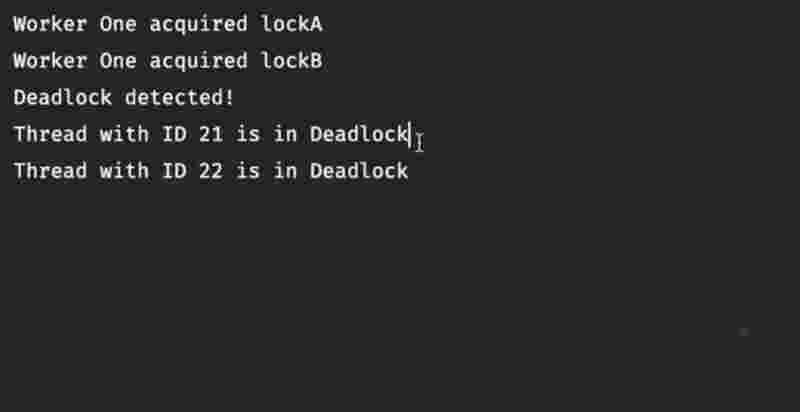
Ways to avoid deadlock
There are certainly ways to avoid deadlock. One way is to use timeouts whenever necessary. This way, if any thread is in the waiting state for a much longer time, it will wake up after the given time period.
Another way is the global ordering of locks, which means that the locks should be acquired in the same order irrespective of whatever method or thread those locks are being applied to. Suppose all in scenarios, thread A is always locked first and then thread B, then deadlock can potentially be avoided.
Another way could be to avoid unnecessary nesting of locks, and use one lock per thread. This way, deadlock can be prevented as that situation arises when there are more than one lock acquiring in a thread.
The last way is to use thread safe alternatives, such as concurrent collections rather than custom implementations, which are specifically designed to handle these scenarios, where problems like deadlock never occurs.
Semaphore
Ther term semaphore comes from signaling devices used in railway and maritime contexts to control traffic. In programming, it similarly signals and controls access to shared resources among concurrent processes.
Imagine a situation where we are building a application which needs to connect to a third party service. Due to some constraints, the third party service could be accessed only by a limited number of threads at a given time. So, here only three concurrent calls would be allowed. So when we need some king of restrictions among concurrent calls, we can make use of the semaphor to implement such restrictions. So even if our applications implements 50 threads or more, the semaphore is going to allow only 3 threads at a given point of time.
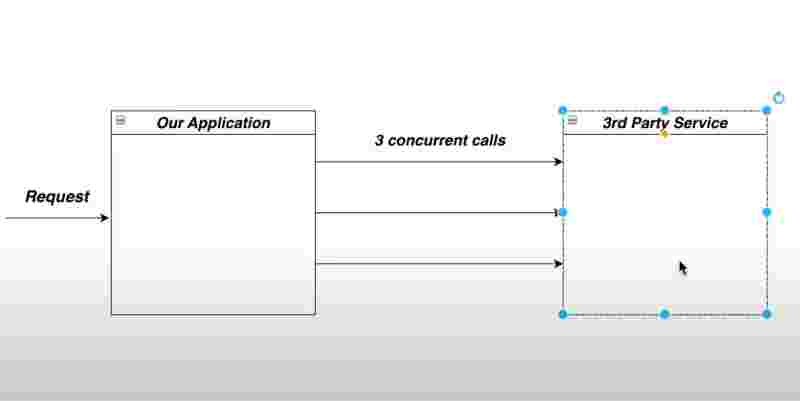
Connecting your application with third party service
Semaphore is nothing but a permit mechanism. For example, here semaphore has 3 permits so it is going to allow three threads to be run concurrently on the third party. When a thread wants to execute, semaphore will check whether it has any permit left or not, and if some permit is still there, it will be given to the thread that was asking for it.
Permit is like a token and once acquired, the thread is going to do its processing. The acquire() method is used for requesting the permit by a thread. At a given instant, here we have three permits available.
Once a permit is given, it’s no longer in the semaphore. And like this, only 3 threads could be given permit as there are only 3 permits in this given semaphore. Hence, thread 1 2 3 will get the permit and will run on the third party application.
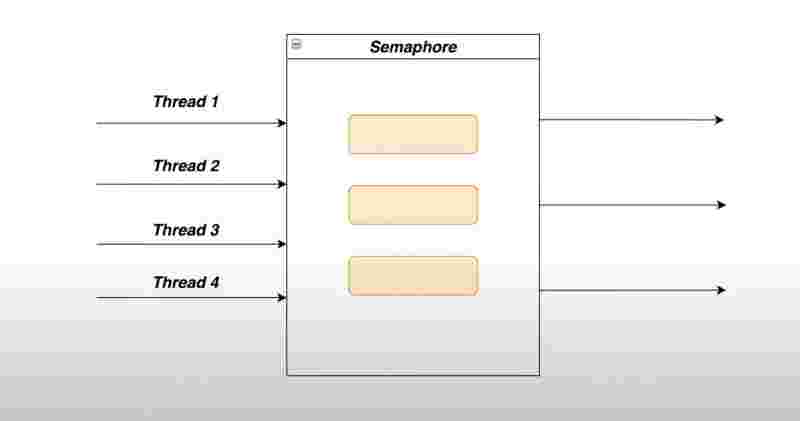
Internal structure of Semaphore (With all permits available)
Now, imagine thread 4 comes to the semaphore asking for the permit, but semaphore has no permit as of now, so it requests thread 4 to wait, and due to this, thread 4 gets blocked when it has called the acquire() method.
When in future, thread one is done with its execution, the permit will be given back to the semaphore, and as soon as the permit has been given back to the semaphore, the thread 4 which was waiting for a permit, will acquire it and proceed with its execution.
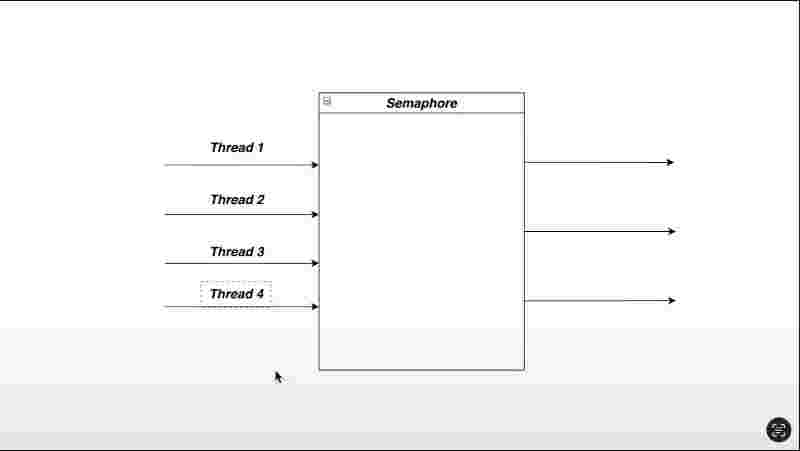
Internal structure of Semaphore (With all permits acquired by threads)
import java.util.concurrent.ExecutorService;
import java.util.concurrent.Executors;
import java.util.concurrent.Semaphore;
publicclassMain{
publicstaticvoidmain(String[] args) {
SemaphoreInstance semaphoreService = new SemaphoreInstance();
try (ExecutorService service = Executors.newCachedThreadPool()) {
for (int i = 0; i < 9; i++) {
service.execute(new Runnable() {
publicvoidrun() {
try {
semaphoreService.scrape();
} catch (InterruptedException e) {
thrownew RuntimeException(e);
}
}
});
}
}
}
}
classSemaphoreInstance {
publicstatic Semaphore sema = new Semaphore(3);
publicstaticvoidscrape() throws InterruptedException {
sema.acquire();
System.out.println("Sema Acquired... " + Thread.currentThread().getName());
Thread.sleep(2000);
sema.release();
System.out.println("After 2s...");
}
}
Sema Acquired... pool-1-thread-3
Sema Acquired... pool-1-thread-2
Sema Acquired... pool-1-thread-1
After 2s...
After 2s...
After 2s...
Sema Acquired... pool-1-thread-4
Sema Acquired... pool-1-thread-5
Sema Acquired... pool-1-thread-6
After 2s...
After 2s...
After 2s...
Sema Acquired... pool-1-thread-8
Sema Acquired... pool-1-thread-7
Sema Acquired... pool-1-thread-9
After 2s...
After 2s...
After 2s...
Process finished with exit code 0
We could also have multiple permits taken by a single thread, sa the acquire() method is overloaded with a parameter taking the number of permits to grant the thread for acquiring. Similarly, the release() method is also overloaded with a parameter taking the number of permits to release while releasing the thread. However, we should make sure that the number of permits is equal to the number of threads.
Some other semaphore methods are, tryAcquire() which does not blocks the thread if it could not acquire any permits, and tryAcquire(timeout) is similar but it has a timeout to wait till there is a possibility of acquiring any permit otherwise we could do something else. We also have a method availablePermits() which as the name suggests, returns the number of permits. new Semaphore(count, fairness) is the overloaded constructor which also accepts the fairness as true or false, and when its true, it only permits the lock to the thread that has been waiting the longest and not otherwise.
Mutex
Mutex is a shot form of the word, mutual exclusion. It is synchronization mechanism used to control access to a shared resource in a multi-threaded environment. The primary purpose of a mutex is to ensure that only one trade can access a critical section or shared resource at any given time. It prevents rise conditions and ensures data consistency.
Mutex is nothing but a fancy term for syncrhonization blocks and locks. Any sort of mutual exclusion comes under the mutex. It means that only one thread can access a critical section at given point of time.
In Java, this concept is realized through synchronized blocks and lock interface.
Fork Join Framework
In a fork join pool, the tasks are divided into subtasks to be executed parallely and the outcome is given back the caller. It’s a parallelized implementation of divide and conquer.
It is designed to take advantage of multi-core processors by dividing tasks into smaller subtasks, executing them in parallel and then combining their results together. It however, is very similar to the executor service which we learned earlier.
However, the fork join framework is different from the executor service in some aspects, such as the subtask creation. And the fork join framework can create subtasks which is not the case with the executor service. Consider this as the standard divide and conquer approach which is not the case with the executor service.
The fork join framework is different from the executor service in two aspects, first is the task producing subtasks. And the other is the per thread queueing and work stealing.
Like in the executor service, where there is a shared task queue, the fork join queue has a dedicated task queue. There is also a mechanism of load balancing, where a thread could pick task from the other queue. This approach is called as work stealing.
Some of the uses of fork join framework are, utilisation of multi core processors, simplified parallelism and efficient work stealing algorithms ( where ideal worker threads steal tasks from the busy threads ). Efficient work stealing algorithm ensures that all the threads remain productive and improve the overall performance.
Fork Join Framework has a certain pattern to it which helps in efficient load balancing. For example, sorting a large dataset, performing operations on large matrices, processing large collections of data in parallel fashion.
Forking in the fork join framework is the process of breaking down large tasks into smaller independent subtasks which can be executed concurrently. This is achieved by using the fork() method.
Joining in the fork join framework is the process of waiting for the completion of a fork task and combining its results, which is done using the join() method.
RecursiveTask is an abstract class which is used for the task which returns a result. It is parameterized which means that the type is the type of result which is produced and returned by the task. So, whenever there is a need to compute a result and return it after completing the task, the recursivetask class should be used. It is somewhat similar to the callable interface.
RecursiveAction is used for the tasks that don’t return any result. And it does not accepts any types. When a task performs operations which does not need to return a value or a result, then we use recursiveaction. We can imagine this to be somewhat similar to a runnable interface.
import java.util.concurrent.ForkJoinPool;
import java.util.concurrent.RecursiveAction;
classWorkLoadSplitterextendsRecursiveAction {
privatefinallong workLoad;
publicWorkLoadSplitter(long workLoad) {
this.workLoad = workLoad;
}
protectedvoidcompute() {
if (this.workLoad > 16) {
System.out.println("Work Load too big, thus splitting : " + this.workLoad);
long firstWorkLoad = this.workLoad/2;
long secondWorkLoad = this.workLoad - firstWorkLoad;
WorkLoadSplitter firstSplit = new WorkLoadSplitter(firstWorkLoad);
WorkLoadSplitter secondSplit = new WorkLoadSplitter(secondWorkLoad);
firstSplit.fork();
secondSplit.fork();
} else {
System.out.println("Work Load within limits! Task being executed for workload : " + this.workLoad);
}
}
}
publicclassMain {
publicstaticvoidmain(String[] args) {
try (ForkJoinPool pool = new ForkJoinPool(Runtime.getRuntime().availableProcessors())) {
WorkLoadSplitter splitter = new WorkLoadSplitter(128);
pool.invoke(splitter);
}
}
}
Work Load too big, thus splitting : 128
Work Load too big, thus splitting : 64
Work Load too big, thus splitting : 32
Work Load too big, thus splitting : 32
Work Load too big, thus splitting : 64
Work Load too big, thus splitting : 32
Work Load within limits! Task being executed for workload : 16
Work Load too big, thus splitting : 32
Work Load within limits! Task being executed for workload : 16
Work Load within limits! Task being executed for workload : 16
Work Load within limits! Task being executed for workload : 16
Work Load within limits! Task being executed for workload : 16
Work Load within limits! Task being executed for workload : 16
Work Load within limits! Task being executed for workload : 16
Work Load within limits! Task being executed for workload : 16
Process finished with exit code 0
💬 Comments will load when you scroll here