
SYSTEM DESIGN
SYLLABUS
How To Approach A System Design Interview In 4 Steps: Understand The Problem And Establish Design Scope, Propose High Level Design And Get Agreement, Design Deep Dive, Wrapping Up.
System Design Basics: Single Server Setup, Database And Multiple Servers, Types Of Scaling, Load Balancers, Database Replication, Caching, Content Delivery Network (CDN), Stateless And Statefull Web Arch, Data Centers, Message Queue, Logging, Metrics, Automation, Database Scaling, Sharding And Justin Bieber Problem
Estimate System Capacity: Back Of The Envelope Estimation, Estimate Twitter’s QPS And Storage Requirements
Design News Feed System: An Overview To Approach System Design Interviews, High Level Design Deep Dive And Diagram
Design A Rate Limiter In Distributed Environments: Token Bucket Algorithm, Leaking Bucket Algorithm, Fixed Window Counter Algorithm, Sliding Window Log Algorithm, Performance Optimizations And Monitoring
Consistent Hashing: Adding And Removing A Server, Virtual Nodes, Adding and Removing A Server In Virtual Nodes
Design A Key-Value Store In Distributed Environments: CAP Theorem, Data Replication, Tunable Consistency, Vector Clocks, Gossip Protocol, Merkle Tree, System Architecture, Read Path And Write Path
Design A Unique ID Generator In Distributed Systems: Multi Master Replication, UUIDs, Ticket Server, Twitter Snowflake Approach
Design A URL Shortner: Code 301 And 302, URL Shortening Flows, Data Model, Hash Function, Hash + Collision Resolution, Base 62 Conversion, URL Shortening, URL Redirection
Design A Web Crawler: DFS Vs BFS, URL Frontier, Politeness, Priortizer, Freshness, HTML Downloader, Robustness, Extensibility, Detect And Avoid Problematic Content
This Page Has Been Intentionally Left Blank
RED FLAGS AND MYTHS
Why system design interviews often feel intimidating, and hectic? They'll ask you to design a well known product, like design instagram, design twitter.
Can you imagine? The design that was built with the help of thousands of engineers. How will you be able to build it all by yourself, that also in one hour? Not fair.
But the good news is, they never expect you to design a perfect real world system in just one hour. Because in real world, system design is even more complicated.
For example, Google search is deceptively simple. But the amount of technology under it is astonishing, and very complex from inside.
If no one expects us to design in an hour, then what is the purpose of system design interviews?
They simulates a real-life probem scenario. in this scenario, two co-workers are working together, and collaborating with each other on an ambiguous probem and coming up with solutions.
The problem scenario is often an open ended problem, and has no perfect solution. It is open to discussions. The process and effort matters much more than the final result.
It is the perfect time to demonstrate your design skills, defend your design choices, and respond to feedbacks. They actually want to accurately assess your abilities.
MYTH: System design interviews is all about your technical design skills.
System design interviews gives a strong signal about your ability to: collaborate and work under pressure, resolve ambiguity, and also ask good questions.
These abilities are more important than just techincal design skills and building the perfect system design which no one expected you to build anyway.
RED FLAG: Overengineering is a problem. Too much design purituy. We forget the tradeoffs of overengineering. Please don't ignore the compounding costs of over engineered systems.
Also, a gentle advice, to not have narrow mindedness and stubborness. If they point out your design as wrong, discuss with them polietly and explain them how it can be right, and have the ability to accept if it was actually wrong.
HOW TO APPROACH
A SYSTEM DESIGN INTERVIEW
( IN 4 STEPS )
STEP 1:
Understand The Problem
And Establish Design Scope
Ask good questions (most important skill) and don't jump to answers without clear understanding of requirements. If you jump directly to conclusion without any thought, then it is a red flag for you, and your interview is gone. Always clarify requirements and assumptions
What kind of questions to ask?
Somehow you have to know the requirements
What specific features to build?
What is company's technology stack?
How many users do the product have?
How fast, company anticipate to scale up?
Remember,
System design interviews is all about discussions
STEP 2:
Propose High Level Design
And Get Agreement
Create a high level design and reach an agreement with interviewer. It'll generally contain box diagrams showing clients (web/mobile), apis, web servers, database, cache, cdn, message queues etc. Remember, we have learned all these before.
Ask if "Back of the envelope" is required. If yes, then do the calculations to evaluate if your blue print fits the scale constraints.
STEP 3:
Design Deep Dive
By this time, following should have already been achieved.
Overall goals and scope - agreed
Feedback on high-level design
High level blue print
What area to focus on? (based on interview feedback)
May focus on:
High level design (HLD),
Back of the envelope estimation
Most of the times: Any particular component
Example:
1. URL Shortner : Hashing
2. Chat System : Reduce latency
We don't have to exaggerate unnecessary component details, as it'll not help you to show your talent in the interview.
STEP 4:
WRAPPING UP
Interviewer might ask follow up questions:
Improvements / System Bottlenecks: What improvements do you see in your design? What else you could have done?
" Never say, your design is perfect. "
Recap of your design:
How do you monitor metrics / logs?
Error cases (network loss, server failure)
Next scale curve: 1 million to 10 million [ Common ]
SYSTEM DESIGN INTERVIEW
DO's AND DONT's
Do's: Always ask for clarification, understand requirements, communicate, talk out your thoughts, multiple approaches (if possible), agreement -> detail each component -> most critical ones first, and don't give up :)
Dont's: Always be prepared with the basics throughly, they'll easily figure out how much knowledge you actually have, and don't directly jump into solutions, too much details are unnecesary, not asking for hints (you should be asking for hints), not asking feedbacks early and often (when designing step by step you should be taking feedback from interviewer).
SYSEM DESIGN INTERVIEW TIME
Step 1: Understand problem + establish design scope
(3 - 10 minutes)
Step 2: Propose high level design + agreement
(10 - 15 minutes)
Step 3: Design deep dive
(10 - 25 minutes)
Step 4: Wrap
(3 - 5 minutes)
This Page Has Been Intentionally Left Blank
SYSTEM DESIGN BASICS
We don't know many terms such as load balancers, dns and that becomes difficult to learn each and everything. Let's handle the basics first, and make it super easy.
SINGLE SERVER SETUP
First, we'll build a single server and a single user relaton. And then we'll scale it up, from single user to billions of user.
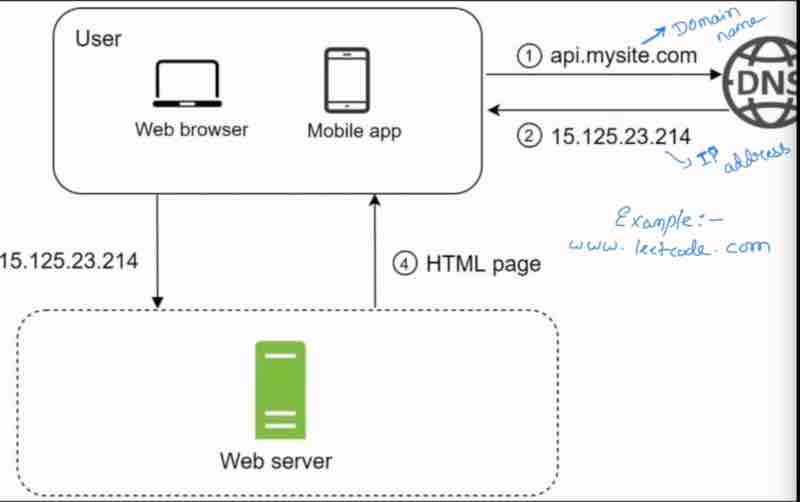
To understand this, we've to understand what domain name and ip address means.
Domain name is just your website name in english, which is easy to remember, but servers doesn't understand this, it needs a IP address..
The domain name we have is converted to IP address for the server. So, who does the conversion? DNS (Domain Name System).
So, the first step is request goes from client side to DNS, and dns gives back the IP address, and then from the IP address, we send the request to the web server, and then the website sends the response page as html.
Let us understand Traffic. Suppose, we're at a restaurent, and there is chair only for one customer. But the traffic soon becomes high as the restaurent goes popular, and more customers start coming up.
So, traffic is number of requests coming up, and requesting a server. But where does the traffic comes from?
Web applications, and mobile applications.
Web apps have two sides of a coin, server side languages and client side languages.
Mobile apps talk through http protocols with server using api response through json format.
Json is a simple key value stored format. For example,
GET /user/
{
"Name" : "Iron Man"
"Movie" : "Infinity War"
"Age" : "50"
}
But for the growth of users, our 1 server is not enoguh. We really need more servers. For millions of users, we need servers.
So, how do we scale them up our servers? How do we design it in that way efficiently so that it could handle more requests easily?
DATABASE AND MULTIPLE SERVERS
So, we were using the same server for the database handling and the traffic as well. But now, we'll have a separate server for traffic, and a separate server for database.
What happens that we can independently, scale both easily.
So, we can easily handle it, by having the web server handle the requests to the database, sending read/write requests, and returning back the data to send back to the user.
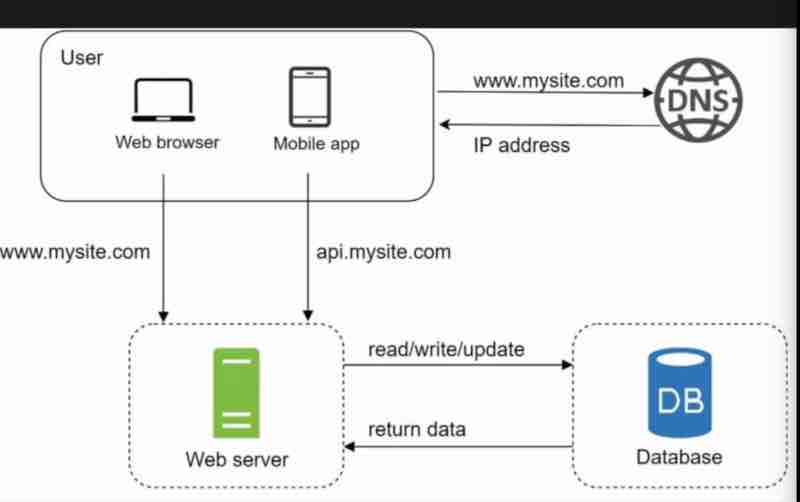
As we know, now, that we can scale the servers separately, as our web server and database has been independent now.
And as we also know now, that the load on one server has been reduced by sharing it with the database server.
What's next?
There are so many services today, and every service uses their own database to scale as per their needs.
So, which database to use? And why?
For scaling up, what does it actually mean? What are the types of scaling? Horizontal Scaling. Vertical Scaling.
First, let us see how many types of databases do we have?
So, we have two types of databases.
1. Relational databases
2. Non-relational databases
Let's understand the difference between them:
Relational database is actually a RDBMS ( Relational database management system ) also SQL database. For example, MySQL, OracleDB, PostGreSQL. It is represented and stored as tables and rows. As we have tables, we can perform JOIN operations using SQL on different tables.
Non-relational databases are actually called NoSQL databases. For example, Cassandra, Amazon DynamoDB. The NoSQL databases can be grouped into 4 categories: Graph stores, Key-value stores, Column stores, Document stores. And since NoSQL databases have no such thing as a table, therefore, JOIN operations are not supported in them.
Now, the question is which one to use actually?
Well, for most developers - Relational DB. Because for the last 40 years, only relational database has been used, and it has worked really well.
But, there are many cases in which Relaitonal DB is not suitable. So, when to think about non-relatioanl DB?
1. When your application requires super low latency and quick responses.
2. When your data is unstructured and no need of defining schema like column name and type.
3. You only need to serialize and deserialize data ( JSON, XML, YAML etc )
4. When you need to store MASSIVE amount of data.
NoSQL databases have a speciality that they are boundless and restriction free. They are often used when a large quantity of complex and diverse data are needed to be organized.
So, when having millions of users storing the user information, their profile and identity, a database is necessary to be handled along with our server.
TYPES OF SCALING
So, suppose your service has become very popular and is being used by millions of users. So, it's obvious that inorder to handle such large users, you need to have that capacity and utility in your server. So, when server reaches it's maximum capability, we've to scale up.
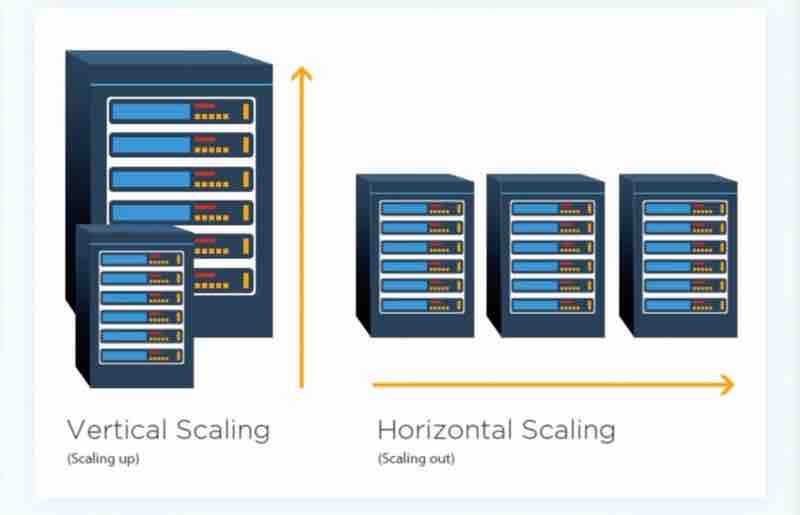
We can scale vertically, or we can scale horizontally.
What do they actually mean?
Vertical scaling is also known as ''scale up". It means that you are adding more power to your servers that are already existing with you. Maybe by adding cpu or maybe by adding more ram.
Horizontal scaling is also known as "scale out" which means adding more servers rather than increasing the power of just one server. It's like replicating the same server again and again and distributing the load.
So, when to use vertical and horizontal scaling?
Vertical scaling is only feasible when traffic is low, and simplicity is its advantage. Because when traffic has become very huge, then you cannot always just push limits of one server by increasing it's power, it's limited. But because you have just one server, and you're scaling up just one server, it's really simple and easy to use.
Horizontal scaling is used for really large scale applications, and to handle a really huge traffic.
There are limitations of vertical scaling:
1. Impossible to add unlimited cpu and ram to a single server
2. No backup (failover). If one server goes down. The website/service goes down completely
That's why, for large scale applications, horizontal scaling is preferred due to limitations of vertical scaling
LOAD BALANCERS
So, suppose we have done horizontal scaling. But you might have noticed that the users are directly connected to the server. But what's the problem with that?
Suppose our server gets offline. Then it's a real problem, because users are directly connected. So, our service gets down.
And there can be other issues as well. Suppose a lot of users are connecting to the web server simultaneously at the same time. Then we can have other issues like, web server load limit, slow responses, or just failing to connect.
So, the best way to handle such problems is to use load balancer.
So, what does a load balancer do?
It evenly distributes web traffic.
Users are connected to the load balancer.
So, because users are connected to the load balancer, so it'll have a public ip address, and our web servers will have their private up address.
So, essentially load balancer communicates with web servers via private ip addresses.
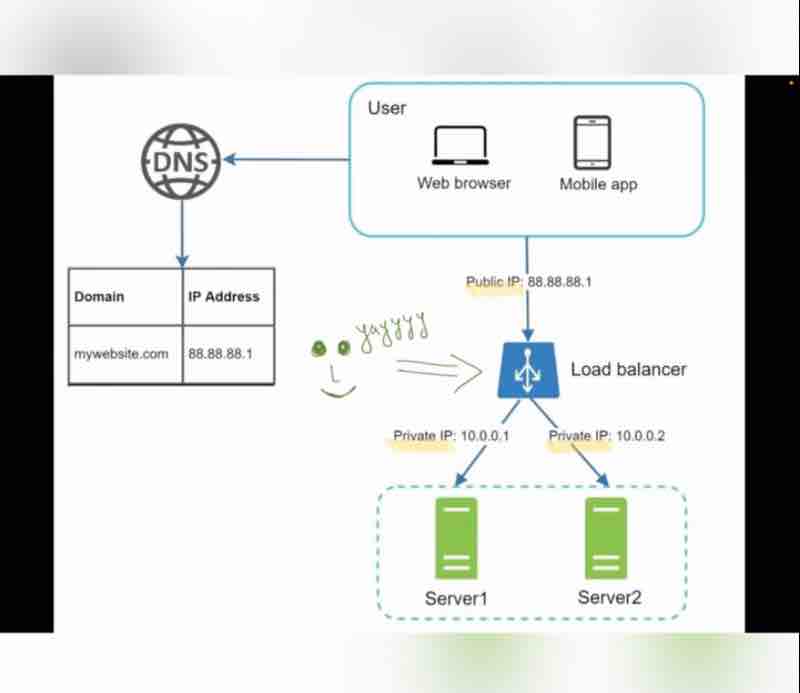
So, we have added our database, done some horizontal balancing, and added a load balancer, and we're good to go.
So, there is no failover and improved availability.
If server 1 goes offline, server 2 will get all traffic. So, our service won't go offline. We'll add new healthy web servers and balance the load.
But if website grows rapidly, 2 servers are not enough to handle traffic. Then, we just add one more server, and load balancer automatically starts to send requests to them.
What's next?
Our database is still one. If database goes down, then what? When database server fails?
DATABASE REPLICATION
As the name suggests, we make the copy of the database, which has to be handled by us. So, we have a master and a slave. The original database is said to be the master db and the replicas are said to be slaves.
Master only handles the write operations, all the insert, delete, update data modifying commands. Slaves are used for read operations. It gets copies of data from master.
So, all the updates in master db are automatically being updated in all the slave databases as well. It's obvious that we don't want our slave to be out of date. We'd want it to be same for both.
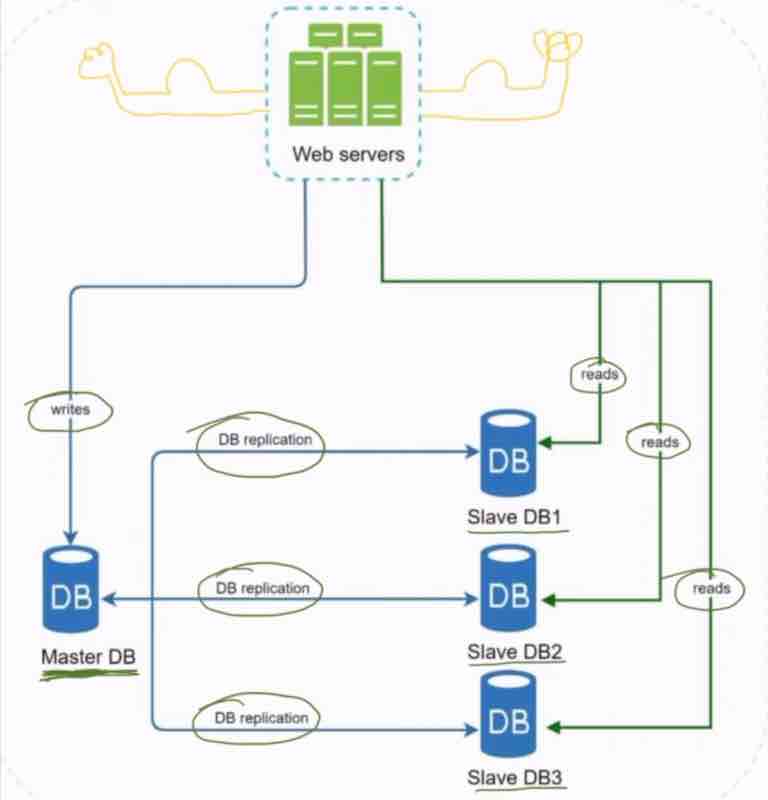
In most of the applications, the read/write ratio is always high, which means that the slaves >>> masters. The number of slaves required are generally more than the number of masters required.
So, what are the advantages of db replication?
1. Better perforamnce
2. High availability
3. Reliability
So, this master slave model improves perforamnce because it allows multiple read/write requests to be executed in parallel.
We can also rely more on the database, even if your database gets offline, you can access database from another location easily.
So, even if your slave databases gets offline, we can transfer the read operations to master db.
And suppose our master db gets offline, then we'll just pick one slave db and do its promotion, that it'll be the new master db from now. And we'll get another slave db for it.
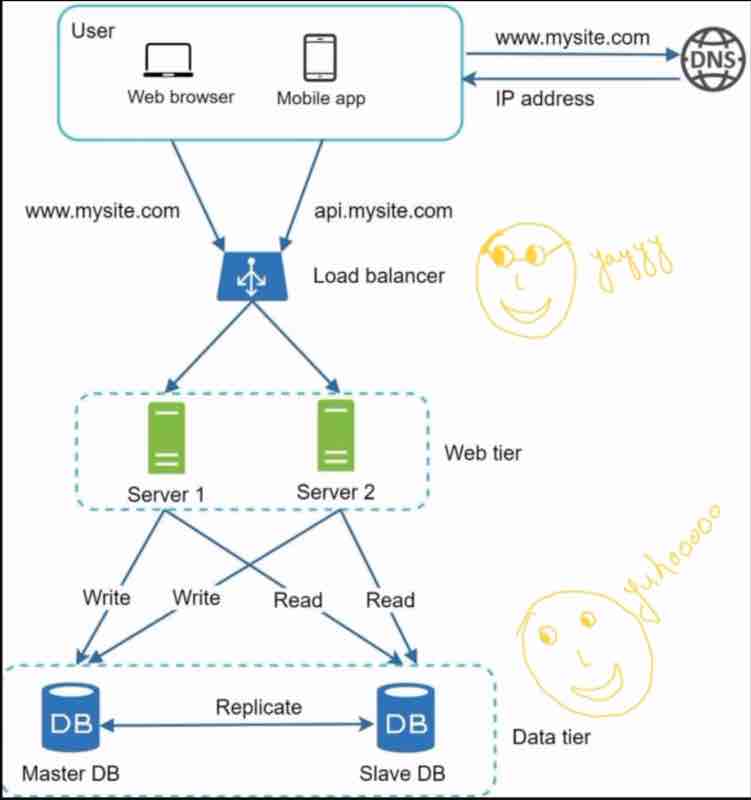
In real world production use, updating a slave db to a master db is really complicated setup, because there may be a case that data in slave may not be up to date, and there can be many other scenarios.
So, we handled server load balancing, database recovery through replication, and now, it's time to learn how to better the load/response time.
CACHING
Cache is like a temporary storage. It stores results of expensive responses, and frequently accessed data.
These server heavy responses that are frequently repeating can be stored in a local cache, so without even calculating anything, we'll just return the same responses we calculated beforehand without accessing the database unnecessarily.
By these ways, we can serve requests even more quickly.
Database would say, don't call me repeatedly when it's not necessary. Why putting all load on me?
Database says, take help of Cache.

So, before web server requests a response, it'll check whether cache has it or not, or cache has it then it'll be returned from it, else it'll then take result from database and store it in cache as well to be able to fetch from the cache next time the user asks for it.
The process of using cache is also known as read through cache.
Interacting with cache is simple, cache servers provide apis.
For example, suppose I have a key and I need the value of a key, so I'll just get that key and store it into the cache, with a time limit upto when it will be stored. So, next time user asks for it, if it is present in the cache, return from it.
Example code:
cache.set('my_key', 'hello', 3600 seconds);
cache.get('my_key');
Things to consider for using cache?
1. Cache is only to be used when data is read frequently and modified infrequently.
Because when modifying is done more often, then we also have to store it in the cache, which is not effective.
2. Expiration Policy:
Not too low - Data reload from database
Not too high - Stale data
There must be consistency as well between db & cache.
Multiple cache servers across different data centres to avoid SPOF (Single point of failure). That all servers pointing to only one cache will lead of issues.
When cache gets full: we have to implement various algorithms like LRU, LFU, FIFO to reuse the memory space. This is also known as Eviction Policy.
Least Recently Used - Removing the ones that were old.
Least Frequently Used - Removing the ones never used.
FIFO - Simple and sober queue, take that comes first.
CONTENT DELIVERY NETWORK (CDN)
Before we learn about CDN, let us understand what type of content a website generally holds.
1. Static contents (Images, Videos, CSS, JS)
2. Dynamic contents (Changes according to user input)
Example: Website for sellign e-book (static content)
If we put the static content on the CDN, then our web server will have less load, and it'll load even faster.
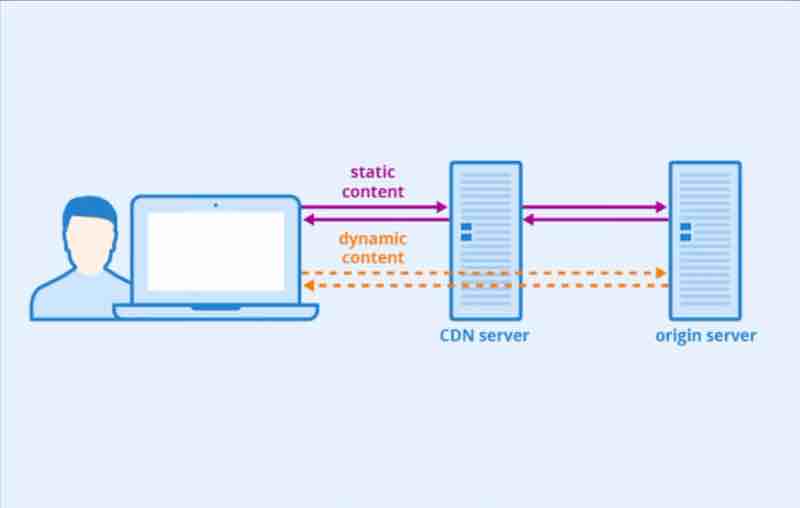
How CDN works (high-level view):
When user visits a website. CDN server that is closest to the user will provide the static content. If the CDN server is far away from you, then static content loading will take time.
Things to consider for using CDN:
Cost: Get rid of infrequently used contents.
Third party companies provide CDN and they charge you for using their CDN and sending the data. So, it's obvious that things not used very often should not be put in CDN.
Expiry time: Not too low, No too high.
Every CDN must be having an expiry time for your content which should be averaged as we did for our cache. If the expiry time is very low, then CDN will request again and again from the web server and load on web server will be high. And the expiry time should not be very high, because if data is kept for too long, then it is stale, and our bill will be generated unnecessarily, the same way as in cache.
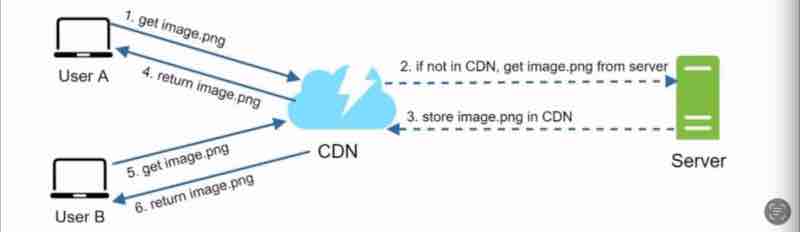
CDN Fallback/Backup: We should keep this in mind, that if the CDN fails then we should be able to fetch from the web servers directly.
Invalidating files: CDN Vendors provide us with APIs to invalidate any file. The other thing can be versioning. For example, our image is stale, and we don't need it, as we have changed it to a new and better image.
So, we can do something like this,
Example: image.png?v=2
The CDN will understand that okay, the request is for a new version of the image file, then the old image file that was stale will be removed.
STATELESS AND STATEFULL WEB ARCH
Session Data/State: Data that represents user's session on web.
It is information related to the user. That we call session data. What can it help us with? It can help to identlify a user, and we can also authenticate the user. We also call this a state.
A web server holds the user information such as profile information, and session timeouts.
Suppose user A state info is stored in the web server 1, and user B state info is stored in the web server 2.
Now, if user A uses web server 2 because web server 1 somehow failed or was not responding, the authentication will fail and everything will break apart. Because web server 2 has no information for the user A. So, web server 2 will think it's an unauthentic user.
We do have a thing called sticky sessions in load balancers to force using a particular server only for a particular user, but that is an overhead. Even if it is not used, there is still an overhead to store the user's information in all servers leading to increased complexity and it is not a reliable solution.
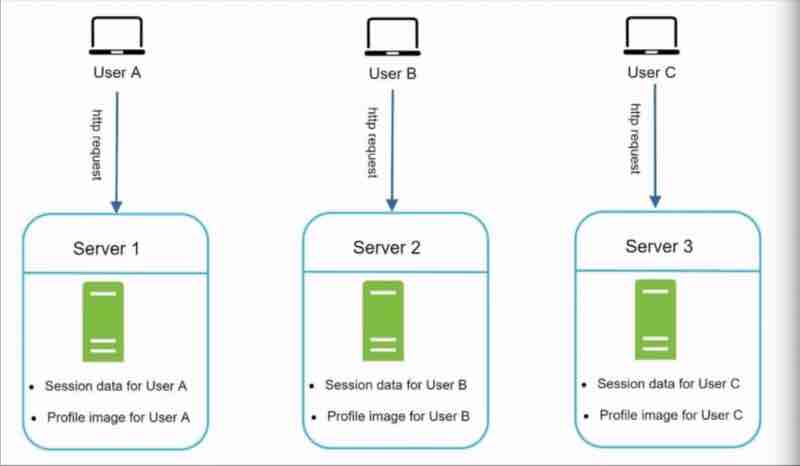
Suppose if we our servers get less load suddenly, and we want to remove a web server, to reduce the cost now, but that'll also delete the user sessions and information attached to that web server.
So, in those situations, we have to use a stateless architecture which'd help us. First let us understand what is a stateful web?
A stateful web remembers client data, stores state information, and has overhead, not even simple.
A stateless web does not remembers client data, and does not stores any state information, therefore, it's simple and robust.
Now, suppose we use a shared storage, then the http requests can go to any web server without any need to track the state within the web server. It is reliable and scalable.
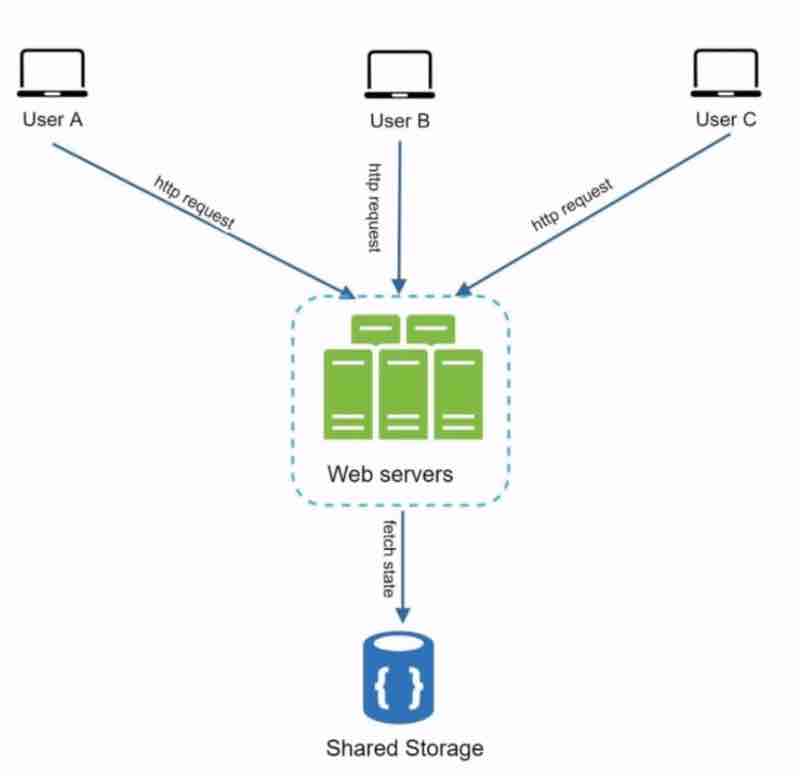
The state data has now been stored in a separate storage and is separate from the web server.
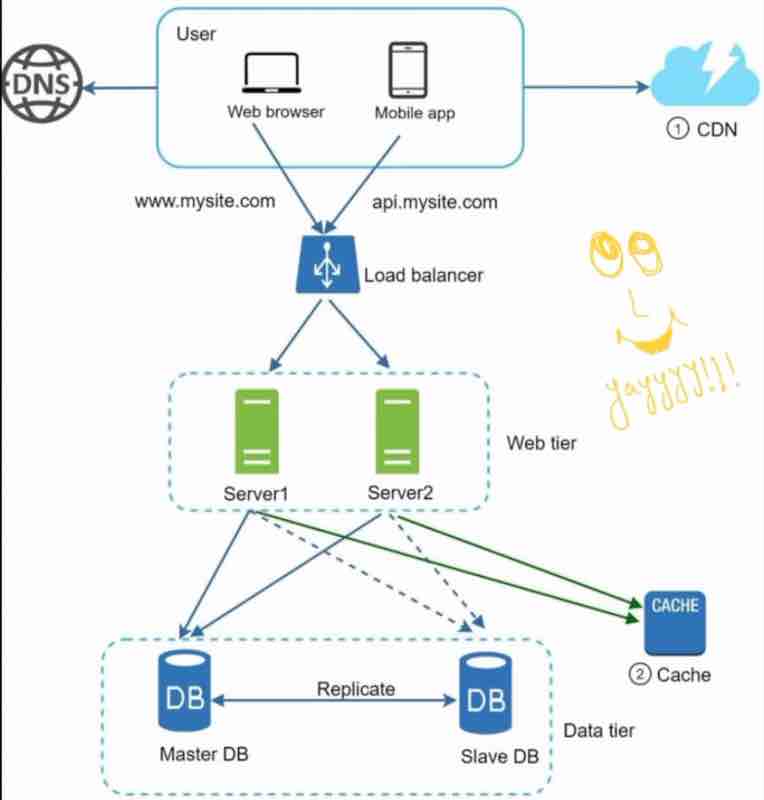
Let us recap and look at our service now.
It's just amazing. Reliable, scalable.
We have implemented:
1. Multiple servers
2. Load balancers
3. Master slave
4. Cache
5. CDN
6. Stateless
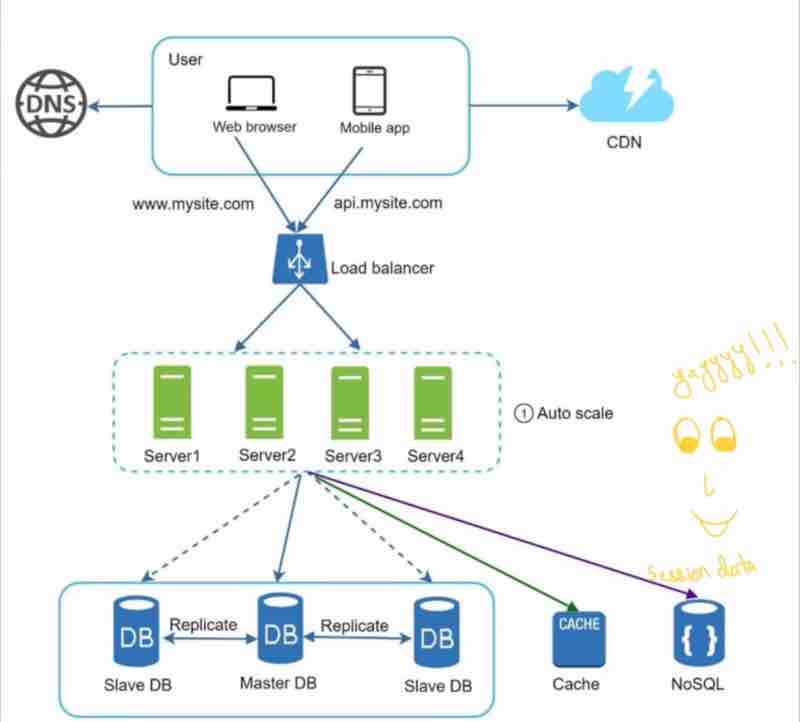
Since, we have separated the session informations in a separate database, we can easily autoscale.
DATA CENTERS
Suppose your website goes very popular, and their are lots of international users as well.
Now, to improve vailability and better user experience across wider "geographilcal" areas, we should support "Multiple data centres".
geoDNS: The routing is split between the closest data centers. Suppose we have two data centers in US, and clients from US are visiting our website. The traffic will actually be split across those two data centers.
What geoDNS does is, it takes the DNS (Domain Name), and, sends the ip address of the server based on the location of the user.
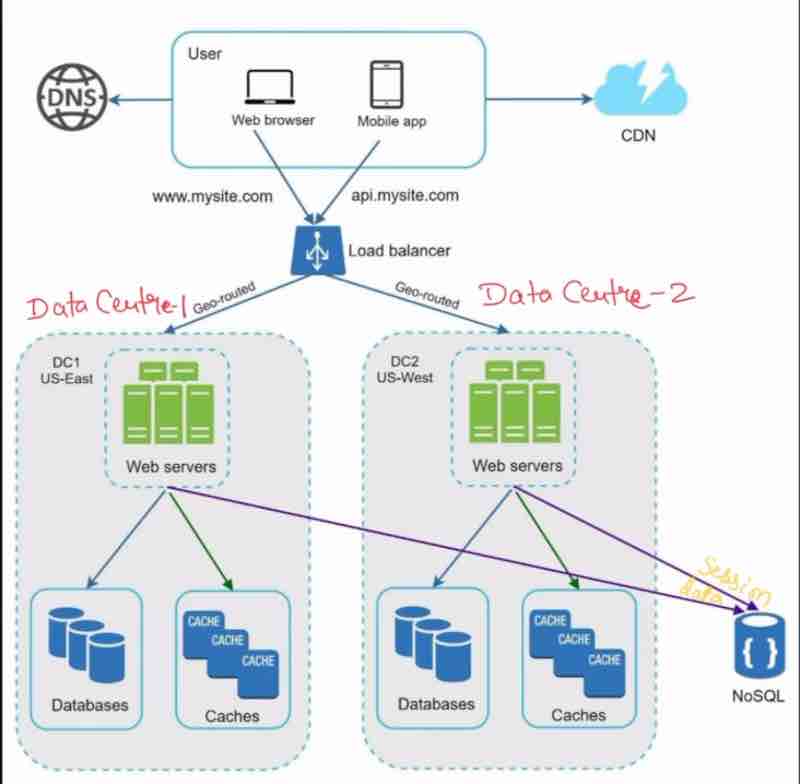
So, the US clients along the east side will get the server location of the east server, and the US clients near ot the west side esrver will get the server location of the west server, and this is how traffic is split.
Suppose our one data center has an outage like this, then we have to send the 100% traffic to data center one now, which is difficult and challenging.
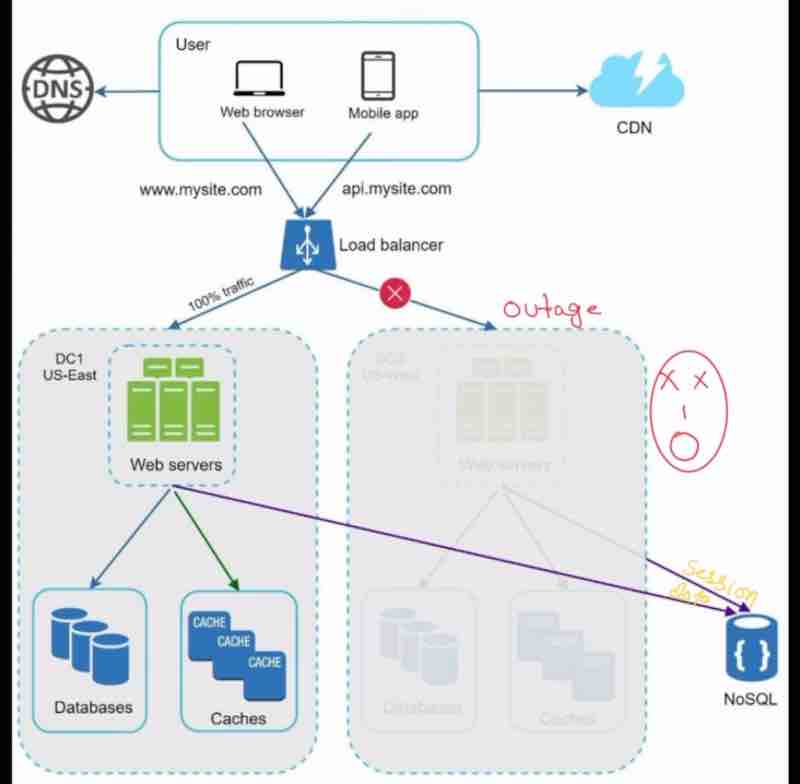
Technical Challenges to achieve multi-data center setup:
1. Traffic redirection: geoDNS does for us.
2. Data Synchronization: Replicate data across multiple data centers.
Suppose, we can redirect the traffic through geoDNS, but suppose we wanted the data that was exclusively present in the data server that got down. Now, even if the traffic got redirected, the data could not be fetched. So, we replicate data to solve this problem.
3. Test and deployment: Test your website/app at different locations to be sure that it is working perfectly.
MESSAGE QUEUE
Why do we need message queue?
What happens that in today's modern architecture, we break down the application into smaller independent chunks called decoupling. So, these decoupled chunks can be maintained, deployed, and updated separately and independently easily. It becomes very easy to develop and maintain.
Okay, we have done decoupling, but how do they communicate with each other? It is through message queues.
Message queues provide communiaction and co-ordination of them. Message queues supports asynchronous communication.
The producer - consumer architecture. Producer sends commands to consumers which follows the orders of the producer.
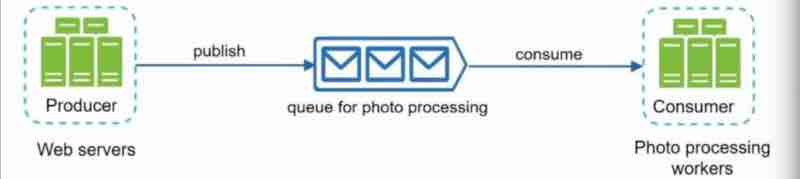
Producers are sending commands and they are being stored up in a queue, and the consumers who have subscribed to them will receive and get the commands from the queue and do their work.
Suppose that consumer is already busy in its task and not available now, then what producer will do is publish its message to queue and be free. Messages are stored in queue and whenever consumer is free, it'll consume the messages.
Some key points:
1. Producer can produce a message to queue even when consumer is unavailable.
2. Consumer can read message form queue even when producer is unavailable.
Producer and consumer are independent, you can work on both separately, and can scale them up separately.
This is what we call asynchronous communication.
There is no synchronization between producer and consumer. Producer can send anytime, and consumer can consumer anyday, depending on whether they are free or not.
Suppose we take the example of a photoshop, where we request the photo editor to process our photos. Now, the consumer, the photo editor may already be busy with processing other photos. So, what producer is doing is just sending it's request to the message queue, and now producer is free. And the consumer can process the photots whenever it gets free.
So, both producer and consumer are always independent of each other. Suppose, we have a lot of photos coming up for processing, so what'll do is increase the consumers. We scaled up consumers (workers) only.
We can independently scale up and down consumers without even being dependent on the producers.
1. Independent
2. Scaled Independently
3. If queue size is large, add more consumers / workers
4. If queue is empty mostly reduce consumers / workers
Being independent, debugging is much easier and reliable.
LOGGING, METRICS, AUTOMATION
Logging: Monitoring error logs, per server level, centralized logging. Example: new relic
When our website is small, and there are few servers, then it is not a necessity to log the metrics, but supose when the website is busy and there is a good amount of traffic, a good business model, then it is essential to log metrics.
Suppose there is a error in your service, then you should be able to monitor it right. You should be logging it somewhere, only then you will be able to deliver efficient products. You can log at servier level as well, from which service has error came. You can even lock servers where errors are coming up. For example, new relic. In which all logs, of the servers and the services are seen at one place easily. So, when there is any issue then we're able to find where one can debug. Logging is very helpful in debugging and finding the erro .
Metrics: Gain bussiness insights. Aware of health of our service. Host level metrics: CPU, Memory etc.
Different types of metrics collection can benefit us a lot, how? It gives you bussiness insiders, and gets to know about the service health. For example, see it's types:
1. Host level metrics: the host where your service is being run, how much is its CPU, and how much is its memory now, so you have to take care of these things very carefully. For example, CPU got increased abruptly, then alerts will come up, and there can be problems due to it, so all these are in one place. So, we need a dashboard kind of thing where we could just see everything all at once, so that you can check your usage. For example, I use Grafana.
2. Aggregated level metrics: You can see the metrics of the total performance of your database and the total performance of your cache etc.
3. Key business metrics: Daily active users, and how much revenue is your service earning.
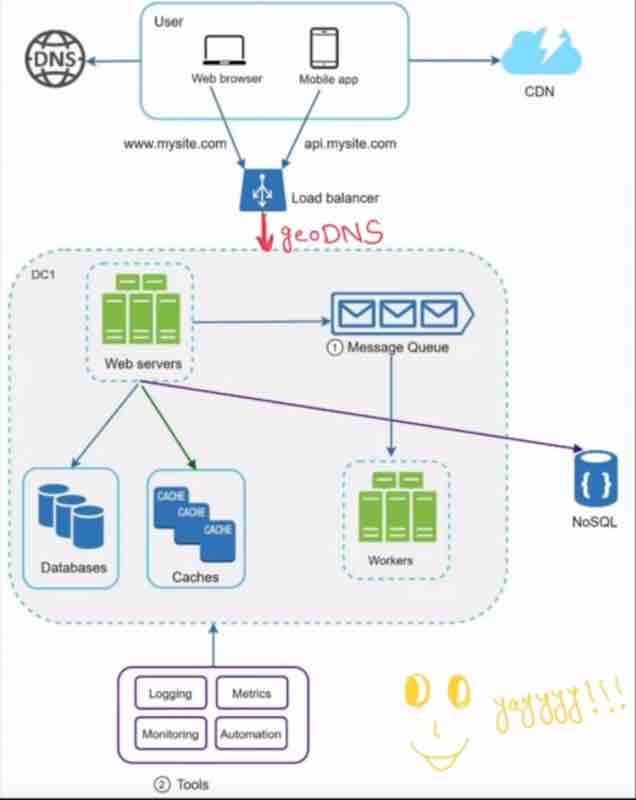
So, when your system gets complex, then we have to use automation tools which can make our deployment very easy. The code changes that we have made, submitted, their verificaiton, can be done automatically, this will improve our productivity, our time will be saved as well. If these tools are doing something like this for us, then now we will reduce the load on it.
Containers integration is very important, so you'll see, in our github, we can see whether there are any issues in our changes or not. The second thing, is automating bills, test deployment, and all these can also be done automatically. Suppose, you have made your changes, and you have to build the service, so in Jenkins, you can easily automate it, everything from testing to deployment, so automating is very very important for a service, now a service is, big and complex.
DATABASE SCALING, SHARDING
AND JUSTIN BIEBER PROBLEM
When data grows, then database overloads, so we have to scale our database servers.
Database Scaling:
1. Vertical Scaling
2. Horizontal Scaling (Sharding)
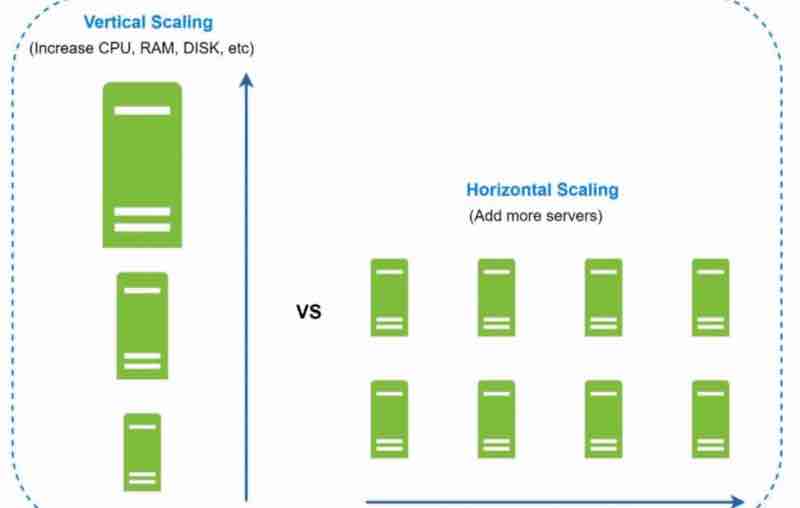
In Vertical Scaling, we are increasing more power (cpu, ram, disk). According to RDS (Amazon Relational DB service), we can take upto 24 tb of ram. For example, in 2013, stackoverflow was handling 10 million unique visitors everyday with only one master db. If that master db got failed, then everything would be gone for stackoverflow, but it presisted somehow.
The drawbacks of vertical scaling are that, hardware limitations are real, and there can be a single point of failure, and it'll be costly as well.
In horizontal sacling, adding more servers is also known as sharding, what we do is rather than having a large database, we can have shards, that means, smaller and easily manageable components of the large db, to easily manage them. In which shard component will our data go, for that, we use a hash function, in which we use a hash key, known as sharding key. The sharding key is something that has to be choosen very carefully, so that the data is evenly distrubited among these shards. We can even use multipe database columns to have our sharding key. It should be choosen very wisely.
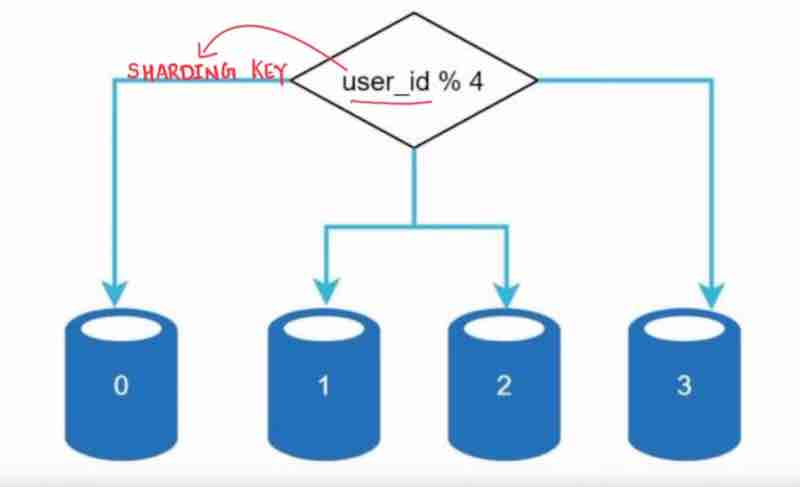
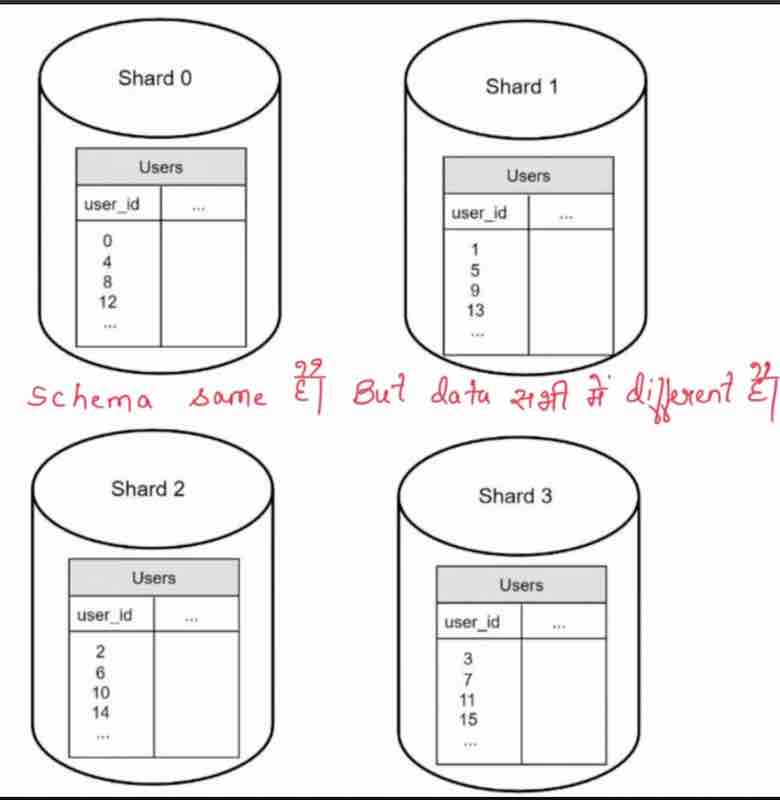
Drawbacks of sharding:
1. Resharding: when a shard has reached a stage when it can no longer hold more. . then shard exhaustion due to uneven distribution. It will require, updating sharding function, then moving data around. It will be a overhead to do everything all again just because of uneven distribution.
2. Celebrity problem (Hotspot key problem): Excessive access to a particular shard cause shard overload. Suppose in shard 1, we have justin bieber, eminem, and lady gaga, and in shard 2, we have no celebrity, just because shard 1 has popular people, maximum read requests will be towards shard 1, and shard 1 will be overloaded. So, what can we do to fix it? We can assign each shard for each celebrity, and we can balance the load for each shard evenly. This is a real story, that whenever justin bieber uploads a photo on instagram, then their apps goes very very slow. Because of overload of like requests on one post, the shard is overloaded. They implemented caching technique to fix it, but even then, cache cannot take the load. Finally, when facebook admired instagram, they fixed the problem, the like counter is stored in a separate database cell, and then only it got solved.
3. Sharding makes it difficult to perform JOIN operations, common fixes are denormalize the database so that queries can be done in a single table.
So, the summary is, keep web tier stateless, host static assets in CDN, support multiple data centers, build redundancy at every tier, cache data as much as you can, scale your data tier by sharding, split tiers into individual services, montior your system and use automation tools.
This Page Has Been Intentionally Left Blank
ESTIMATE SYSTEM CAPACITY
Performance requirements using
" Back Of The Envelope Estimation "
So, back of the evelope can be done using some estimates + your thought experiments + common performance numbers which helps you determine which design will meet the requirements and will fulfill our needs.
It's like an estimate, and an experient we are doing.
For this, we should have a good sence of 'Scalability basics'
Following concepts you should be aware of:
1. Power of 2
2. Latency numbers
3. Availability numbers
Power of 2
No matter how much is your volumne, when you have to do the calculations, you will always fall back to the basics.
2^10 is 1KB
2^20 is 1MB
2^30 is 1GB
2^40 is 1TB
2^50 is 1PB
Latency numbers
By the word latency, we can understand that it says how much time would it take for a operation to be completed.
After seeing latency numbers, we understand:
1. Memory is faster than disk
2. Avoid disk seeks if possible ( use memory cache )
3. Simple compression algorithms are fast
4. Compress data before sending if possible
5. Data centers are far located, time taking
Availability Numbers
These numbers show for how long will your services be available, like what is your up-time for it. For how long will it be operational.
If someone is saying that our system has very high availability, that means their system is being continously operational for long.
Generally, availability is measured in percentage,
100% availability = 0 down time
Mostly services = 99% to 100%
What is SLA (Service Level Agreement)?
Agreement between service provider and consumer / customer, to follow up and fix the up-time of the service between them.
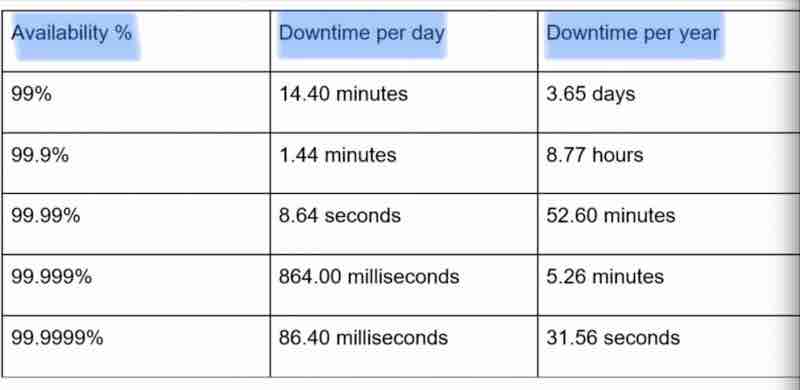
Example: Amazon, Google, Microsoft offers 99.99%
Remember these figures and facts, when asked to estimate your system, then you should be able to do it.
[INTERVIEW QUESTION]
ESTIMATE TWITTER'S QPS (QUERY/SECOND)
AND STORAGE REQUIREMENTS
Note: Estimates are examples, they are not real for twitter.
Always start your answer with some assumptions, because when you go ahead in your answers, you have to take reference of your assumptions.
Our assumptions:
Monthly active users = 300 million
Tweets per day on avg. per user = 2
Tweets containing media = 10%
Tweets stores for = 5 years
Daily users = 50%
Estimations: (Query per second)
Daily active users (DAU):
50% of 300 million
= 150 million
Tweets QPS:
150 * 2 tweets / 24 hours / 3600 seconds
= 3500 tweets
Peek QPS: (100% uers)
2 * QPS
= 7,000
Storage Requirements Estimation:
Note: we will only estimate media storage here, because text size is very very small as compared to media.
Average tweet size:
tweet_id = 64 bytes
text = 140 bytes
media = 1 mb
Media storage:
= per day active users * no. of tweets per user * 10% contain media * size of media
= 150 milltion * 2 * 10% * 1mb
= 30 * 10^6
= 30 TB / d
5 Year media storage:
= 30 TB * 365 * 5
= 54750 TB
= 55 PB
Interview Tips:
In interviews, it's about the process and approximation can be leveraged, you have to slowly build up these estimations, rather than trying to be perfect with exact answers.
1. Rounding and approximation
2. Always write down your assumptions
3. Always label your units that you've taken
Common asked questions:
QPS, Peek QPS, Storage cache, number of servers etc.
And only those services are asked who are very heavily used.
This Page Has Been Intentionally Left Blank
DESIGN A NEWS FEED SYSTEM
Candidate: Is this a mobile app? Web app? or both?
Interviewer: Both
Candidate: What are the most important features of the product?
Interviewer: Ability to post: Ability to see friend's news feed
Candidate: News feed sorted in any particular order? Like close friends first, then other groups coming up?
Interviewer: Reverse chronological order (to keep things simple). [Like stacks]
Candidate: How many friends can a user have?
Interviewer: 5000
Candidate: What is the traffic volume?
Interviewer: 10 million daily active users (DAU)
Candidate: Can feed contain images, videos, or just text?
Interviewer: It can contain media files (both images and videos)
[ Remember, how we assumed all such things in our twitter estimation interview question. We get these assumptions from the interviewer only. We list down these assumptions and then we build the systems. ]
As we have collected the requirements, we can propose a high level design finally.
NEWS FEED SYSTEM
HIGH LEVEL DESIGN
Note: Few components in design, we'll cover in upcoming topics as they are long in themselves and need to cleared properly separately.
High level 'News Feed System' will have 2 flows:
Feed publishing: Pushlished post -> DB/cache -> Friend's news feed
News feed building: Aggregating friend's posts in "reverse chronological order"
NEWS FEED SYSTEM
DESIGN DEEP DIVE
Right now, our focus is on understanding how we clear system design interviews, through our news feed system in step wise manner. So, we'll discuss the fanout service, rate limiter, graph db and other services in detail as a separate topic.
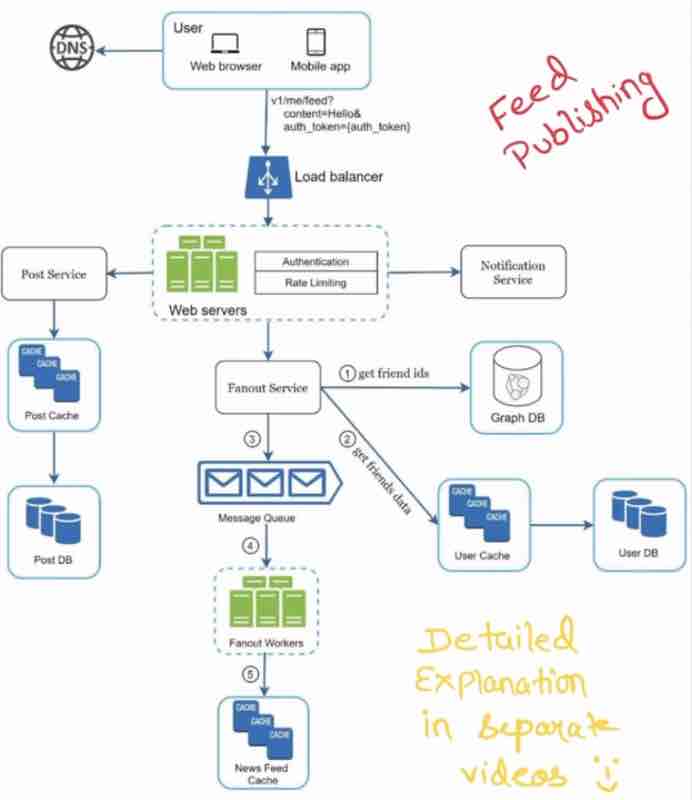
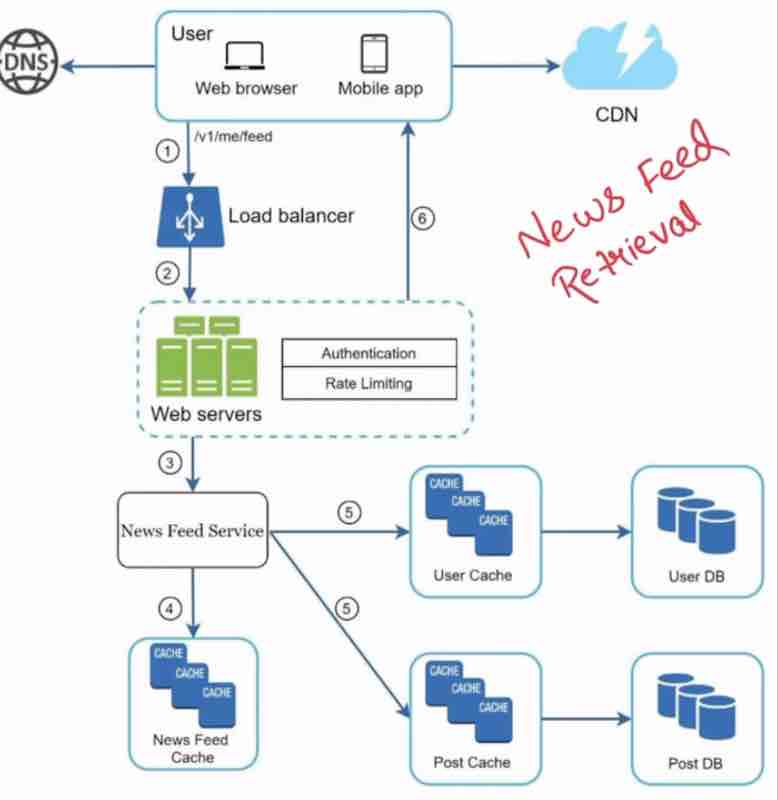
Again, we'll understand these in detail further.
What happens in interviews is that, they focus on one component more, and they'll tell you to explain it in detail, this way, they'll know how much knowledge you have about system design, because there is not enough time to get in details of every single compoent and service.
This Page Has Been Intentionally Left Blank
RATE LIMITER
What is it?
In Network System, rate limiter is used to control the rate of traffic sent by client.
In http world, rate limiter limits the number of client requests allowed to be sent over a specified period.
If count(api request) > threshold { "access calls blocked" }
Example:
No more than 2 posts / second
Maximum 10 accounts / day from same ip address
We can have specific any kind of rate limiter.
Because it essentially means to limit something.
Before designing, see the benefits, of "Rate Limiter"
Almost all of the services use rate limiter of some form
It prevents DoS attack:
Example: Twitter has rate limiter, number of tweets per user is 300 per 3 hours, more than that will block.
Blocking excess 'intentional' and 'unintentional' requests.
It reduces cost:
If we have limited the excess requests then few servers will be needed, and more resources acn be used for high priority apis.
Rate limiter is very important when using 3rd party apis.
It prevents servers overloading:
Filter out excess requests, caused by bots or users misbehavior.
DESIGN A RATE LIMITER
Note: Rate limiter has many different algorithms, pros and cons, so you have to interact in order ot know which one to implement.
Candidate: What kind of rate limiter? Client-side rate limiter or server-side rate limiter.
Interviewer: Server-side api rate limiter
Candidate: Limit api requests based on which condition? Same Ip address? Same user-id? Other properties?
Interviewer: Flexible enough to support different sets of limiting rules
Candidate: What is the scale of system? Start-up? Big company (large user base)
Interviewer: It should be able to handle large number of requests.
Candidate: Will system work in distributed systems?
Interviewer: Yes
Candidate: Rate limiter will be a separate server? or it will be implemented in code itself?
Interviewer: It is a design decision, you can decide by yourself.
Candidate: Do you need to inform users who are throttled (limited)?
[ If we limit them and don't do anything then it'll act as an error to them, right? ]
Interviewer: Yes
Requirements
Limit excess requests
Large user base,
Should not slow down http response time
Use as little memory as possible (not expensive)
High fault tolerance,
If any issue (cache server goes offline)
Must not affect entire systems
Exception handling: Show clear exception to user
Distributed rate limiting: Shared across multiple servers
So, where to put rate limiter?
Client-side: we generally have no control on client side.
Server-side: Client-side will send http requests and our api server will hold rate limiter
Rate-limiting middleware: A middle service between client and api servers
Example:
Assumpe api allows 2 requests / second, and client sends 3 requests within a second. 3rd request throttled with error: http request error 429 (too many requests exception)
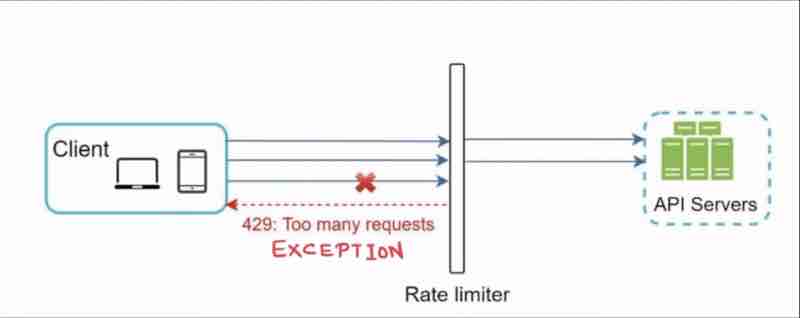
API Gateway (middleware): Fully managed service that supports a lot of things: Rate limiting, IP whitelisitng, Authentication, Static content
So, where to implement this?
In server side or In a gateway? Well, it depends
We'll see current technology stack in your service
Is programming language efficient enough to apply rate limiter?
We see the best rate limiing algorithms that suits your business
If we are already api gateway, then implement there itself
Or use commercial api gateway to save time and resources
Let's move unto the rate limiting algorithms one by one
Token Bucket Algorithm
It is widely simple, used by companies like amazon and stripe
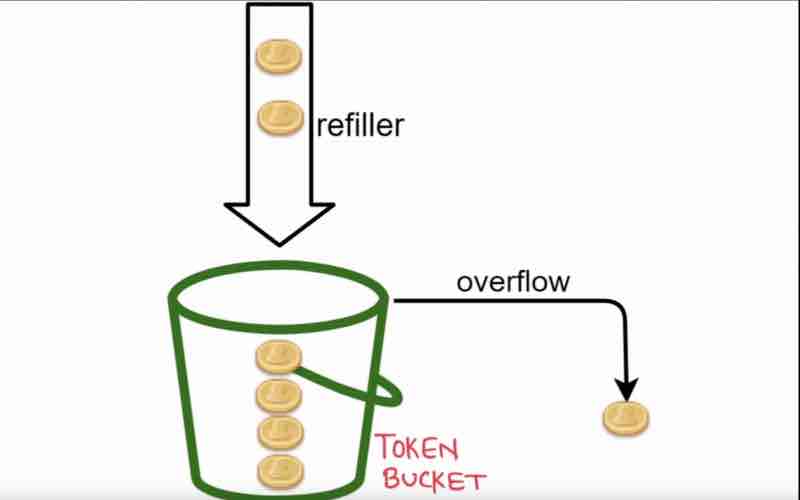
We have a bucket in which we fill tokens in through the refiller, and this token basket has some limit, if we fill in more, then overflow will happen,
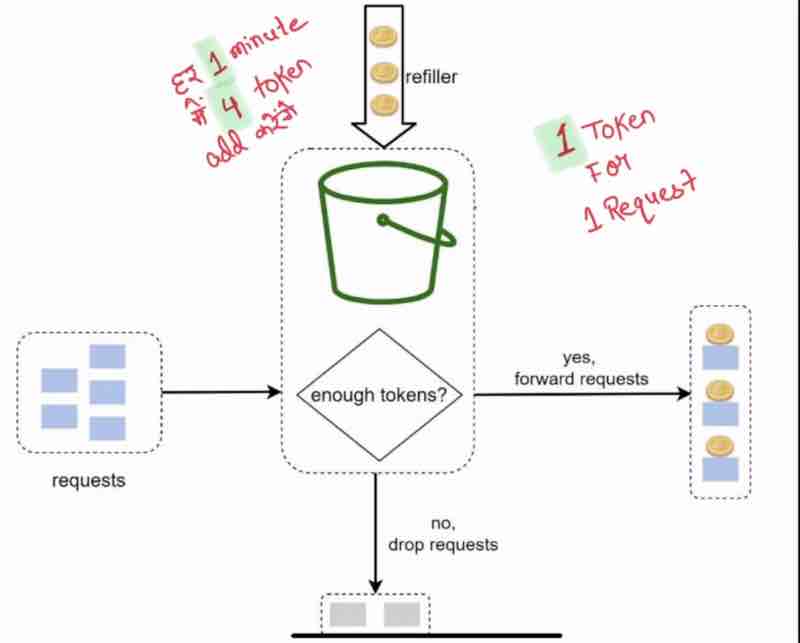
Suppose one token is used for one request, and suppose our bucket already has 3 tokens within it, and I have said that I'll send in 3 tokens every minute, then the request when it'll come will check whether it already has the tokens in it, if it has, suppose 3 tokens came, and 3 tokens was there, so we passed it forward, but suppose requests has exhausted the tokens, before it got refreshed next minute, so what I'll do is drop the request because there is no token in the bucket currently.
Let's go in more deeply:
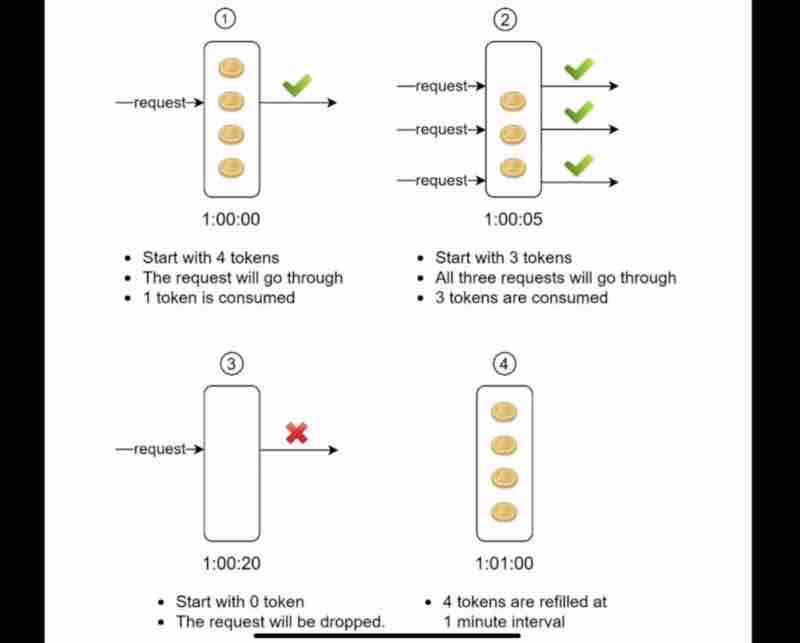
Suppose we start with 4 tokens, that are refreshed every minute, one request came and it consumed one token, and got passed, now, we are left with 3 tokens within just 5 seconds. Now, 3 requests came up simultaneously, and because we have 3 tokens, it'll be passed and consume our remaining tokens, wihin just 20 seconds, now the 1 minute refresh has not been reached yet, there are still 40 seconds left, now whenver a new request will come within these remaining 40 seconds, they'll be blocked and dropped. Now, as soon as the 1 minute completes entirely, the tokens are refilled again, and can be consumed again by the consumers.
So, it's pretty simple, one token is used by one request. And when tokens are exhausted, we'll not let request pass by. And the tokens are refilled after a particular period of time.
This algorithm is defined by two parameters:
"bucket size" and "refill rate"
How many buckets would you use? It depends solely on rate-limiting rules.
Suppose we have different apis with different parameters and conditions, so we've to set limits on each api separately.
So, if we have 3 apis, then we'll use 3 buckets.
Suppose, we're blocking per ip address and doing rate limiting at that level.
Then we've to take the same number of buckets as the number of ip addresses we have.
Suppose our overall system allows max. 10,000 requests / second
Then we've to use a Global bucket shared by all the apis and requests
So, the count of buckets depends on the use cases always
Pros: Simple, a request can go as long as we have tokens
Cons: Bucket size and token fill rate tuning is challenging
Leaking Bucket Algorithm
We have a bucket, and droplets are overflowing when full, and there is a hole in the bucket, that is making the bucket leak with a constant rate.
Remember, outflow happens in a constant rate. Always being passed with a fixed rate.
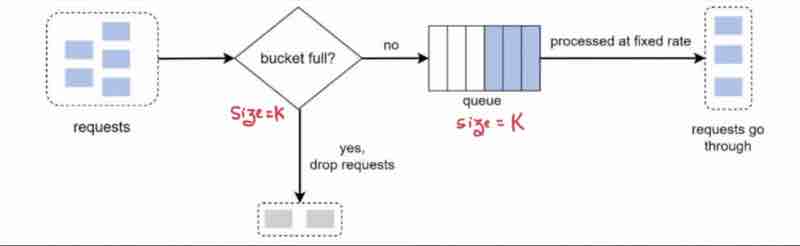
The constant rate is being handled and implemented with the queue here.
Also remember, the size of bucket and the queue is always same.
So, no matter how many requests have been coming up, it'll always proceed with a constant rate.
It is stable in processing requests. To control the outrate flow and processing rate. Then leaking bucket is very good.
Shopify uses leaking bucket algorithm to implement rate limiter.
Note: It takes 2 parameters, Bucket size: Equal to queue size and Outflow rate: Number of requests at fixed rate
Pros: Memory efficient. Limited queue size. Stable outflow rate
Cons: Take 2 parameters. Tuning is challenging. Like how do we decide the parameters?
Fixed Window Counter Algorithm
What window counter does is divides the timeline in fixed counters. It is split into fixed windows (suppose 1 min each). For every window, I have set a counter, and the threshold of each window is 2 requests. Therefore, it is 2 requests / min. For every request, the counter increments, and before the 1 minute reset hits, if the counter has reached 2 and still a request is coming up, it'll be blocked and dropped because they were in the same counter minute which has already reached the threshold. As soon as the 1 minute cap hits, the counte resets and is ready to receive 2 more requests again.
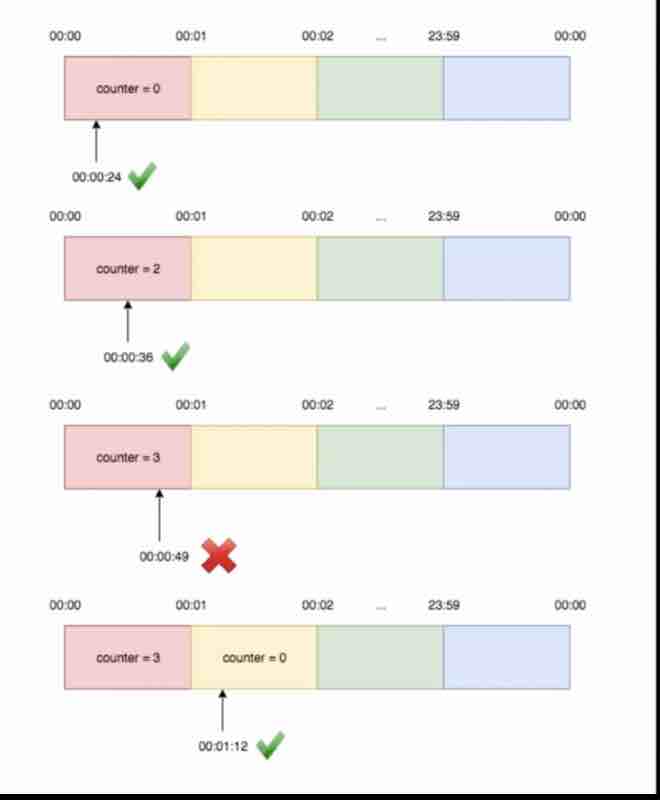
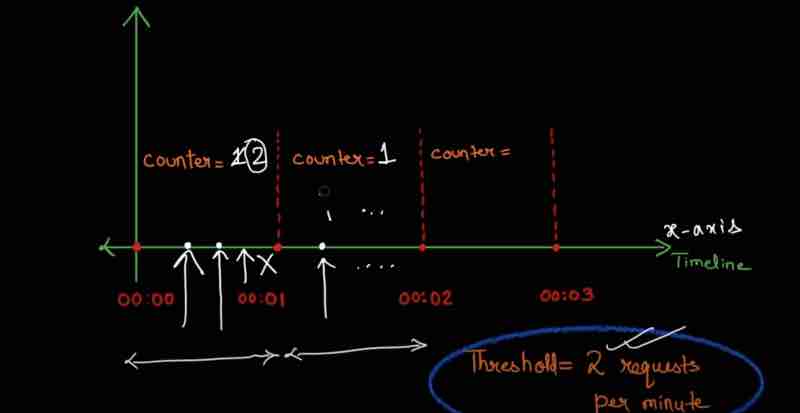
When the requests are being sent along the edges of windows, suppose we take 2 windows, where on the first window, the 2 requests are being passed at the end after 30 second cap, and the next window has passed 2 requests earlier before its 30 second cap, then if we notice carefully, even though they have been processed in separate windows with 2 requests each, the total gap time between these 4 requests were in the 1 minute cap, and the requests on the next window should not have been passed unless the 1 minute cap resets. But the window time cap is independent of how the requests have been sending within a window, which is major demerit of this algorithm.
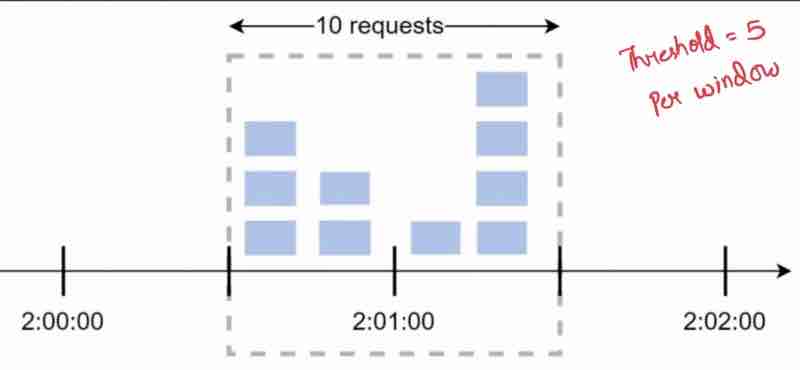
So, within these windows, we are getting more than 5 requests which was not what we wanted as per our rate limiter.
Note: Timeline is fixed for each window. Each window has a counter. Counter increments +1 per request. If counter reaches threshold then new requests dropped until new window starts
Pros: Easy to understand and implement very well
Cons: Traffic burst at edges of a window, cause more requests than the threshold.
Sliding Window Log Algorithm
Sliding window log algorithm fixes the issues of the fixed window counter algorithm
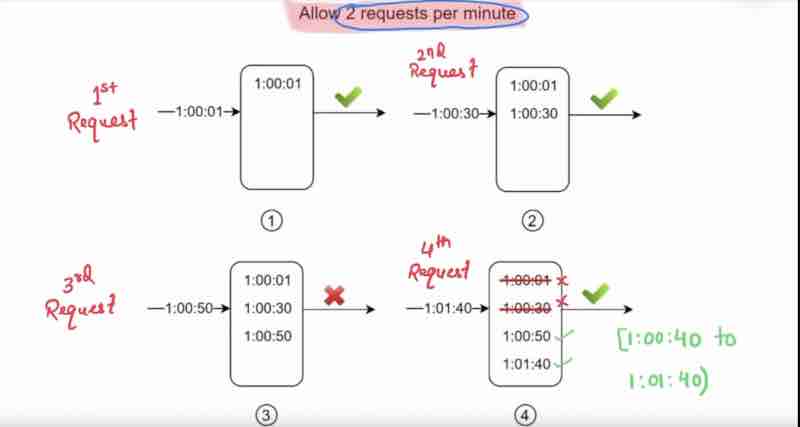
First, here in this example, we are allowing only 2 requests per minute. So, when the first request came, we'll lock that time stamp, suppose at 0 min 1 second, at the time of locking, we're checking the logs, are there any requests before hand, no requests in log so it was passed. When the next request has came at 0 m 30 s, it checked the logs first and saw only 1 request has been passed earlier, so it was passed. Now, when the third request came at 0 m 50 s, it first checked the logs, and how many requests have been passed within this 1 m cap, so it'll be dropped, but still we'll lock this timestamp. Now, when the fourth request comes at 1 m 40 s, it'll check the logs, and it'll see there are 3 requests in hit, now, it'll check within the current window, from 1 m 40 s to 0 m 40 s, and take those requests only, and leave all other past requests that were passed to it, then it'll lock it finally.
So, within a minute, if the count of timestamps are more than threshold, so we'll delete the logs that were there before its current window, and we'll keep locks within the 1 m cap before it, so we've finally handled the drawbacks of fixed window counter algorithm.
Note: Save timestamp of every request, we can store it in cache as well. When new requests came, remove outdated timestamps, and add the timestamp of new request. If the count of current timestamp is greater than the threshold -> Rejected
Pros: Accurate, and will never exceed threshold
Cons: Even if requets rejected, still we are logging in cache. Memory usage high.
RATE LIMITER
High Level Architecture
Basic idea (to explain rate limiter in simple terms)
It's just a counter to keep track of requests, with same user, same ip address like these, and if that counter crosses the threshold mark, then we'll discard those requets. Now, the interviewers will ask where shall we store the counters?
Interviewer: Where shall we store the counters?
[ Candidate be like: Meh ]
Candidate: Using a database
Interviewer: Don't you think, it will be slow due to slowness of disk access.
Candidate: In-memory cache, it'll be fast, it has time based expiration.
Interviewer: Can you give an example?
Candidate: Redis cache is a popular option.
Interviewer: Can you tell me more about Redis?
Candidate: In-memory fast store, offers two commands, INCR: counter++, EXPIRE: Timeour for counter.
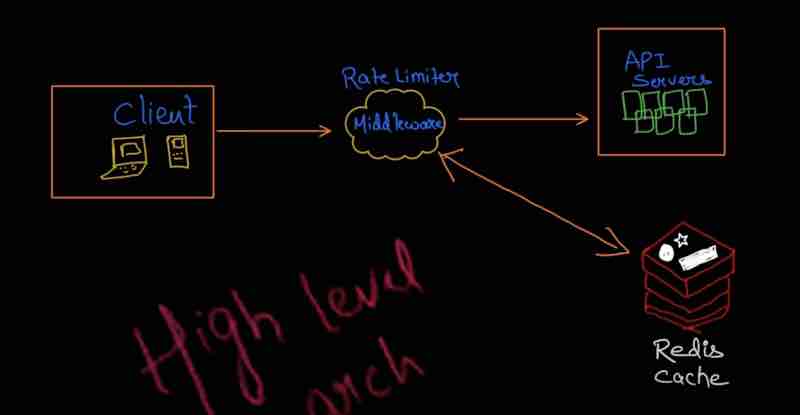
What happens here is that client has sent the request, and the rate limiter middleware will check the counter from the redis cache, if the counter is more than the limit, we'll drop the request, else it'll pass the request, and increment the value in redis cache using INCR function.
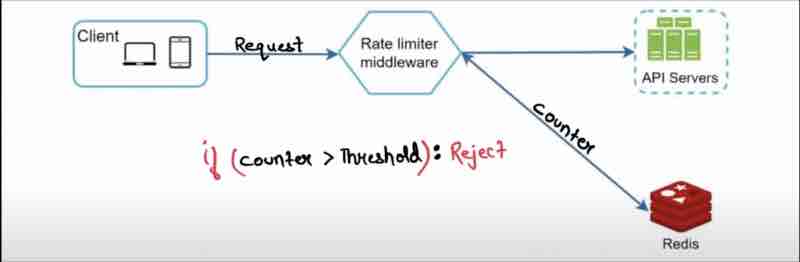
RATE LIMITER
Design Deep Dive
Interviewer:
1. How are rate limiting rules created?
2. Where would you store these rules?
3. What’ll you do to requests that were limited?
Candidate: First, let's talk about limiting rules
Rate limiting rules:
Example: Lyft is popular in US (like ola and uber)
Lyft has made their rate limiting component open source
They allow maximum 5 marketing messages / day
They allow not more than 5 logins / minute
If you search: Lyft rate limiting github (go down the readme and find rate limiting definition)
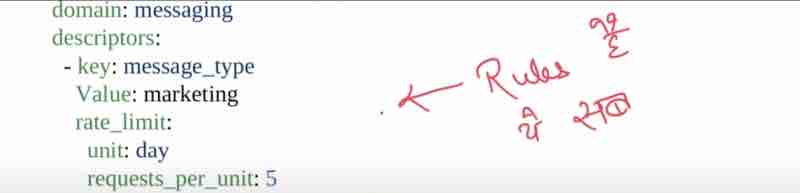
Rules are written on configuration files and saved on disk
Candidate: Coming to the next question
Exceeding the rate limit:
Sending http response code 429 to client.
429: "Too many requests"
Depends on usecase what to do next?
Enqueue - processed later
Example: Some of your orders got rate limited (amazon, swiggy)
And they'll process your order after some time
Interviewer:
How will the client know, his request has been rate limited?
How many requests have been remaining before being hit rate limited?
Candidate: Via 'http response headers' sent by rate limiter.
Headers: Meaning
X-Ratelimit-Remaining: How many requests have been remaining?
X-Ratelimit-Limit: How many maximum requests you can sent?
X-Ratelimit-Retry-After: After how much tiem can you send the request again?
So, if client has sent too many requests, 429 (too many requests) X-Ratelimit-Retry-After will be sent to the client
RATE LIMITER
Design Diagram
Let's try to build the design by yourself
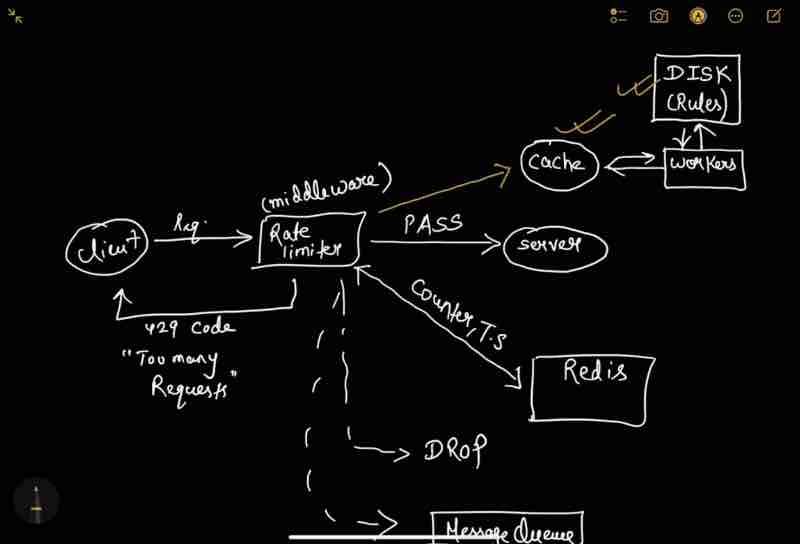
1. Store rate limiting rules into the disk [Show disk in diagram]
2. Disk is slow so we need a cache for fast access [Show cache in diagram]
3. Requests will always be coming and may be too many [Use workers in diagram]
4. Client and server will always be there [show in diagram]
5. We need a rate limiter [Middleware]
6. Rate limiter gets it's counter from the redis cache [show in diagram]
7. If the request rate limit has reached: 429 code send, drop it, or enqeue it for later.
Because we have identified so many things, it'll be easy to draw diagram now, let's do it together.
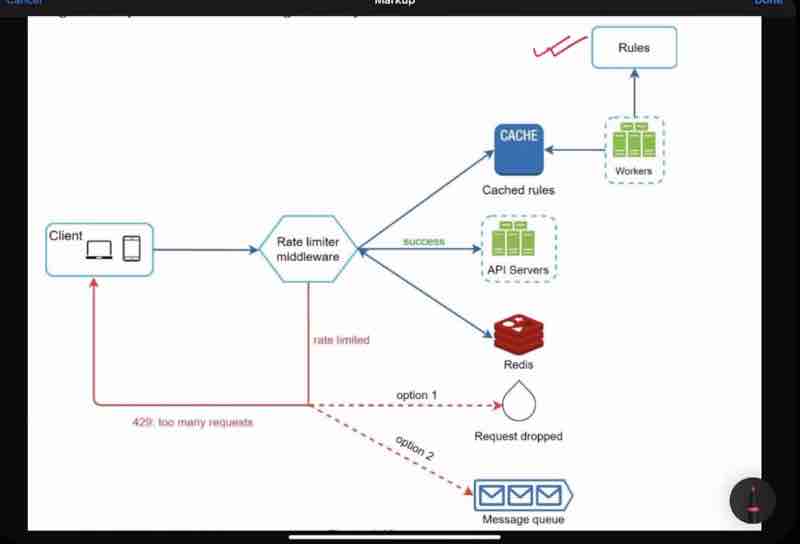
So, how were we able to build this? Just how we discussed with the interviewer and how he asked questions step by step?
RATE LIMITER
Design Deep Dive
In Distributed Enviroment [Advanced]
Interviewer: Any challenges for rate limiter in distributed environment?
Candidate: There are mainly two challenges: Race condition, and synchronization issues
Interviewer: Can you elaborate?
Candidate:
Issue 1: Race condition
Read counter from redis, check if (counter + 1) > Threshold, if not, incr.
But if concurrently requests are coming up:
Original counter value = 3
Request: 1
Before updating the value, one more request came in that timeline Request: 2
But after first request, counter = 4
And after second request, counter = 4??
Counter should be 5 :(
Note: Locks are the obvious solution
When request 1 came, it'll lock the counter, till it has updated the value:
But it is still a problem, because request 2 has to wait now.
So, locks are the obvious solution but it slows down the system.
Issue 2: Synchronization issues
We have millions of users, 1 rate limiter is not enough.
When multiple rate limiter used, synchronization must be there.
Let's see the diagram
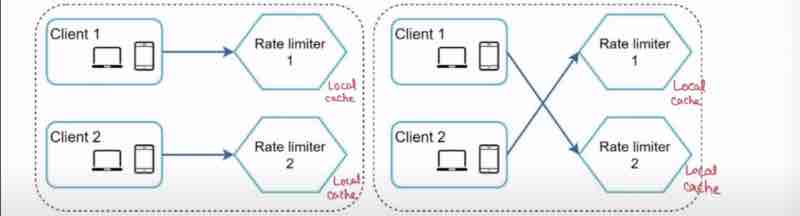
Rate limiter doesn't know from whom the request has been coming up. Suppose at first time, client 1 sent request to rate limiter 1 and client 2 sent requset to rate limiter 2. But suppose at second time, rate limiters were swapped, now, the limits imposed on the client has also been swapped which is a big concern.
Because we are using a stateless web server, not storing the state of a user, being in a separate db, how would rate limiter know whose client it belongs to?
A simple solution to this could be, instead of having a local cache for everyone, we can use a centralized global cache. (redis)
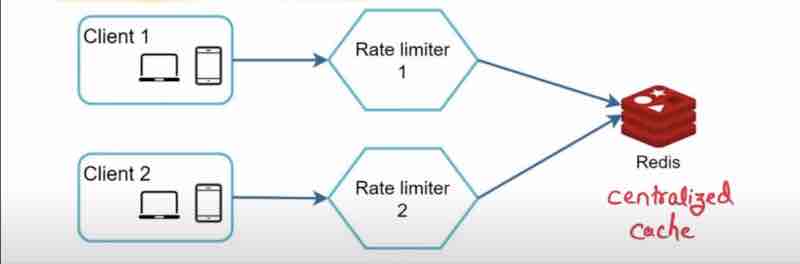
RATE LIMITER
Performance Optimizations And Monitoring
Interviewer: Any areas where we can improve?
[ Always say yes because no one can build a perfect system ]
Candidate:
1. Multi data centre setup: geoDNS will locate the nearest center
2. Better synchronize data: There are many models to do this. For example: Event consistentcy model
Interviewer: How will you check if your rate limiter is effective?
Candidate: By monitoring metrics ( gathering analytics data )
There are mainly two things to ensure:
Rate limiting algorithm - effective?
Rate limiting rules - effective?
Interviewer: Rate limiting rules are too strict? Suppose there is a sudden increase in traffic in flash scales?
Candidate:
Relax the rules a bit because otherwise many valid requests might be throttled. Replace the algo, to suport burst of traffic: Token Bucket can be used
RATE LIMITER
Wrapping Up
Additional talking points: If time allows:
Hard rate limiting: #Requests <= Threshold (Always)
Soft rate limiting: Can exceed threshold for a short period of itme
Interviewer: As a client, what will you do to avoid your requests being rate limited?
Candidate:
1. Use client cache: Avoid frequent calls to api
2. Do not send too many requests as per the threshold limit within a time frame
3. Code to catch exceptions (429 code)
4. Add sufficient back off time to retry request call
Recap :
1. Rate limiting algorithms
2. System architecture (HLD)
3. Distributed environment
4. Optimization and monitoring
This Page Has Been Intentionally Left Blank
CONSISTENT HASHING
Remember, horizontal scaling
We used to increase the number of server instead of increasing its power.
So, when the number of servers have been increased, it is our responsibility to evenly distribute the requests being very important.
Also, it is not good to query the main database again and again very frequently, for that, we used cache to fetch quickly.
For Example,
Employee record: one column has email-id, and other column has details. Let's focus on email-id, the records are continously increasing, so one server is not enough to store all data. So, we'll distribute the data in multiple servers.
Suppose we have 3 servers, so we have distributed the data in those 3 servers equally.
Suppose one client is now requesting the data of one email id, now, how will you decide on which server is the data of that email-id being stored?
How to know which server to know up for a particular email id?
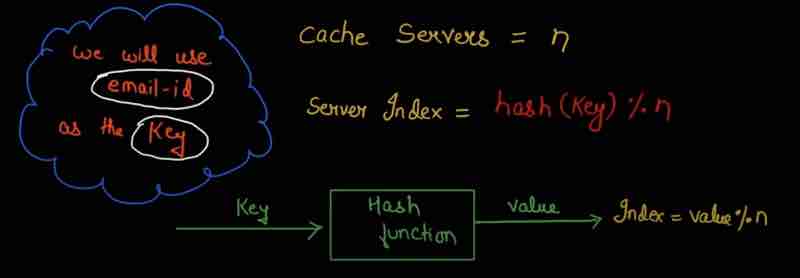
So, we'll give hash function a input and it'll give us a value. And we'll take mod of cache servers.
Suppose we have done indexing of those 3 servers, as 0 1 2.
So, whatever mod value will be, will be the place where our data will be stored.
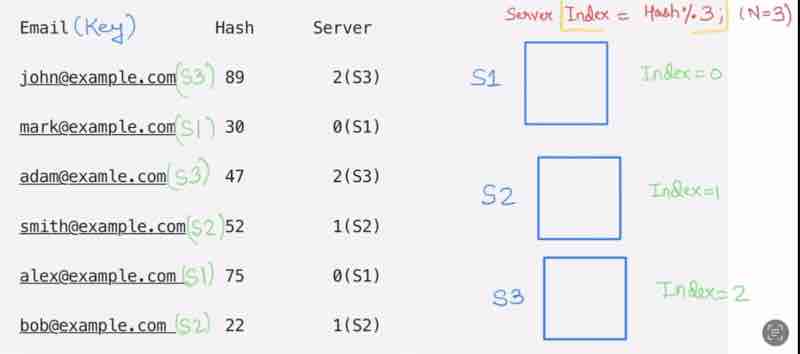
Suppose our server gets crashed, now our n becomes 2, and now when client searches for the data that was supposed to be stored in server 3, is now being redirected to server 1 or 2, showing that the data is actually missing, because the data was only stored in server 3 which is now crashed. This is known as cache-miss.
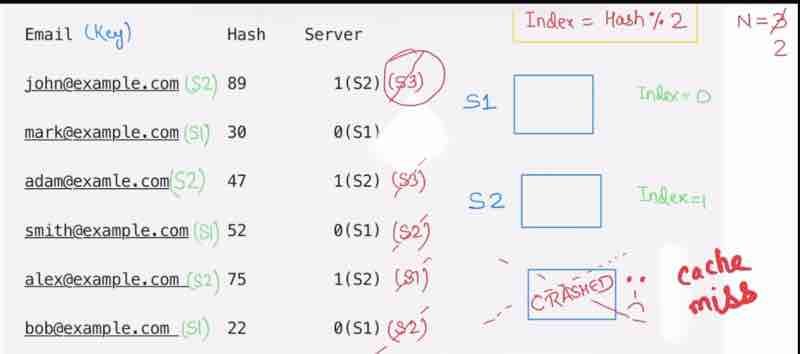
For just one server crash, I had to do rehashing of all users. And so many users having cache miss will degrade our performance. And we also have to go to database again and again to get the correct information, and store them in the correct server. So, we have to do so much of work for just one server crash.
So, this is a major problem.
How consistent hashing works and solves this problem?
Note:
Consistent hashing does not depend on the servers (Independent of servers) Uses a hash function, to first hash servers, then hashes values.
A hash function in consistent hashing:
maps servers in the hash ring
maps keys in the hash ring
Locate key in ring using hash funciton, Whereever you find a key, go in clockwise direction untill you find a server
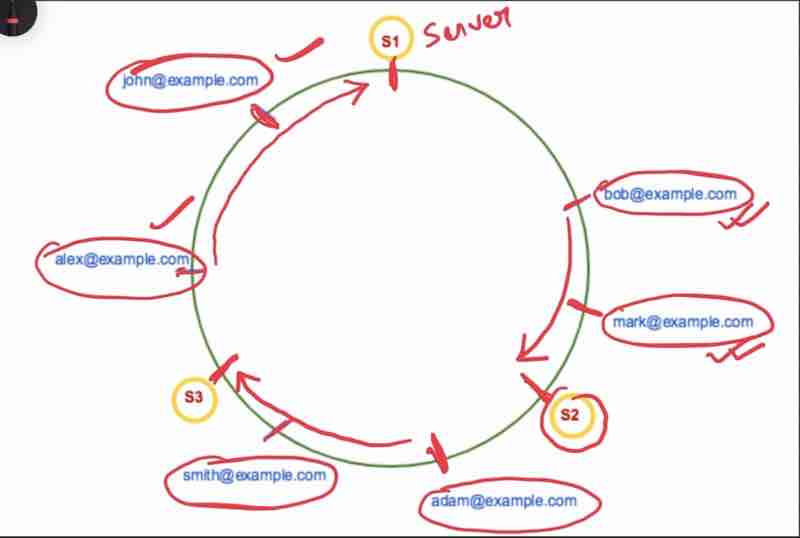
What we did:
1. Hash a server
2. Hash keys
How would all this help us to avoid the rehashing problem?
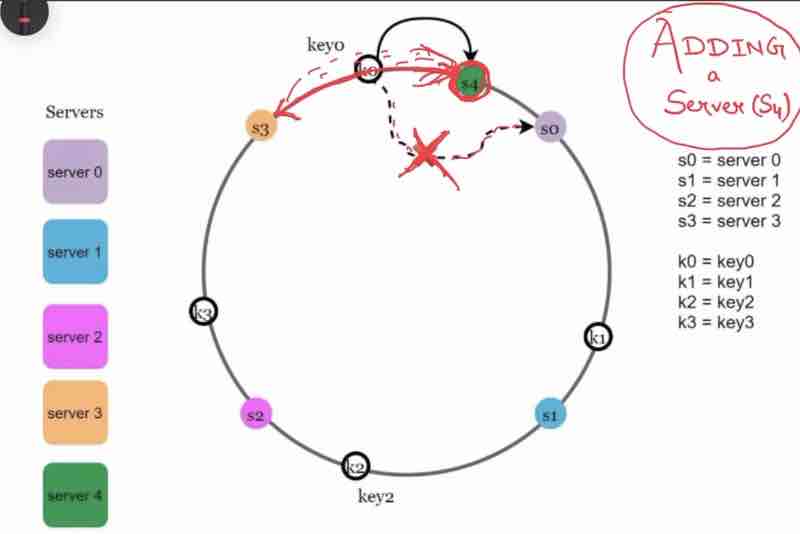
Case 1: Adding a server
When we add a new server to the ring after hashing, only the adjacent keys has to be changed.
Suppose we moved clock-wise, then only the keys that have found a new server earlier than that it was pointing to before will be rehashed.
In this example, just by adding one server S4, we only had to do rehashing of one key.
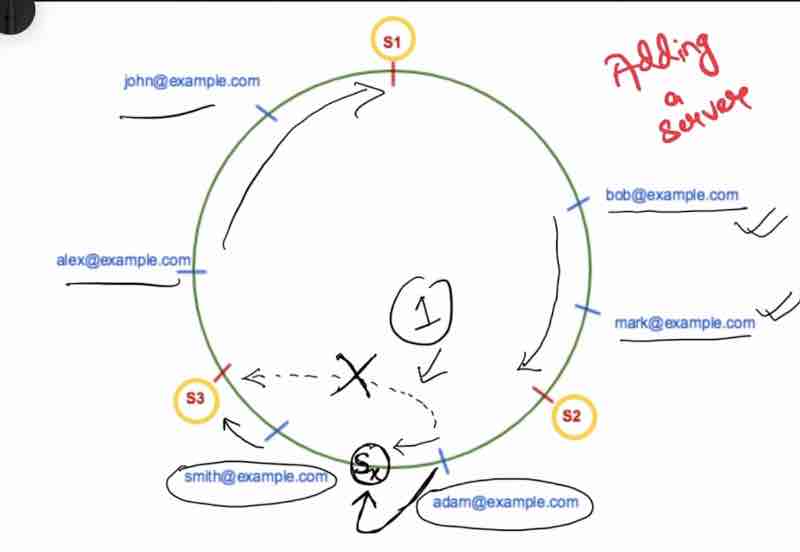
Case 2: Removing a server
Suppose server 2 got crashed, so it's keys connected to it that were reaching it through clock-wise direction will be rehashed to the new server that will be reached through that same clock-wise direction.
In this case, only 2 keys were required to be rehashed, rest remained as it is.
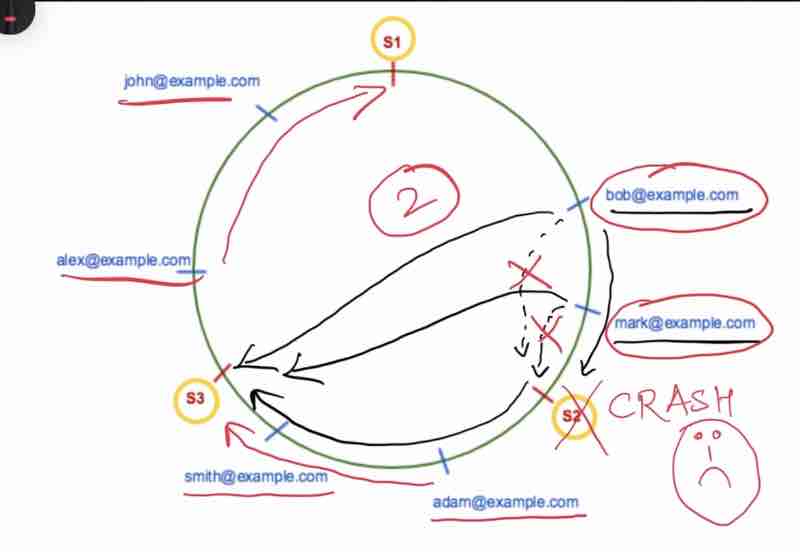
What are the problems of consistent hashing?
Recap :)
Map servers and keys on to a ring
Using uniformly distributed # funciton
To find server, we always move clock-wise
Interviewer: Can you point our problems above?
Candidate: There are 2 problems with above basic approaches:
Problem 1: The partition between servers being always equal is nearly impossible
Because servers are being added on scaling and being removed as well on being crashed

Problem 2: Keys can also have non-uniform distribution
Some servers may get overloaded, and some may get underloaded
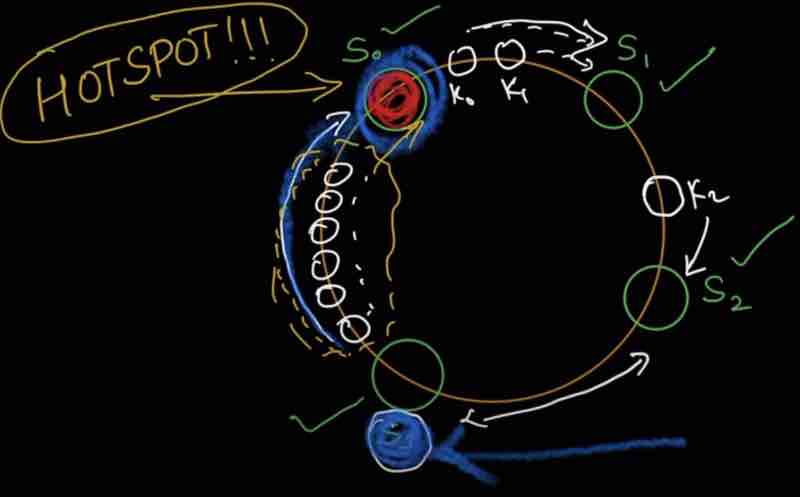
What to do to solve those problems above?
VIRTUAL NODES
IN CONSISTENT HASHING
Virtual nodes actually refers to the real node (server), just the way of representing becomes different.
For example, we are taking 3 virtual nodes for server 1 as S1_0, S1_1, S1_2 and for server 0 as S0_0, S0_1, S0_2
Note: In real world systems, virtual nodes are very very high.
We are actually doing partition in very small ranges.
And evenly distributing between them.
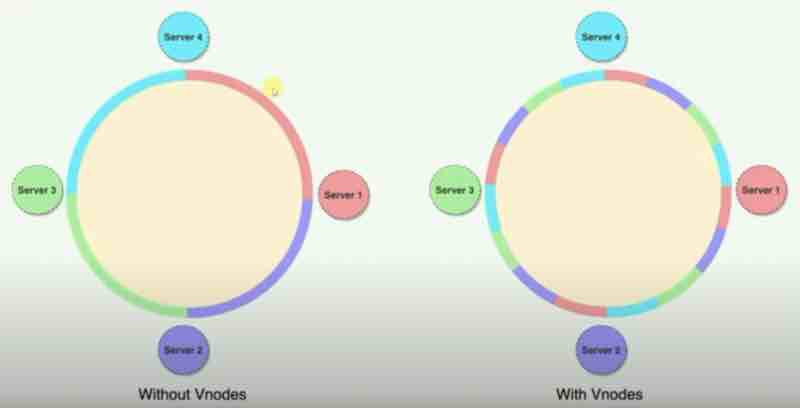
Without virtual nodes, our distribution had big regions between servers.
With virtual nodes, we are having smaller partitions switching context between servers.
Now, you have to locate which server has data for a key:
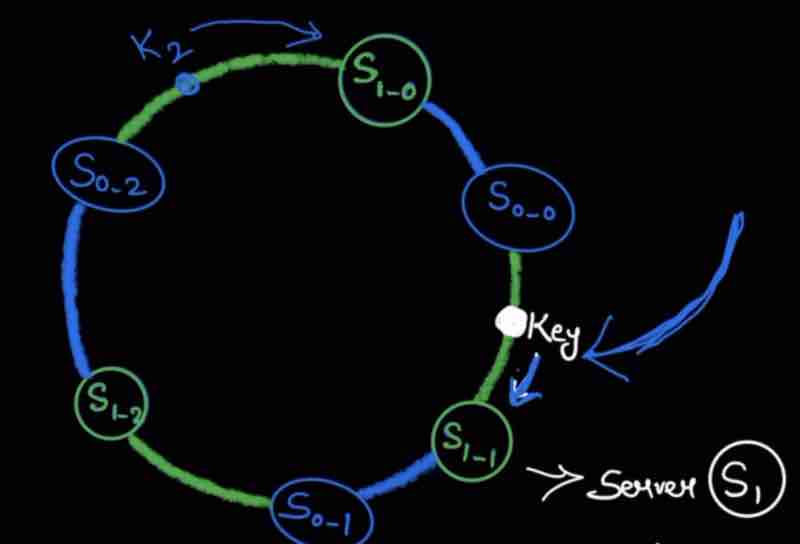
Interviewer:
How will you find affected keys when:
server is added
server is removed
Case 1: Adding a server
We have to find the affected keys from where the server has been added?
We can go anti-clockwise from the new server till we find another server
So, the region between the new server and the another server in anti-ck direction is where redistribution has to be done.
Case 2: Removing a server
Suppose our one server crashed, so we have to find the affected keys?
So, we'll go anti-clockwise from the affected server untill we find another server.
Now, all those keys in that region will now be pointing to the server next to the affected server in clockwise direction.
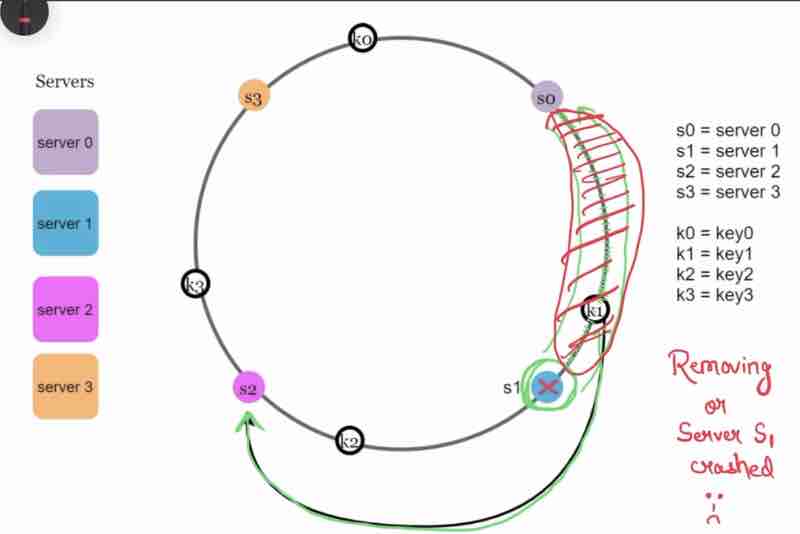
Consistent Hashing
Wrapping Up
Note: Always do a quick recap / summary for interviewer
We now know: Why need? How it works?
Minimum keys are redistributed (for server add, remove). Since data can now be evenly distributed using virtual nodes, easy to "horizontally scale". Avoids hotspot key problem (overloaded server) with the help of virtual nodes
Consistent hashing is widely used in real-world systems:
Amazon dynamo db, apache cassandra, discord app
This Page Has Been Intentionally Left Blank
DESIGN KEY-VALUE STORE
It is also known as Key-value database
It is a non-relational database (NoSQL)
"Key-value pair" -> requirement gathering
Value can be anything, strings, list, objects
Key must be unique -> requirement gathering
Key can be anything, either a plain text or hashed key
Interviewer: Design a key-value store that supports:
put(key, value) // insert "value" associated with "key"
get(key) // get "value" associated with the "key"
Candidate: What should be the size of the key-value pair?
Interviewer: It should be less than 10KB and it should be able to store big data.
Candidate: What about "availability" and "scability"?
Interviewer:
Availability should be very high, and it should respond quickly
Scalability: It should be scalable to support large data set
Note: Scaling should be "automatic"
i.e, addition/deletion of servers should be done automatically based on traffic
Candidate: What about 'Consistency' and 'Latency'?
Interviewer: Keep consistency tunable, and make sure of low latency.
[ Tunable consistency means in our master-slave db model, how many slaves have read/write as per master for system to be consistent, how many can be tuned by consistency level ]
SINGLE SERVER
KEY-VALUE DESIGN
How to implement key-value store in a single server?
For single server, it is easy to implement.
Take a hash table for example.
We will keep everything in memory.
Memory access if fast, but memory limited.
Space is constant.
Interviewer: Any improvement you can do?
Candidate:
We can compress data before storing in table.
We can store frequently used data in memory for quick access.
We can store the less frequently used data in disk itself.
Interviewer: Will it solve all our problems?
Candidate: No, even with above optimizations, a single server will easily reach it's capacity limit.
Interviewer: then anything else we can do?
Candidate: Yes, we can use "Distributed key-value" store (across many servers).
Interviewer: Okay, explain me about this in more detail?
KEY-VALUE DESIGN
IN DISTRIBUTED ENVIRONMENTS
Distributed key-value store (Distributed hash table)
Distributes key value pairs accross many servers
Remember always, for distributed system design, you must understand CAP theorem
CAP THEOREM
Consistency | Availability | Partition Tolerance
Consistency: All clients see the same data at the same time no matter which node they connect to
Availability: Any client requesting data gets response even if some of the nodes are down
Partition Tolerance:
Partition -> Communication break between 2 nodes
Tolerance -> Still system will continue to operate
Cap theorem says you have to sacrifice one thing in order to get other two properties, getting all three properties is impossible.
"Cap theorem": One of the three properties has to be sacrified to support two properties.
Now a days, key-value stores are available as:
1. CP systems: sacrified "A: Availability"
2. AP systems: sacrified "C: Consistency"
3. CA systems: sacrified "P: partition tolerance" [cannot be a system]
In real-life, network-failure is unavoidable, therefore CA is not possible
Examples:
In distributed systems, data is usually replicated multiple times.
Assume data replicated on 3 replica nodes (n1, n2, n3)
Then, what could be the ideal situation? (like being in a dream)
Network partition never occured. Data written on n1 will be replicated to n2 and n3 perfectly, therefore, both consistency and availability achieved.
However, in real-world distributed systems:
Partition cannot be avoided, so you either have to choose consistency, or availability.
( P is must, choose either C or A )
Suppose n3 goes down, and it cannot communicate with n1 and n2 anymore.
So, whatever is written on n3 cannot be propated to n1 and n2
So, n1 and n2 can have stale data because n3 is down
Case 1: Client writes on n1 and n2: then system won't propagate to n3
Case 2: Client writes on n3, won't propagate to n1 and n2 ( stale data )
Suppose you choose "Consistency" (CP)
then because you want consistency, you'll block all write operations on n1 and n2
System will be unavailable and shut down unless n3 comes back
So, you sacrified availability :( for consistency
Example: Bank Systems
Always we need up-to-date information
If inconsistency, then return error until resolved
Suppose you have 500 rupees in your account, and you have now added 500 rupees more in your account. Now, when you check it, suppose it is still showing 500 rupees, then you'll be in stress, because it should have been 1000 rupees. So, for banking systems, consistency is on way way top. So, there systems may have less availability for a trade-off to consistency.
Now, suppose you have choosen "Availability" (AP)
system keeps accepting reads and may have stale data
writes will be done on n1 and n2, and will be synced to n3 later when n3 is resolved
Suppose a client has fetched data from n3, he may get stale data because it has not been updated through n1 and n2, so you have sacrified consistency :( for a trade-off with availability.
Note: A crucial combination of cap theorem as per your need is a crucial step for "Distributed key-value store"
So, discuss / ask your interviewer what system would they need? cp or ap?
KEY-VALUE STORE
DESIGN DEEP DIVE
Core components and techniques to build key-value store
1. Data partition
2. Data replication
3. Consistency
4. Inconsistency resolution
5. Handling failures
6. System architecture diagram
7. Write path
8. Read path
DATA PARTITION
Large applications have very large data set, so it is infeasbile to fit data in a single server
Split data (Smaller partitions) into multiple servers containing some components
Two challenges:
Distribute data across multiple servers evenly
Minimized data movement when node are added or removed
What has helped us tackle these two challenges?
Consistent hashing
Revise :)
Servers are placed in hash ring
Key is hashed in the same ring
We go clockwise in the hash ring
What were the benefits of consistent hashing?
Automatic scaling, virtual nodes solved uneven distribution in hash ring.
DATA REPLICATION
For high availability and reliability, data must be replicated to N servers, ( where n is configurable as per our need )
Replication means having backup, and where would we store it? Server
Key mapped -> walk clockwise -> replicate to N servers
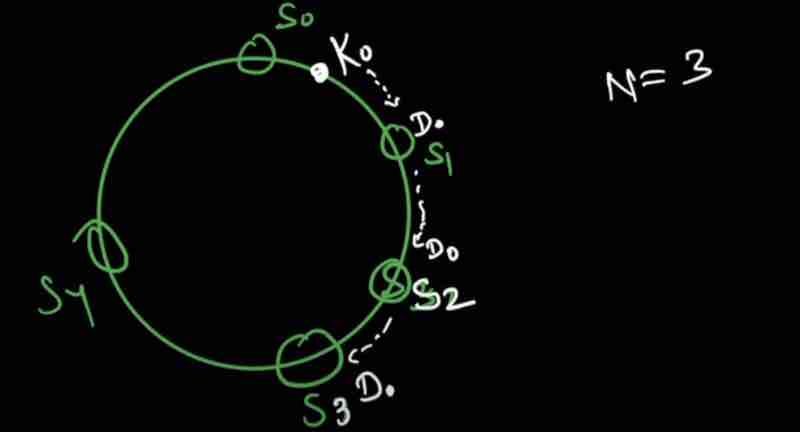
Replicate but in different data centers ( different locations ), why?
Suppose all replicas were in one data center, and when the data center got down, all the replicas along with the database will be gone, so what was the point of replicating data?
So, replicated data has to be done in different locations, not in just one location
TUNABLE CONSISTENCY
Interviewer when giving its requirements had said about Tunable Consistency, but what does it actually mean?
When data is being replicated in multiple nodes, we have to be careful about consistency, they must be sychronized
[ NWR ]
N: Number of replicas
W: Write quorum of size W
R: Read quorum of size R
What is "Quorum"?
Quorum is like agreement, settlement. For example:
For write operation to be successful, atleast "W" replicas must send acknowledgement that write operation has been done.
For read operation to be successful, I will wait for atleast "R" relicas to send the acknowledgement that they are done.
Let us understand with an example,
Let's take N = 3:
So, data has been replicated in three servers S0, S1, and S2. We have a Coordinator as well tracking the read, write operations.
Coordinator is like a middleware between the client and the replica nodes (servers)
When W = 1, Coordinator will say, I need atleast one server to confirm my write operation
Because servers are replicas, the same write operation from the client has to be done in all servers, and they all will return acknowledgement after their operations
For W = 1, if just one server responded with it's write operation acknowledgement then I'll mark it successfull and go ahead without waiting for the acknowledgement of other 2 servers
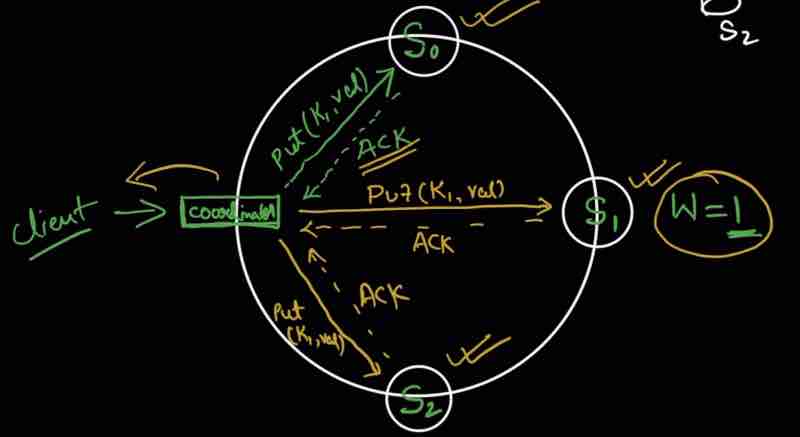
So, the configuration of W, R and N is a typical tradeoff between Consistency and Latency
For W = 1, write operation is returned quickly because operation of other replicas will not be waited
For R = 1, read operation is returned quickly without waiting for the acknowledgement from other replicas
Latency will be low (quick response), but it is not good for consistency ( we are not sure of other replicas may contain stale data )
So, there is always a tradeoff between consistency and latency
Let us see more cases,
W or R > 1: Consistency will be good, but latency will increase because we have to wait for the response from more than one replica nodes.
Special case:
W + R > N: Strong consistency gauranteed. How?
Suppose N = 3, we have three replicas
Now, we have taken W = 2, and R = 2
When W + R > N, consistency is gauranteed
How consistency is gauranteed? Because we are sure to have at least one replica where both the read and write operations have overlapped always
Atleast one overlapping node will be there containing the latest data ensuring our consistency
How to configure N,W,R to fit our use case:
If R = 1 & W = N, then Fast Read
If W = 1 & R = N, then Fast Write
If W + R > N, strong consistency gauranteed
And mostly, W = R = 2 and N = 3 is taken
If W + R <= N, then consistency never gauranteed :(
So, we are able to tune the consistency also by manipulating the value of W, R or N, and because of tuning, our consistency varies.
That's exactly what “ Tunable Consistency “ means.
"Depending on requirement, you can tune W,R & N to achieve your desired consistency"
Interviewer: Do you know about "consistency models"?
Candidate: It tells us about the level of consistency. [ Degree of data consistency ]
So, there are three types of consistency:
1. Storng consistency: Client never sees out of date data. Always updated data (no matter how much read/write operations)
2. Weak consistency: Subsequent read operation may not see the latest data always
3. Eventual consistency (a form of weak consistency): Given enough time, all updates are propagated to replicas and they are updated
Interviewer: Do you think "Strong consistency" is good?
Candidate: "Strong consistency" will have to block read/write operations untill current write operation is updated to all replicas. So latency will increase a lot, and our system will not be available for that time being. It is not good at all for highly available systems.
Interviewer: What will you use for "Key-value" store?
Candidate: We should use "Eventual Consistency". Dynamo & Cassandra also adopted "Eventual Consistency".
INCONSISTENCY RESOLUTION
Why do we do replication?
For high availability but causes inconsistencies among replicas
Suppose we replicated data in n1 and n2
By getting data from them, it'd be same initially
Suppose n1 and n2 have been updated separately using put() with different names
Now, the names in n1 and n2 will not be same even though they are deemed to be replicas leading to inconsistency
It's like n1 was updated firsrt, then n2 updated the same data, therefore, n1 has version 1 and n2 has version 2
So, when inconsistency like this arises, somehow if we could have history, we could have resolved this.
So, when conflict arised? You have to see how we can resolve the conflict by knowing the past versions.
VECTOR CLOCK
A pair [Server, Version] associated with a data item.
Example, We have a data D, which server has updated it and what version of updating it is holding now?
D[Sx, 1] -> D[Sx, 2]
Suppose there is a client who has made request to write data on my system, and suppose the write request has been handled by server Sx, so its vector clock will be D1([Sx, 1]).
Suppose another client came, and again did a write operation on data, so because the server was same, it's version will now be changed as, D2([Sx, 2])
Suppose another client came again, read the db, and updated the data into D3, now this update was handled by a different server Sy, so our vector clock will look like this, D3([Sx, 2], [Sy, 1])
Suppose another client came, read the db, and updated the data into D4, now this update was handled by a different server Sz, so our vector clock will look like this, D4([Sx, 2], [Sz, 1])

Suppose another client came, and asked for a read request, and he'll see both D3 and D4 and he'll find a conflict, because D2 was changed by two different parties in their own ways, now, the client can resolve this conflict by themselves, by writing some logic we provide, and suppose Sx server now handles D5 data after conflict resolving, so our vector clock will look like this, D5([Sx, 3], [Sy, 1], [Sz, 1])
What are the benefits of vector clock?
We can track Ancestors: D([S0, 1], [S1, 1]) -> D([S0, 1],[S1, 2])
We can find siblings (conflicts) and can resolve them easily
Disadvantages:
Complexity -> Client needs to implement conflict resolution logic
[Server, version] pairs grow rapidly. We can set a threshold and if limit exceeds then we can safely remove the oldest pairs, but then there will be inefficiency in resolution ( old history deleted )
But, according to Dynamo paper, Amazon has not faced such problems yet.
HANDLIND FAILURES
Failures can be either temporary or permanenet.
If your system is large, then failure is common (unavoidable), but we should be able to deteect that a failure has actually occured.
Failure Detection In a distributed system,
If server 1 is down, then if only one other server tells me that server 1 is down then I can't trust it, at least 2 or more servres acknowledging me about the server 1 failure then only I can trust on this that server 1 is down
When all servers must know about each other, this is known as all-to-all multicasting
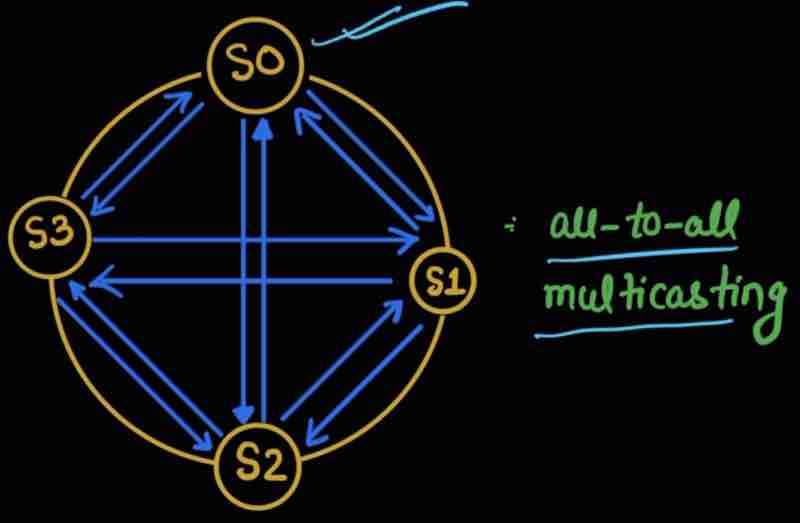
But this is an unefficent way to handle it when there are a lot of servers of your service.
There is a way, “ Gossip Protocal “
Every node has a membership list
And they have [ Member ID, Heartbeat Counter, Time ]
Every server has a membership list of all other servers, and every sever increments their heartbeat coutner periodically
And every node periodically sends their heartbeats to random nodes
When a node checks the heartbeats and finds a node not being updated since a lot of time, then that member node is said to be offline
So, when other servers also confirm a server being down after some time, we are sure of it
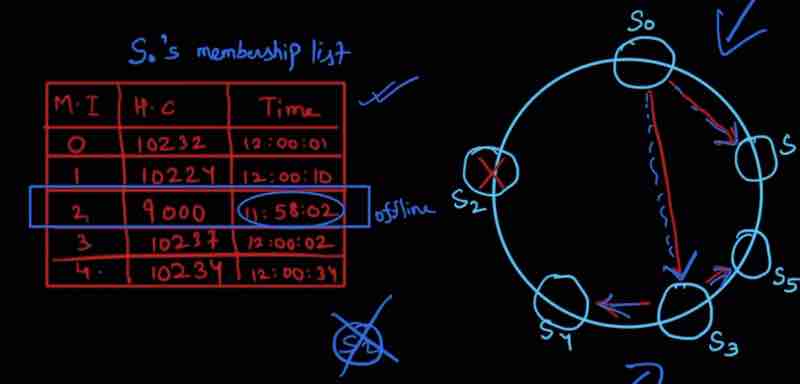
Now, we have detected failures, but we have to handle it as well:
Temporary Failures
Strict Quorum: Read/write blocked (for consistency) However, this is not good, to down your server, just for the sake of consistency.
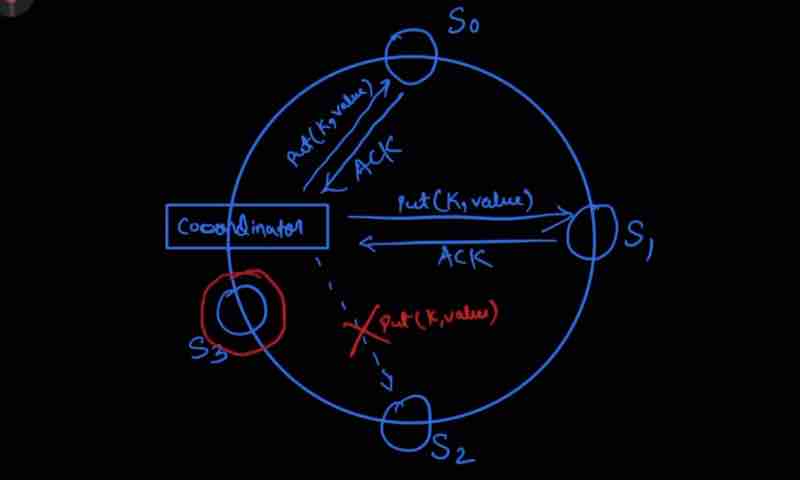
Sloppy Quorum: Used to improve availability
In a hash ring,
we allow first W servers to write,
and allow first R servers to read.
When server is down, some other server will process requests temporarily. Once it is up, changes will be pushed back to achieve consistency. This is known as Hinted Handoff.
For example, when server 2 is down, then it's request put() will be handled by server 3 till it is down, and when server 2 is up again, server 3 will push it to server 2, this is hinted handoff.
Permanent Failures
We implement "Anti-entropy" protocol to keep replicas in sync.
Anti-entropy: Compare piece by piece the data in replicas and updating them.
We use "MERKLE TREE" (hash tree)
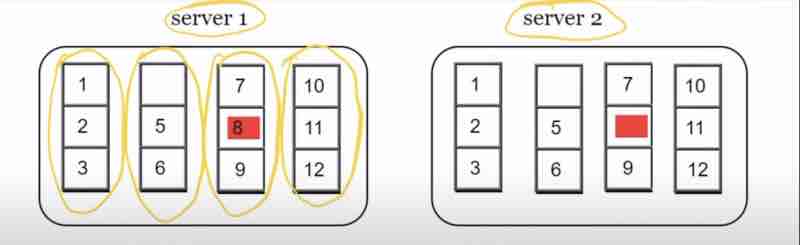
Suppose we have server 1 and server 2 being replicas of each other, and we have 12 keys, so what we'll do is distribute these keys into buckets
So, what we do is hash these key buckets, and we'll get the same corresponding box in server 2 with respect to the box in server 1 which is having the inconsistency
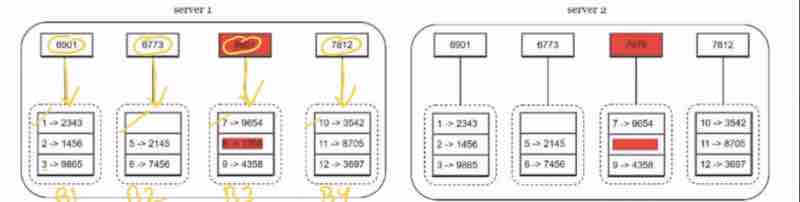
What we do is build a tree upwards, by creating a hash of its children, so this upward tree is known as "Merkle Tree"
So, we start comparing from the top of merkle tree in both server 1 and server 2. When these hash codes are different, that signifies that there is inconsistency somewhere in its children.
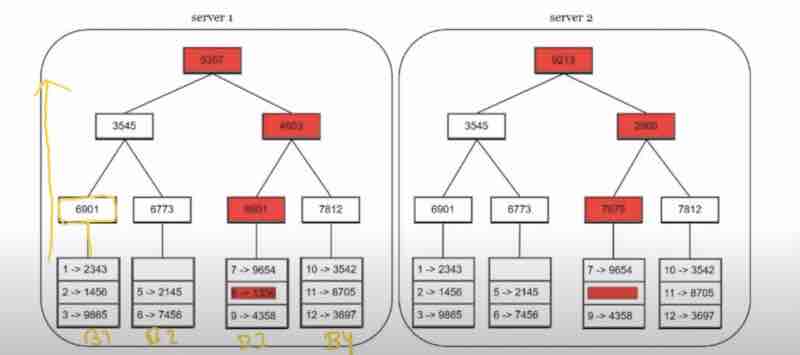
Because the root of server 1 and server 2 is inconsistenct, we check for its children, the left child is consistenct in both nodes, so we ignore it, but the right child is inconsistent in both the nodes, so we'll go furtther deep in it, and we'll only compare the bucket being inconsistent corresponding to it once we find it.
Benefit of using Merkle Tree:
" Amount of data to be synchronized will be proportional to the differences between the two replicas "
The data which is equal is simply ingored using our merkel tree, and the data will be in sync when their roots are in sync
Handling data center ourage:
Like power outage, network outage, natural disaster
We should replicate data across multiple data centre locations
KEY-VALUE STORE
SYSEM ARCHITECTURE DIAGRAM
What it'll have:
A client communicating through the key-value store using two apis, get(key) and out(key, value)
We also used a coordinator node, which acted like a proxy between client and key-value store
Nodes were distributed on a ring using consistent hashing
The adding and removing of nodes (servers) are automatic
Data is being replicated in replicas
There is no single point of failure: Multiple nodes
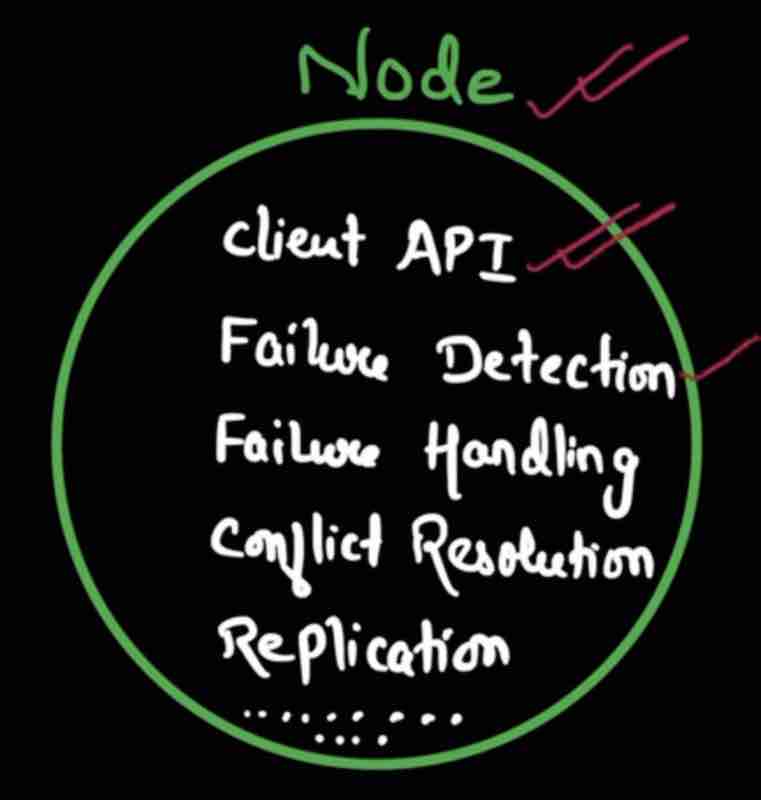
Let'd draw the diagram together:
1. A client will communicate through the server using apis, read/write through get,put so we'll show this
2. The server will send a response to the client. The server nodes are stored in a hash ring, so we'll draw this
3. We'll show one coordinator that is directly communicating with the client
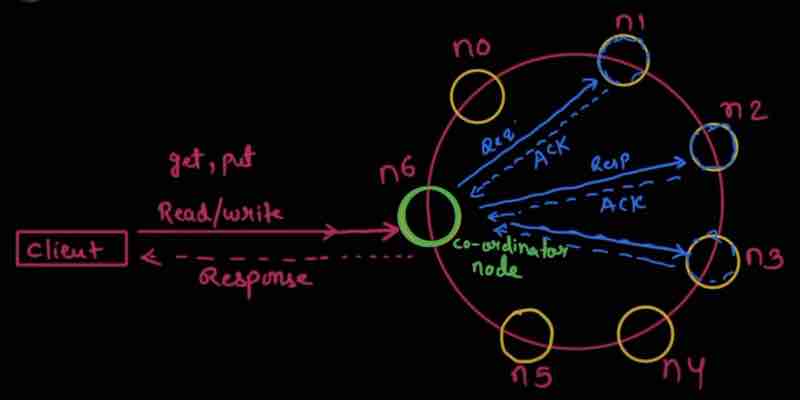
So, when I'm reading the data through the node, what'd be the steps and the journey that we're getting the response. This read journey is said to be Read path.
Similarly, when I'm requesting a write operation to the node, what'd be the steps and the journey before we're getting the response. This write journey is said to be Write path.
We'll see the real Casandra key-value store example and see how it's actually working
READ PATH AND WRITE PATH
The read and write path we're going to study is based on the Cassandra database,
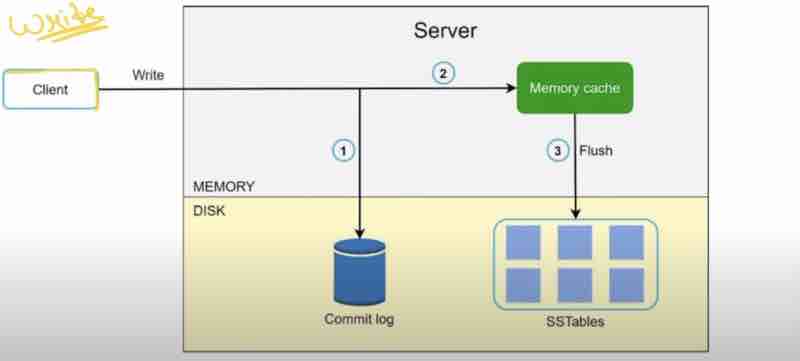
We're seeing a particular node zoomed in, not just a cluster of nodes in a hash ring, taht we've already seen.
Whenever a write request comes, it'll always commit a log request, to have persistence, with time and meta, now, the request has been stored in the memory cache first, but our cache has a threshold, a limit, when it crosses a particular threshold, then we flush out the memory cache in a memory table known as SSTables ( Sorted string table of <Key, Value> pairs )
Now, let us see the read path for a particular node zoomed in.
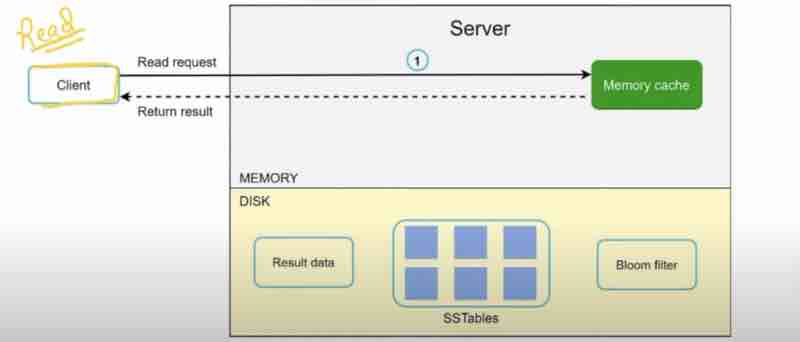
When a read request comes, we'll first check it in the memory cache, and send the response directly, making it faster. Suppose it was not in cache,
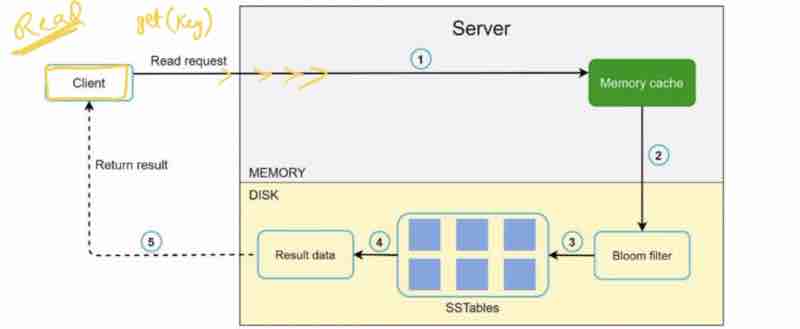
So, it'd definately be present in the SSTables. But to search in the SSTables, we need a filter, so we'll use Bloom filter, which will help us find in which SSTable is exactly our key stored. Suppose "K" table, we got the result data, and we returned the result to the client.
Only with bloom filters, we're able to find the key in the SSTables.
Let us see the summary, and see what we have understood:
1. Ability to store big data: Use consistent hashing to spread the load across servers
2. High availability reads: Data replication multi-data center setup
3. High available writes: Versioning and conflict resolution with vector clocks
4. Dataset partition: Consistent hashing
5. Incremental scalability: Consistent hashing
6. Heterogeneity: Consistent Hashing
7. Tunable Consistency: Quorum consensus
8. Handling temporary failures: Sloppy quorum, hinted handoff
9. Handling permanent failures: Merkle tree (anti-entropy)
10. Handling data center outage: Cross-data center replication
This Page Has Been Intentionally Left Blank
DESIGN A UNIQUE ID GENERATOR
IN DISTRIBUTED SYSTEMS
First Thought: We will have a database and a table within it, and a primary key with "auto-increment" attribute
What are the problems in this approach?
Single database is not large enough
Generating unique-ids in multiple databases is challenging
What to do then?
Understand The Problem
And Establish Design Scope
Candiate: What are the characteristics of unique-ids?
Interviewer: IDs must be unique and sortable
Candidate: For each record, does ID increment by 1?
Interviewer: Increment can be done with time, but necessarily by 1
For example, the ids generated in evening must be greater than the ids generated in the morning
Candidate: Do IDs contain only numerical values?
Interviewer: Yes
Candidate: What should be the requirement of the length of the IDs?
Interviewer: IDs should fit in 64-bit
Candidate: What is the scale of the system?
Interviewer: System should be able to generate 10,000 IDs per second
Therefore, collected requirements are:
IDs must be unique
Numerical values only
64 bit only
Ordered by data
10,000 unique IDs/sec
UNIQUE ID GENERATOR
Propose High Level Design
Multiple options can be used to generate unique-ids in distributed systems
1. Multi master replication
2. UUID (universally unique identifier)
3. Ticket server
4. Twitter Snowflake approach (very popular)
Multi Master Replication
It uses database "auto-increment" feature
But instead of incrementing IDs by 1, we'll increment it by "K"
K = number of database servers in use
Let's see a diagram with K = 2
Suppose there are 2 database servers attached to multiple web servers. How will it generate unique ids?
The unique ids generated in 1st database will start from 1, and follow up with K gap, 3, 5, 7, and so on
Similarly, the unique ids generated in 2nd database will start from 2, and follow up with K gap, 2, 4, 6, 8, and so on
Now, you can see unique ids are not clashing.
The next id generated is equal to the previous id plus number of database servers
This solves some scalability issue. How?
Major drawbacks:
Hard to scale with multiple data centers (difficult to synchronize between all data centers)
When a server is added or removed, then it'll be a problem and will not scale well
UUID (Universally unqiue identifier)
128 bit number
It is a easy way to obtain unique IDs
Very low probability of getting collision
Fact: 1 billion UUIDs/second for 100 years probability of single collision will be 50%
It can be generated independently without coodinating with servers, and without worrying about any collision
Example: 123e4567-e89b-12d3-a456-426614174000
Diagram:
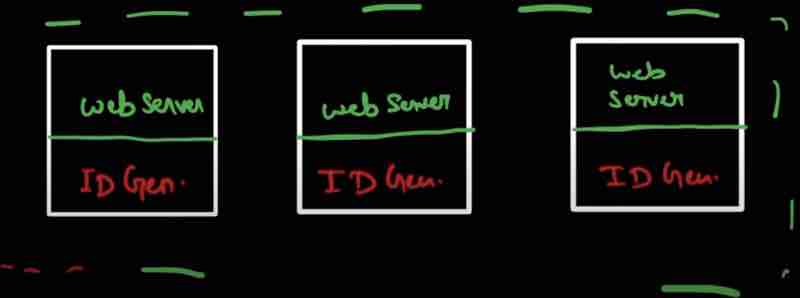
All servers can generate their UUIDs separately, and they can independently generate their IDs without any collision
Pros:
Generation is very simple
No coordination within servers required
So, no synchronization issues
And easy to scale up
Cons:
UUIDs are 128 bits long, but our requirement was 64 bits
IDs could be non-numeric as well, but our requirement was only numeric
Ticket Server
It was developed by a company named as FLICKER
They wanted to generate distributed primary keys and it worked
So, how does it work and what is it's idea?
"Use a centralized auto-increment feature in a single data server (Ticket server)"
Let's see this with a diagram:
We have a single database, and multiple web servers eager to have their unique ids provided to users.
Our centralized single database server will be our ticket server, and will be responsible for our ticket id generation.
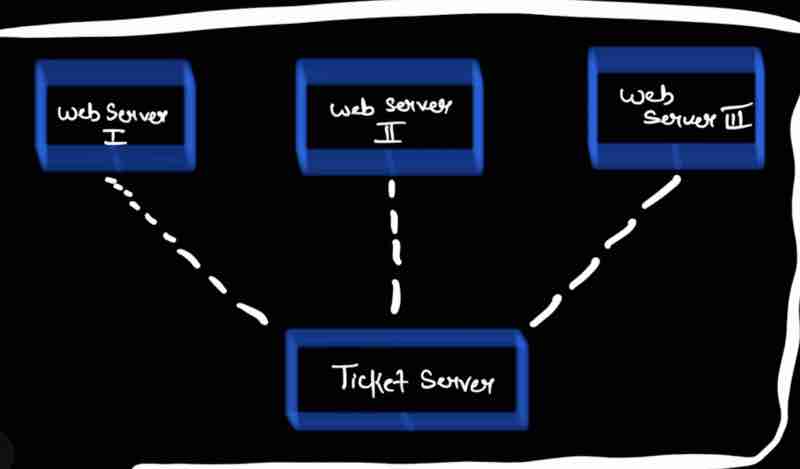
Pros:
Numeric IDs
Easy to implement
Works for small to medium scale applications
Cons:
Single point of failure being ticket server, if this gets down, then all web servers dependent on this ticket server will be impacted, so it's very risky
To avoid SPOF, we can setup multiple ticket servers, but this will introduce challenges like "data synchronization" between ticket servers
Twitter Snowflake Approach
(Very Popular)
It was developed by Twitter
It is a optimized concept of UUIDs, keeping IDs sortable and ID size between 64 bit

The first 41 bit is Epoch timestamp in milliseconds
It is the timestamp from a particular starting point to current time
The 10 bit machine ID ( 2^10 = 1024 machines accomodated )
The 12 bit sequence number is the counter bits to count the number of IDs being generated
The 12 bit is generated by local counter for every machine
The 1 bit is an extra bit for future use, it's default is set to 0
Advantages of Twitterflake:
1. Sortable by time: They have a timestamp in the beginning
2. 64 bit: Less storage size requirement
3. Scalable: 1024 machines bro
4. Highly available: 1024 machines and each machines generates 2^12 = 4,096 unique IDs each millisecond
Disadvantages of Twitterflake
1. We have to maintain machine IDs
2. Generated IDs are not random like UUIDs, so they are predictable and can cause security issues
UNIQUE ID GENERATOR
Design Deep Dive
We're going to use the twitter snowflake approach for our design
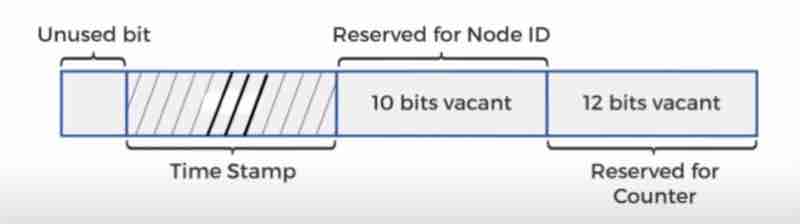
NODE IDs (10 bits): Choosen at the startup. Generally fixed when the system is running. Use MAC Address - Unique for every machine
Time Stamp (41 bits): As timestamps grow with time, IDs are sortable by time
Time Stamp (Binary) w.r.t epoch can be converted to decimal to milliseconds to UTC time
Maximum time stamp with 41 bits: 2^41 - 1 = 2.199×10¹² = 69 years
So, after 69 years, we will need new epoch itme or some other technique to migrate IDs.
Counter (12 bits): 12 bits = 2^12 = 4,096 combinations (4096 ids per millisecond)
Let's take a real-life example to better understand this,
UNIQUE ID GENERATOR
System Design
Example: A social networking application calls ID generator to assign unqiue ID to each post
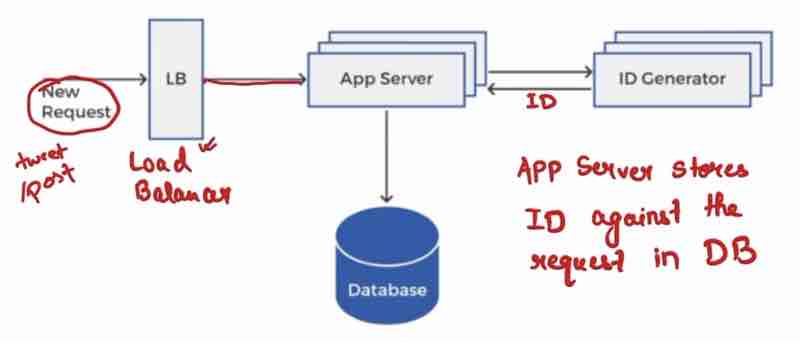
Let's zoom inside the ID generator
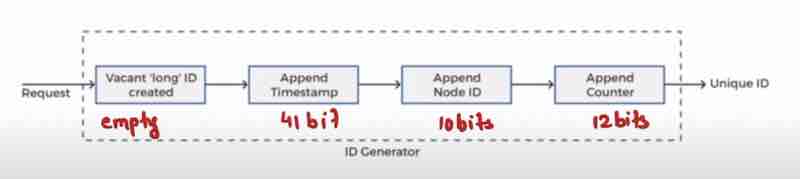
UNIQUE ID GENERATOR
WRAP UP
What we discussed so far:
Multi master replication, UUIDs, Ticket Server, Twitter snowflake
We settled for twitter snowflake because it supports all our usecases and scalable in a distributed environment
Additional points to disscus in intervew:
1. Clock synchronization:
We asume ID generation servers have the same clock. Might not true when a server is running on multiple cores.
For this, we use "Network Time Protocals"
2. Fewer sequence numbers but more time stamp bits
Sounds like a good idea for long-term applications
3. High availability: ID generator is a mission-critical system, so it must be highly available, "Mission-critical" means for our system and process to be successful, this plays the most crucial role
For example, if someone posted on twitter, then to actually post it and save in database, unique ID is necessary, and if an ID is not generated, I cannot save the post in the database, and therefore our whole operation will be blocked
This Page Has Been Intentionally Left Blank
DESIGN A URL SHORTNER
It is a very popular system design question asked by famous companies like Microsoft, let's ask questions as much as we can to gather information from our interviewer.
Understand The Problem
And Establish Design Scope
Candidate: Can you give an example on how URL shortner works?
Interviewer: Assume URL
"https://www.interview_ds_algo.com/q=course&c=loggedin&v=v3&l=long" -> original url
Your service should create an alias with shorter length.
Example: "https://tinyurl.com/y7keocwxyj" -> shortened url
If you click on this link, it should redirect to original url
Candidate: What is the traffic volume?
Interviewer: 100 million URLs are generated / day
Candidate: How long is the shortened URL?
Interviewer: As short as possible
Candidate: What characters are allowed in shortened url?
Interviewer: Can be a combination of numbers (0 - 9) and characters (a - z), (A - Z)
Candidate: Can shortened URLs be updated and deleted?
Interviewer: For simplicity, assume that they cannot be updated or deleted
Gathered requirement:
url shortening: long url -> short url
url redirecting: short url -> redirects to long url address
It should have high availability, scalable, fault tolerance
DESIGN A URL SHORTNER
Back Of The Envelope Estimation
1. Write opeartion: 100 million urls / day
2. Write operation per second: 100 million / 24 / 3600 = 1160
3. Read operation: Assume that users read 10 times the write operations
So, read operations / second = 1160 * 10 = 11600
Assume our service is available for the next 10 years
So, we must support 100 million * 365 * 10 = 365 billion records :)
Assume average url length = 100
Let, 1 byte for each character
So, total = 100 * 1 = 100 bytes per URL
Storage requirements for 10 years
We have to support "365 billion" URLs over 10 years
Per URL = 100 bytes
Total storage = 365 billion * 100 bytes = 365 TB
For our service to run for 10 years, it should have 365 TB storage
Hence, we got the total storage estimation of our service
DESIGN A URL SHORTNER
Design Deep Dive
We'll consider three things
1. API endpoints
2. URL redirection
3. URL shortening flows
API end-pints: Our service need two api end points
1. For shortening a url as per user's request
[ POST api/v1/data/shorten ]
Request Parameter: {longURL: <longURLString>}
Return <shortURL>
2. Redirecting a shortURL to longURL
[ GET api/v1/shortURL ]
Returns LongURL for redirection
URL redirection
If I click a shortURL, how'd it redirect to LongURL in browser?
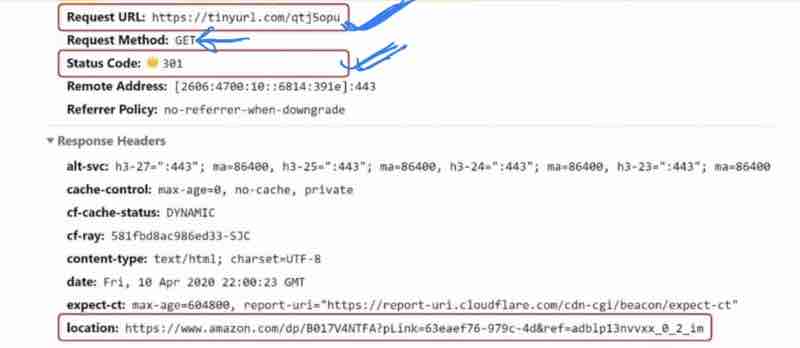
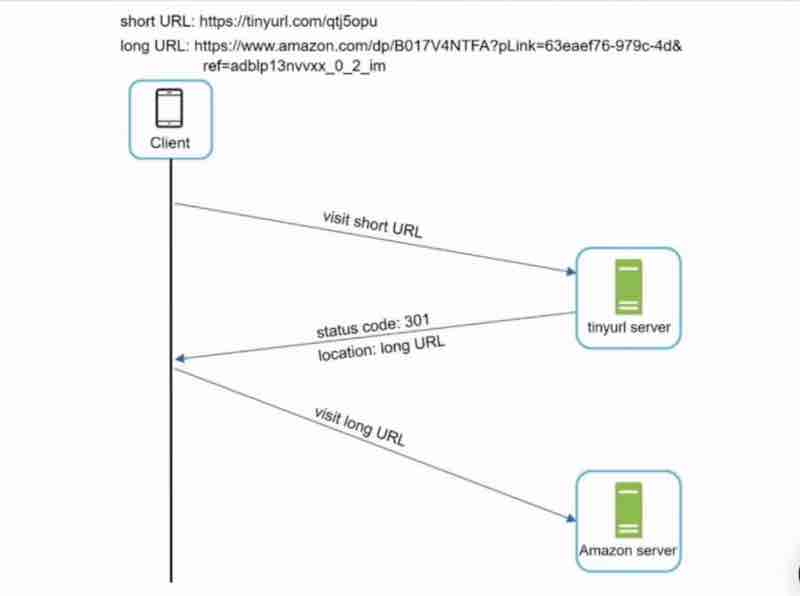
Code 301 Vs Code 302
When our client asks the tinyurl service to get the longurl from our tinyurl, then our tinyurl server returns the longurl with the status code 301 which redirects us to the long url like amazon server
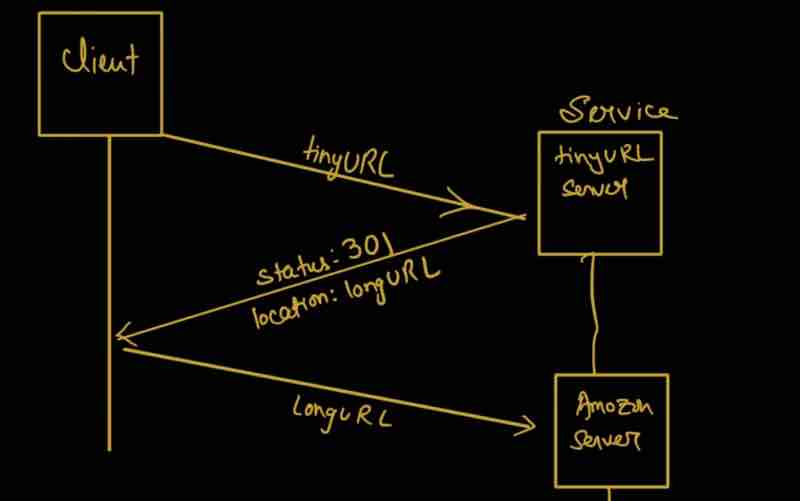
301 Redirect:
Requested URL (tinyurl) is "Permanently" moved to long url
Browser has cached the response and will reduce load on tinyurl server requests
So, next time we click on that tinyurl, the request will not be sent to tinyurl service
Now, direct longurl will be redirected through the use of browser cache
302 Redirect:
Requetssed url (tinyurl) is "Temporarily" moved to long url
If the user clicks on the tinyurl again, it'll again send the request to tinyurl again
So, again and again the request will go to the tinyurl server without use of any browser cache
Pros & Cons of 301 and 302 redirect and which one to use first?
If we want our tinyurl service to have less load on us, we'll use 301 code :)
If we want to temporarily redirect users to a url, suppose our site is in maintainance, and only till then, redirect should happen, we'll use 302 for this
Also, 302 is good for seeing the analytics, we can track click rate, and even the source of click
URL Shortening Flows
First, let us discuss, how "URL redirection" actually works
tinyURL redirection to longURL
We'll use a map<String, String>
The map will have the key as tinyurl and the value as the longurl
How can we short these urls now?
Example: www.tinyurl.com/{hash_value}
We need a hash function (Fx) such that:
LongURL -> (fx) hash -> www.tinyurl.com/qtj50pohu
How should our hash function (fx) be like?
Each longurl must be hashed to one hash value
Each hashvalue can be mapped back to longURL
Now, we’ll discuss further these topics,
1. Data Mode: Which database to use?
2. Hash Function: If it comes in design, we have to deep dive?
3. URL Shortening: How it works?
4. URL Redirection: How it works?
Data Model
Data Model: Why do we need a database when we were using hashtable?
Hashtable is not feasible enough for real-world systems. Why?
Memory resources are limited and expensive
So, better option is,
<shorturl, longurl> -> store in relational database
Interviewer: # How table will be designed?
Candidate: We'll use 3 columns
id = primary key and "auto-increment"
shorturl as string
longurl as string
Hash Function
It should have only one responsibility, to convert our longurl to shorturl by providing us with a "hashvalue"
Interviewer: What should be the length of the hash value you are using?
Candidate:
Hash value can have [0-9, a-z, A-Z]
Total possible characters = 10 + 26 + 26 = 62
Suppose our hash value is n
For every position, there are 62 possibilities
= 62^n possibilities
By our back of the envelope estimation, we have to support 365 billion values
So, n should be that much which could support 365 billion or more
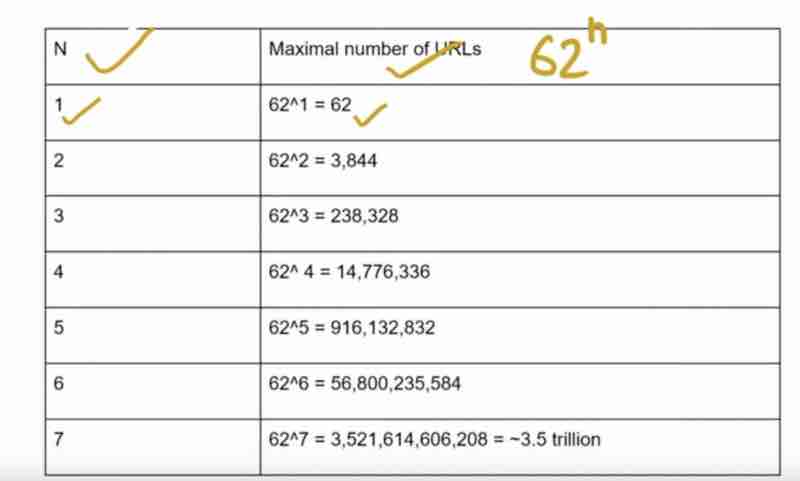
For n = 7, it is more than enough to store 365 billion URLs
Interviewer: What hash function will you be using?
Candidate:
1. "hash + collision resolution"
2. "base 62 conversion"
Hash + Collision Resolution
We want a hash function that could take a long url and give me a unique 7 character string (hashed value)
Straight forward solutions: Use well-known hash functions like:
CRC32, MD5, SHA-1
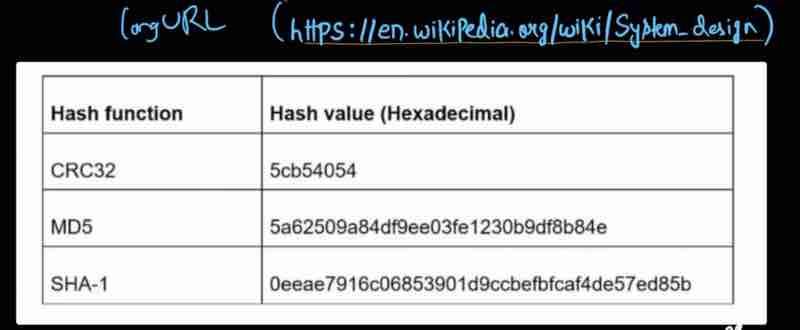
We can use these hash functions to generate hash value, but even the smallest one is of 8 characters, which is not as per our requirement
What we can do is just take the first 7 characters of our CRC32 hash value. But there is a problem, look here,
Example: 5cb54054 and 5cb54059
The first 7 characters of these hash value are same which is hash collision
The values will not be unique, it'll be "Hash Collision"
Whenever collision happens, append a pre-defined string and try again untill we find "no collision"
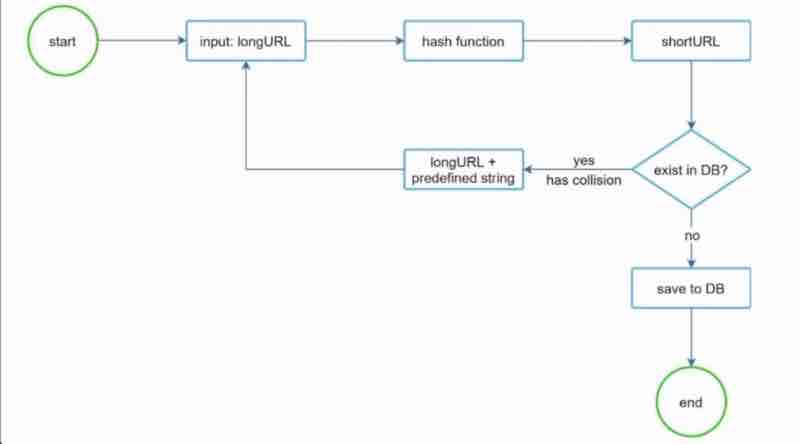
In this diagram, we take the input as longurl, give it to the hash function, and take out our 7 charcter short url from it, now, if those 7 character string already exists in the db, it is a hash collision, so we'll add a predefined string to that longurl, and again run a hash function on it, maybe this time, we get a unique first 7 characters, once we find that there is no collision, we save it to db.
But look carefully, it is a tedious work, we're querying to the db again and again unnecessarily. It's not good for our system and may slow down.
For this, we have to take into picture the "Bloom filter", through which we can quickly find out whether a given hash is already present in the db or not.
Base 62 Conversion
Hashed value can have a total of 62 characters,
[0 . . 9 , a . . z, A . . Z]
Take a unique number, suppose auto incremented id of a MySQL database
For Example, let us take a unique number to be 11157, we have to convert this to base 62
What we can do is do numbering of our characters [0 . . 9 , a . . z, A . . Z] containing 62 characters as 0 to 62 for our hash value
Let us now, divide 11157 with 62 -> the result is the reminders 59, 55, 2 for which our characters mapped will be 2, T, X
What is the difference between these two techniques, hash + collision resolution abd base 62 conversion ?
Which one would you use, and which one is better?
In hash + collision resolution, the short url length is fixed, and it does not need a unique id generator, collision is possible here and must be resolved, and it is impossibl eot figure out the next available short url because it does not depend on id.
In base 62 conversion, the short url length is not fixed, it goes up with the id, and this option depends on a unique id generator, collision is impossible here because id is always unique, and it is easy to figure out the next available short url if id increments by 1 for a new entry, and this can be a security concern.
DESIGN A URL SHORTNER
URL Shortening Deep Dive
Let's draw the diagram together:
1. First we take input from the client, the long url
2. Check the long url in db, and whether it already exists or not
3. If the long url is present in db, simply return the short url
4. If not present, then we'll use the base 62 conversion method
5. To use the base 62 conversion, we'll need a id, so we'll generate a new unique id
6. Now, we'll convert this id, to short url, using base 62 converison
7. Now, we can store the short url in the database [save id, short url, long url]
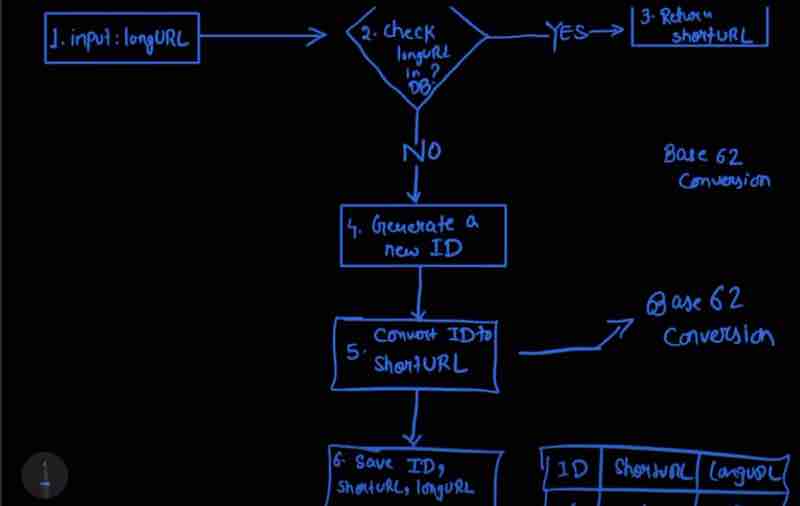
Example,
Longurl: https://en.wikipedia.org/wiki/System_design
Unique id generator returns id: 20138653
Convert id to shorturl using base 62 conversion: "mten2f3"
Our shorturl: www.tinyurl.com/mten2f3
DESIGN A URL SHORTNER
URL Redirection Deep Dive
There are generally more reads than writes
Number of read requests > write requests
We can store a map of <shorturl, longurl> into the cache so that when user requests for the links, we'll get it from the cache only, and it can lead to improved performance.
In system design interviews, there must be discussions like these, rather than cramming up and throwing it out, it's about collaboration, and thinking out of the box, in order to make your systems better.
Let's draw the diagram together:
1. We have a user who has clicked on our shorturl (get request)
2. We will have load balancers that will redirect this into the servers
3. Web server will check if it is already available in cache then return it
4. If not present in cache, then we get it from the database and also store it in the cache
5. Finaly, we'll send back the long url associated with the short url to the user who clicked on it
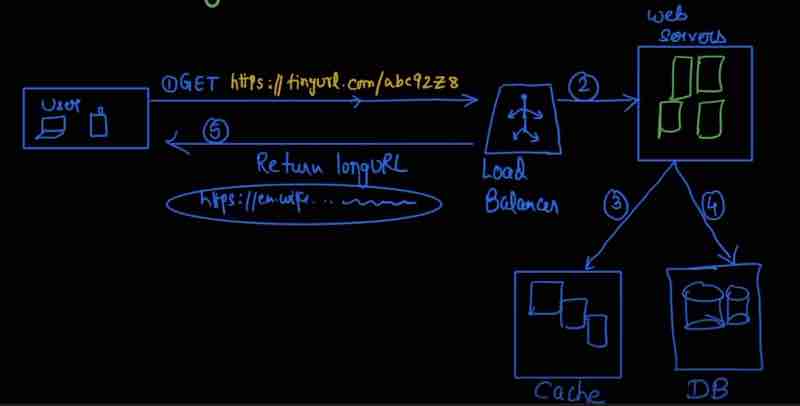
DESIGN A URL SHORTNER
WRAP UP
If there is extra time left in the short url interview, you can discuss other concepts with interviewer such as rate limiter, web server scaling, data base scaling.
We can use rate limiter because our server may not be able to handle too many requests at once, and can be used to protect from bots
Server scaling can be done easily because we have not stored any state to them, it is stateless. For database scaling, we can do database replication or sharding.
This Page Has Been Intentionally Left Blank
DESIGN A WEB CRAWLER
Generally web crawler is used by search engines, it is used to find contents on the web, the contents can be web pages, pdf files, videos, images etc.
Why do we say this web crawler? Because it is crawling the web pages from the root to find the relevent search results
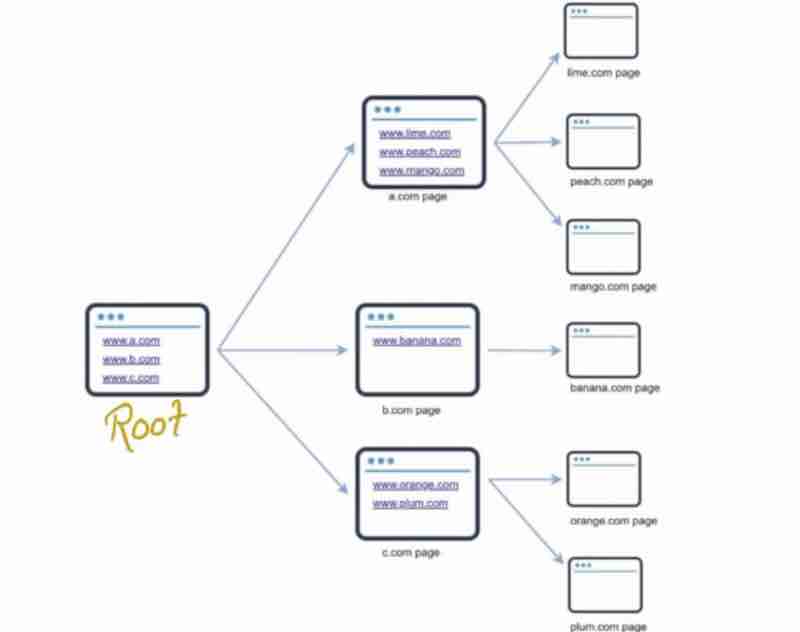
The basic algorithm:
1. Set of urls: Download all web pages addressed by URLs
2. Extract urls from these web pages
3. Add new urls to the list of urls
4. then repeat from step 1
Is it really that simple? No
Understand The Problem
And Establish Design Scope
In order to understand the problem, we have to question the interviewer:
Candidate: What is the main purpose of web crawler?
Search engine indexing? Data mining? or something else?
Interviewer: Let's go for "Search engine Indexing"
We have scrolled the data and created an index of it so that it could be easier to crawl in future.
Candidate: How many web pages does the web crawler collect / month?
Interviewer: 1 billion pages
Candidate: What content types are included? HTML or PDF or Images etc.
Interviewer: HTML only
Candidate: Do we also need to store the downloaded web pages?
Interviewer: Yes, store upto 5 years
Candidate: What if we get web pages which are duplicate?
Interviewer: Ignore the duplicate web pages
[ Besides functionalities, you should note down characteristics of a good web crawler ]
Scalability: As we know that web is huge, and there are billions of web pages, our server has to be extremely efficient using parallelization
Robustnes: We have to handle bad html, unresponsive servers, malicious links etc
Politeness: Crawler should not make too many requests within a short time interval
Extensibility: System has to be flexible, so that for adding new features, there should be minimal changes, like adding crawl for image files in future
DESIGN A WEB CRAWLER
Back Of The Envelope Estimation
It is always based on assumptions, so it also important to tell the interviewer what assumptions you are taking
1. Assume 1 billion web pages download / month [ requirement given by interviewer ]
Query per second: 1,000,000,000 / 30 / 24 / 3600
= 400 pages per second
Peak QPS: 2 * QPS = 800 pages per second
2. Assume web page average size = 500 KB
Total size of billion pages / month = 500 TB / month
3. Assume we have to store data for upto 5 years [ requirement given by the interviewer ]
Total storage requirement for 5 years
= 500 * 12 * 5
= 30,000 TB
= 30 PB
So, 30 PB storage will be needed for 5 years
DESIGN A WEB CRAWLER
Propose A High Level Design
What would we need?
In start, we would have to get some urls from where we'd crawl, these're said to be "Seed URLs"
The downloaded seed urls will have more new urls to be downloaded, said to be " URL Frontier "
Now, the urls that we have gathered from the URL Frontier has to be uploaded again, that'll be done using "HTML Downloader"
We cannot download from the urls directly, first we'll convert the urls to their corresponding ip address through "DNS Resolver"
After being downloaded, we'd have to parse and validate the content as well, through "Content Parser"
After parsing the content, we've to see whether we've seen the content earlier, for that we use "Content Seen"
For checking the compare value, we can quickly do it through hash values, if the hash values are same, the content seen
We also have to store the content that'll do through the " Content Storage " service, and we've to store it in disk, because of too many data
However, the important links that user uses very often can be stored in memory for quick access as well
We also have to get the URL from the html pages to recursively crawl further, that'll be done through the " URL Extractor " service
We also to filther out the broken links, that'll do through the "URL Filter"
And URL that we've already seen, we'd not want to see again, we'll check through "URL Seen" service, and can use Hash table or Bloom filters
Now, we've gathered the good new URL's that we've gathered and we'll add them again to the "URL Frontier" for recursive crawling
And the URLs that have already been visited will be stored somewhere, in a database "URL Storage"
Let's design the web crawler diagram together
1. Let's start from the Seed URLs
2. The URLs that we have to process will be in URL Frontier
[ HTML Downloader will get urls and download the web pages ]
3. Before downloading, it must get the actual ip addresses at those urls through dns resolver
4. After downloading, we need the content parser to parse the content
5. We have to check for already seen, we'll use the hash table function
6. After that, we'll store up the content that we have not already seen in disk as content storage
7. Now, there can be more urls within the content that we have not seen, we need URL extractor for it
8. Now, we'll filter out the irrelevent and wrong urls through url filter
9. Now, there are urls that we have already seen, so we'll remove that through url seen
10. These new urls after url seen will be stored in the url storage database
11. Now, the fresh urls that we have not seen will go back to URL frontier and will recursively call the crawler again
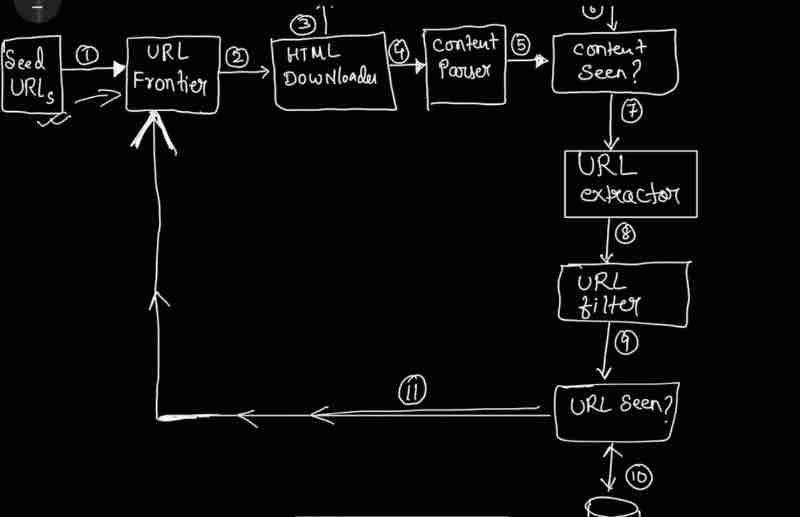
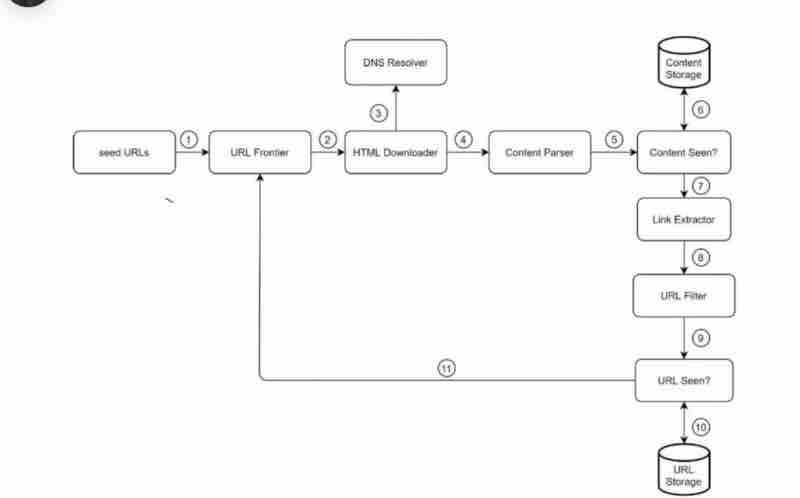
DESIGN A WEB CRAWLER
Design Deep Dive
1. DFS vs BFS
2. URL Frontier
3. HTML Downloader
4. Robustness
5. Extensibility
6. Detect and avoid problematic contents
DFS vs BFS
Which traversal should we use for our web crawling?
We can think of web as an directed graph, web pages are our nodes, and that which is connecting them is url which acts as our edges
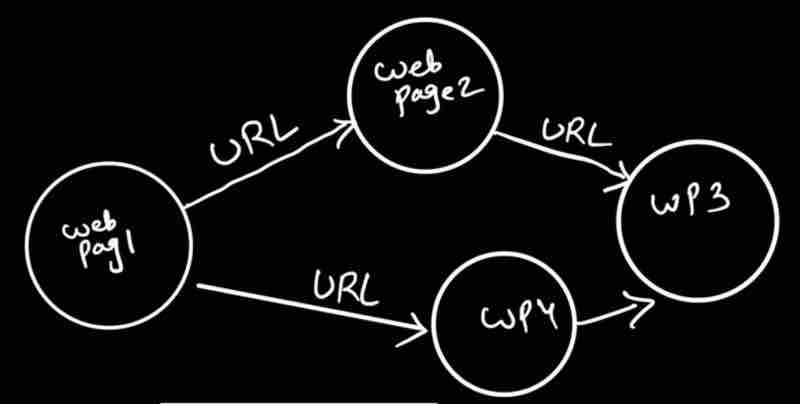
So, crawling simply means " traversing a directed graph from one webpage to other "
And there are 2 ways to traverse a directed graph, dfs or bfs
We cannot use dfs in our web crawler, because depth is way too much, the levels are so deep that it'll inefficient to crawl the web entirely
So our best bet is bfs, which we can implement by using queues
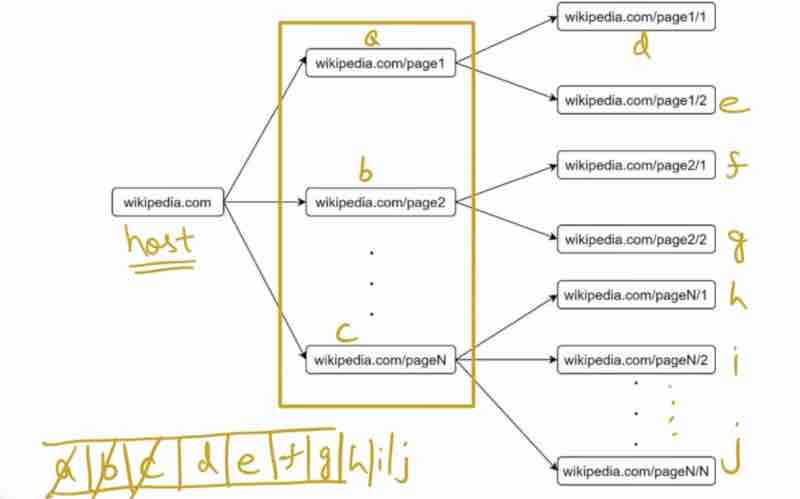
In this diagram above, we're throwing too many crawling requests to wikipedia itself, showing " Impoliteness "
A standard bfs does not sees the priority in a situation, and throws whatever comes ahead of the queue, which leads to impolite behaviour
When we are visiitng the same website urls in levels deep in our crawler, then their rank will increase and our priority for subsequent increased ranks will decrease
So, the link with more priority in this manner will be added to the queue first, and more similar strategies can be found to implement " politeness "
URL Frontier
- It helps to address and ensure politeness
- It does URL prioritization
- It maintains freshness
URL Frontier has all the web pages that needs to be crawled, now, it's his responsibility to recrawl on updated dat to maintain freshness, and also solves the problems that were coming from a basic bfs crawling approach
Politeness
What does politeness actually mean?
Avoid sending too many requests to same host within a short period of time
For politeness, we can assign each thread a website, and they'll crawl on that website only, and we can tell those threads that when you have downloaded a page from that website you have been assigned, that wait a little before downloading a next page in that same website, this way, every thread can have separate website concerns and also gaps between them handled well for " politeness " We'll also use different queues for each thread, and we'll use queue selector to select a thread corresponding to that queue.
Now, how we'll know who which queue has been focusing on which hosted website? We'll use a mapping table, that'll have a host and a queue. We can have a queue router, that'll take the request from the mapping table, and see which queue host does that mapping belong to, and it'll do routing accordingly.
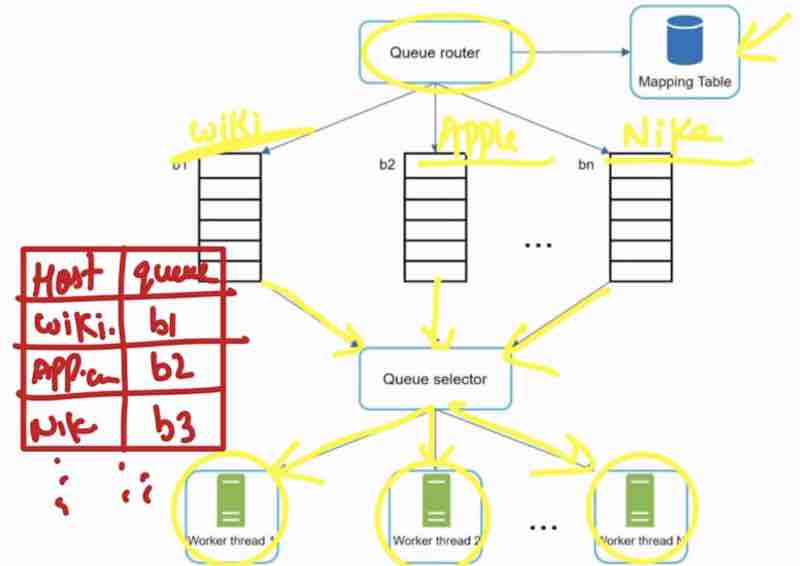
Priortizer
How will we choose the priority now?
Suppose a situation where a random discussion form uses the keyword "Apple" many times, and we also have the original Apple home page with "Apple" keyword that many times? How will we come to know about the priority of those websites that are going to give us more usefulness? Maybe if web traffic is more, or maybe update frequest is more, and we can see that website as more useful. There can be more metrics to decide the usefulness. We can use a " Priortizier " service to determine the priority.
What priortizier does is throws the urls in different queues according to their priority, and those queues are connected to the queue selector, who'll take only that queue value whose priority is the most.
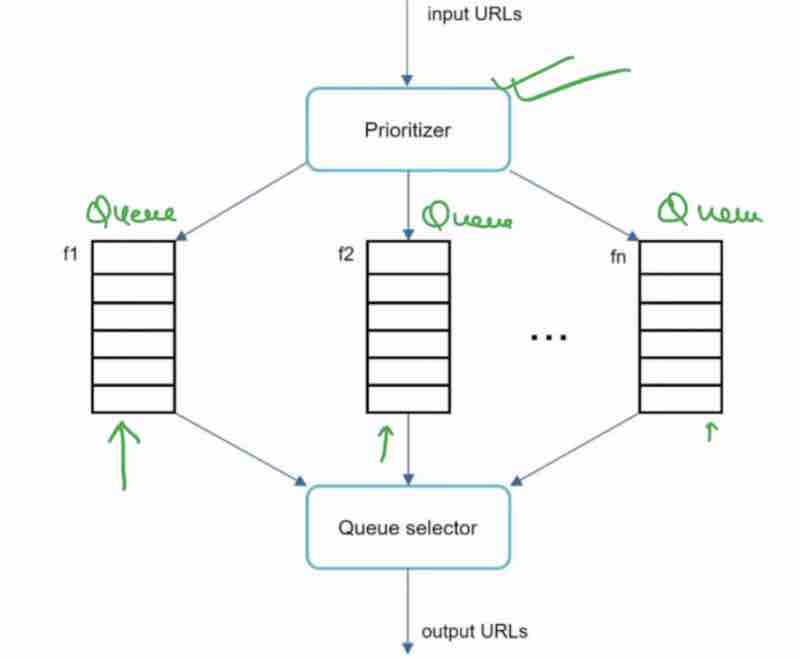
The overall URL Frontier takes the input urls, then sends them to the prioritizer, and then sends them to the politeness.
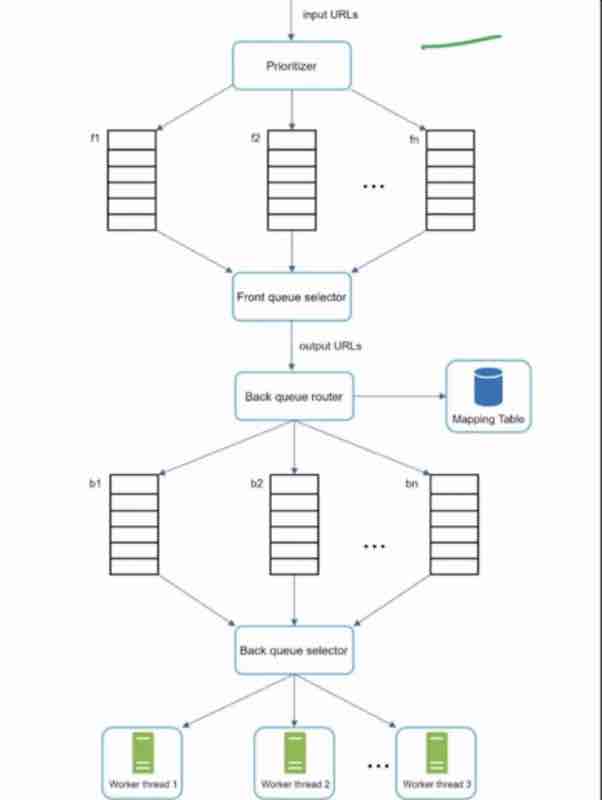
Freshness
We know this very well that web pages are continously being edited, deleted and added across the web
It has to recrawl the web pages that have been updated to not have any stale data
We can keep freshness through either last update history or through prioritize ( recrawl top most only )
We need a solid storage for our URL Frontier
Because in real world, there are millions of URLs
We cannot put everything in memory?
:( Neither durable nor stable
We also cannot store it in disk because disk is very slow
So, we can use a hybrid approach :)
Majority urls can be in the disk
Remaining urls to avoid read & write load on disk
HTML Downloader
It downloads web pages from the internet
Interviewer: Can web crawler download everything from a web page? Because it's not safe
Candidate: No, crawler will follow some rules that web pages have already set
Suppose, when visiting amazon.com, we have to check for a file named Robots.txt, so that the web crawler could find this, and understand the rules
This concept of using Robots.txt file is known as " Robots Exclusion Protocol "
And our web crawler will not download Robots.txt file again and again, it'll store it in the cache
We can see ourselves at " amazon.com/robots.txt "
What happens is HTML Downloader checks some properties from robots.txt and then downloads as per rules
And because URL Frontier throws a lot of urls at once, the html downloader would be better of with a distributed enviroment having multiple servers
We can do distributed crawling which will improve our performance manifold times [ Distrubuted Crawling ]
URL needs DNS to resolve it to IP addresses, and DNS is also very slow, it is not that optimal in high distributed environments, it takes 10 to 200 ms to respond
So, we can store these ip addresses in the cache for super fast access [ Cache DNS Resolver ]
We can geographically distribute our multiple HTML Downloader servers throughout the globe, so that a server located will be downloaded by the nearset corresponding html downloader, so "Locality" plays a very important role for fast access
We can use a " Set Timeout " way so that even if one host has not responded, our html downloader server will not waste time with it, and will quickly jump to other hosts
Robustness
The ability to handle the crashes in distributed environments
So, to evenly distribute the urls from the URL Frontier to various HTML Downloader servers, we can use " Consistent Hashing "
Suppose, our one html downloader server crashed, and we immediately replaced a new server to handle the crash, now the new server should be knowing the state the crashed server was in, so that it can resume from that point onwards easily, so we save the crawl state and data of every server, so that it can be passed to new server if it crashes
Suppose, there is any error or network failures, we should be able to handle it easily, through exception handling, so handle errors gracefully
Extensibility
There should be flexibility in your design, that is what is said to be extensibility.
Interviewer: What if in future, I want to download PNG files too? Where in the design you'll put it?
Candidate: New modules can be added to it, we can make changes to our high level design
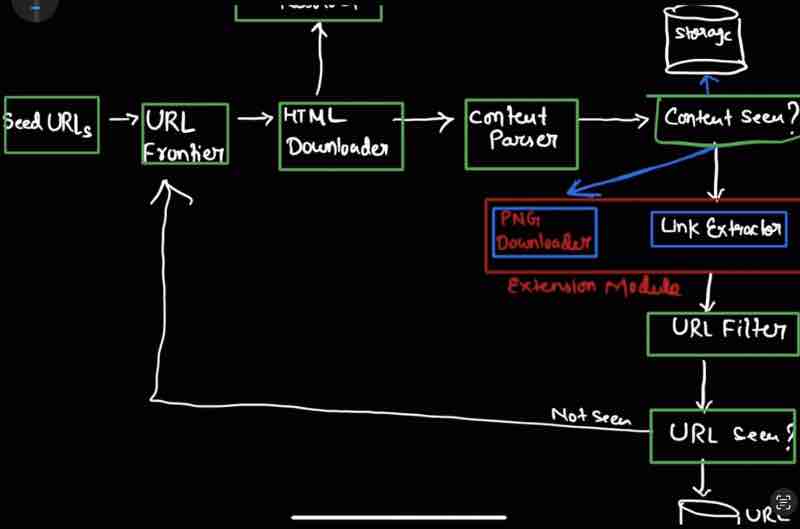
We can add an "Extension Module" once we indentify that the content of a webpage has not been seen before and is fresh, and here, we can use a " PNG Downloader " to download PNG files from that entire page
Suppose we want to verify the authentication of websites and their trademarks so we can again add an " Extension Module " to it alongside the PNG Downloader as a " Web Monitor "
Detect And Avoid Problematic Content
Almost 30% of the entire internet is redundant and has duplicate data, we have use hash values to find this out and filter it, we already have " Content Seen " service in our design
Harmful data (Spider traps): There are some websites that go in infinite loops and never stop, which is harmful for our crawler, for example, a famous website, spidertrapexample.com/foo/bar/foo/bar/foo/bar... which we can deal with by either limiting the maxmimum link length, or by manually noting those down and filtering them using " URL Filter " service
Meaningless data (Data Noise): These are like data which has little or no value, like (advertisements, code snippets, spam urls etc )
DESIGN A WEB CRAWLER
Wrapping Up
What are the properties of a Good Web Crawler?
1. Scability
2. Politeness
3. Extensibility
4. Robustness
In modern websites, dynamic content loading is being encouraged, where websites use " AJAX " to load their url links behind the scenes
And because our web crawler is downloading the html pages statically, it may never be able to find any url links in dynamic websites
What could be the solution? We can use something called " Server side rendering " and then we'll parse these pages
What more can we do for our web crawler? We can filter out unwanted pages and we can do horizontal scaling
Always remember for any system design success: availability, consistency, reliability
💬 Comments will load when you scroll here